
Marvel's Spider-Man
## Game Overview **Marvel's Spider-Man** is an open-world action-adventure video game developed by **Insomniac Games** and published by **Sony Interactive Entertainment**. It was originally released on **September 7, 2018** exclusively for PlayStation 4. A remastered version, **Marvel's Spider-Man ...
Download & Installation
Introduction
This guide covers the official download and installation of Marvel's Spider-Man (including the original 2018 release and the Remastered version) across all supported platforms. The game is available exclusively on PlayStation (PS4, PS5) and PC (Steam, Epic Games Store). There is no native Xbox, Nintendo Switch, or mobile version. Follow the instructions below for a smooth installation experience.
Platform Availability
| Platform | Versions Available | Store / Source |
|---|---|---|
| PC | Marvel's Spider-Man Remastered<br>Marvel's Spider-Man: Miles Morales (separate purchase) | Steam<br>Epic Games Store |
| PlayStation 4 | Marvel's Spider-Man (original)<br>Marvel's Spider-Man: Miles Morales (if purchased) | PlayStation Store (digital)<br>Retail disc |
| PlayStation 5 | Marvel's Spider-Man Remastered (standalone or via Miles Morales Ultimate Edition)<br>Marvel's Spider-Man: Miles Morales | PlayStation Store (digital)<br>Retail disc |
Step-by-Step Installation
PC Installation (Steam)
1. Ensure you have a Steam account. If not, create one at [store.steampowered.com](https://store.steampowered.com).
2. Install the Steam client from the official website and log in.
3. Purchase or redeem a key for Marvel's Spider-Man Remastered on Steam.
4. Start the download:
- Open your Steam Library.
- Find "Marvel's Spider-Man Remastered" in the list.
- Click “Install”.
- Choose the installation directory (at least 110 GB free space recommended).
- Select “Next” and wait for the download and installation to complete.
5. Launch the game from your Library when ready.
PC Installation (Epic Games Store)
1. Create or log in to your Epic Games account at [store.epicgames.com](https://store.epicgames.com).
2. Download and install the Epic Games Launcher from the official site.
3. Purchase Marvel's Spider-Man Remastered via the store.
4. Initiate download:
- Open the Epic Games Launcher.
- Go to “Library”.
- Locate the game and click “Install”.
- Choose installation path and a component (default is fine).
- The launcher will handle the rest.
5. Launch from the Library after installation.
PlayStation 4 Installation
Digital download:
1. Power on your PS4 and sign in to your PlayStation Network account.
2. Go to the PlayStation Store from the main menu.
3. Search for “Marvel’s Spider-Man”.
4. Select “Download”. The game will begin downloading to your system storage.
5. Once downloaded, the game icon appears on your home screen. Insert the disc if you have a physical copy, then follow the on‑screen prompts to install.
Physical disc:
1. Insert the game disc into the PS4.
2. An installation prompt appears – follow the instructions.
3. The game and any required patches will install. Ensure you have at least 50 GB free space.
PlayStation 5 Installation
Digital download:
1. Sign in to your PSN account on your PS5.
2. Open the PlayStation Store.
3. Find “Marvel’s Spider-Man Remastered” (or the Miles Morales Ultimate Edition which includes the Remaster).
4. Click “Download” and choose which version (PS5 or PS4) you want (PS5 recommended for best performance).
5. The game installs automatically. You can monitor progress in the Downloads/Uploads area.
Physical disc:
1. Insert the PS5 disc (or PS4 disc if you own the backward‑compatible version).
2. The console will prompt you to install. Follow the on‑screen steps.
3. For PS4 disc on PS5, you may need to download a free PS5 upgrade patch if available (check store).
System Requirements (PC)
Minimum Requirements (720p, Low settings, ~30 FPS)
- OS: Windows 10 64-bit (version 1909 or later)
- CPU: Intel Core i3-4160 / AMD Ryzen 3 1200
- RAM: 8 GB
- GPU: NVIDIA GeForce GTX 950 / AMD Radeon RX 470 (4 GB VRAM)
- DirectX: Version 12
- Storage: 75 GB SSD (HDD supported but may cause stuttering)
- OS: Windows 10 64-bit (version 1909 or later)
- CPU: Intel Core i5-4670 / AMD Ryzen 5 1600
- RAM: 16 GB
- GPU: NVIDIA GeForce GTX 1060 (6 GB) / AMD Radeon RX 580 (8 GB)
- DirectX: Version 12
- Storage: 75 GB SSD
- OS: Windows 10 64-bit (version 1909 or later)
- CPU: Intel Core i7-8700K / AMD Ryzen 7 3700X
- RAM: 16 GB
- GPU: NVIDIA GeForce RTX 3080 / AMD Radeon RX 6800 XT (10+ GB VRAM)
- DirectX: Version 12
- Storage: 75 GB NVMe SSD
- PC (Remastered): ~75 GB (install size). An additional 10–15 GB may be required during patching.
- PS4 (original): ~50 GB.
- PS5 (Remastered): ~70 GB (with optional high‑resolution texture pack).
- Always ensure your drive has at least 20% extra free space beyond the minimum to avoid installation errors.
- PC: A valid Steam account or Epic Games account is required to purchase, download, and activate the game. No additional subscription is needed for single‑player.
- PlayStation (all): A PlayStation Network (PSN) account is mandatory for digital purchases, patches, and online features (photo mode sharing, updates). A PS Plus subscription is not required for the single‑player campaign.
Recommended Requirements (1080p, High settings, ~60 FPS)
Ultra Requirements (4K, Very High, ~60 FPS)
Storage Space
Account Requirements
First Launch Setup
After installation, launch the game. You will be prompted to:
1. Accept the End User License Agreement (EULA) and any privacy policies.
2. Choose an audio language (English, French, German, etc.) – this can be changed later in settings.
3. Set graphics preferences (PC only):
- The game automatically detects your hardware and suggests presets (Low, Medium, High, Very High).
- Adjust as needed. Options include resolution, refresh rate, V‑Sync, ray tracing (if supported), and upscaling (DLSS, FSR, etc.).
4. Configure controller settings:
- The game supports DualShock 4, DualSense, Xbox controllers, and keyboard/mouse.
- You can recalibrate stick dead zones, vibration intensity, and button mapping.
5. HDR calibration (if your display supports HDR): Adjust brightness, paper white, and HDR luminance.
6. Create or load a save file. If you have no prior save, select “New Game”.
Tip: Run the built‑in benchmark tool (Options > Graphics > Benchmark) to verify performance before diving into the main story.
Common Installation Errors and Fixes
PC Errors
| Error / Issue | Possible Cause | Solution |
|---|---|---|
| “Missing MSVC DLL” (e.g., ```vcruntime140.dll```) | Visual C++ Redistributables not installed | Install the latest Microsoft Visual C++ Redistributables (x64) from Microsoft’s official website. Also install DirectX End‑User Runtimes. |
| “Failed to write to disk” | Insufficient write permissions or disk full | Run Steam/Epic Launcher as Administrator. Free up space (at least 80 GB). Ensure drive is NTFS. |
| “Corrupted game files” or crash on launch | Antivirus quarantined files or download error | Verify integrity of game files (Steam: right‑click game > Properties > Local Files > Verify integrity…). For Epic: click the three dots in Library > Verify. Temporarily disable antivirus. |
| “GPU driver outdated” | Old graphics driver | Update NVIDIA/AMD driver to the latest Game Ready driver. |
| “Not enough video memory” (0x887A0005) | GPU doesn’t meet 4 GB VRAM minimum for certain settings | Lower texture quality to Medium or use upscaling (DLSS/FSR). |
| Game stuck at “Preparing” or “Downloading” | Launcher cache issue | Restart the launcher. Clear Steam download cache (Settings > Downloads > Clear Cache). For Epic, exit launcher and delete the ```webcache``` folder in ```%localappdata%\EpicGamesLauncher\Saved```. |
| Black screen on launch (PC) | Incompatible overlay or HDR mismatch | Disable overlays (Discord, etc.). Switch to windowed mode in config file. Turn off HDR temporarily. |
PlayStation Errors
| Error Code / Issue | Cause | Solution |
|---|---|---|
| CE-30005-8 | Corrupted game data or installation error | Delete the game and reinstall. Check for system updates. |
| CE-34878-0 | Application crash | Rebuild PS4 database (Safe Mode > Option 5) or reinstall. Update system software. |
| Insufficient storage | Not enough free space | Delete unwanted games/saves. External storage may transfer but won’t run the game (PS5 requires internal for PS5 games). |
| Download stuck or slow | PSN server issues or network congestion | Pause and resume download. Use wired connection. Change DNS to Google (8.8.8.8 / 8.8.4.4) on console. |
| Disc not recognized | Dirty disc or drive issue | Clean disc with soft cloth. Check for scratches. If PS5, ensure PS4 disc is inserted for backward compatibility. |
| PS5 upgrade not appearing | Licencing issue | Restore licenses: Settings > Users and Accounts > Other > Restore Licenses. |
Post-Installation Verification
After installation, perform these checks to confirm everything is working:
1. File integrity scan (PC):
- Steam: Right‑click game > Properties > Local Files > “Verify integrity of game files”.
- Epic: Click the three dots on the game tile in Library > “Manage” > “Verify”.
2. Launch the game and play for at least 5 minutes. If it crashes, check error logs.
3. Run the in‑game benchmark (PC): Go to Settings > Graphics > Benchmark. Aim for stable FPS without stutters.
4. Check for patches: On PlayStation, if connected online, automatic updates will download. On PC, Steam/Epic handle updates automatically. Manually check by right‑clicking the game > Properties > Updates.
5. Load an existing save (if you have one) to ensure save data is compatible. If you transferred a save from PS4 to PS5, use the built‑in save transfer tool via the main menu.
6. Test controller functionality: Swinging, combat, and web should respond without input lag. Recalibrate if needed in the controller settings.
If everything passes, you are ready to experience Marvel’s Spider-Man. If you encounter persistent issues, consult the official support pages:
- PC (Steam): [Steam Help](https://help.steampowered.com)
- PC (Epic): [Epic Games Support](https://www.epicgames.com/help)
- PlayStation: [PlayStation Support](https://www.playstation.com/support/)
- Nixxes (PC developer): [Nixxes Support](https://nixxes.com/support/)

Game Introduction
Game Overview
Marvel's Spider-Man is an open-world action-adventure video game developed by Insomniac Games and published by Sony Interactive Entertainment. It was originally released on September 7, 2018 exclusively for PlayStation 4. A remastered version, Marvel's Spider-Man Remastered, launched on November 12, 2020 for PlayStation 5 and later on August 12, 2022 for Windows PC. The game is the first installment in the Marvel's Spider-Man series and has been widely praised for its storytelling, gameplay, and faithful adaptation of the Spider-Man mythos.
Genre
- Action-adventure, open world, superhero
- Developer: Insomniac Games
- Publisher: Sony Interactive Entertainment
- Original (PS4): September 7, 2018
- Remastered (PS5): November 12, 2020 (included with Marvel's Spider-Man: Miles Morales Ultimate Edition and later sold separately)
- Remastered (PC): August 12, 2022
- PlayStation 4 (original)
- PlayStation 5 (Remastered)
- Windows PC (Remastered, via Steam and Epic Games Store)
- Peter Parker / Spider-Man (voiced by Yuri Lowenthal) – The protagonist, a 23-year-old scientist and superhero.
- Mary Jane Watson – Peter's ex-girlfriend and investigative journalist, playable in stealth-focused sections.
- Aunt May – Peter's caring aunt who runs a homeless shelter.
- Miles Morales – A teenager who later gains spider-powers and becomes a playable character in the story expansion.
- Dr. Otto Octavius – Peter's mentor and a brilliant scientist who eventually becomes the villain Doctor Octopus.
- Wilson Fisk / Kingpin – The crime lord defeated at the start of the game.
- Martin Li / Mr. Negative – A philanthropist with dark powers and the primary antagonist early on.
- Norman Osborn – The mayor of New York and father of Harry Osborn.
- Silver Sable, Black Cat, and other villains appear throughout the story.
- Fluid Web-Swinging Mechanics: Players traverse the city using a physics-based web-swinging system that feels intuitive and exhilarating.
- Combat System: A combo-driven combat system inspired by the Arkham series, with gadgets, acrobatics, and environmental takedowns.
- Engaging Narrative: A character-driven story that explores Peter's dual life and emotional struggles.
- High-Quality Graphics: Stunning visuals, especially in the Remastered version with ray tracing and improved textures.
- Authentic Spider-Man Experience: Faithful to the comics while offering an original story.
- Fans of Spider-Man and Marvel comics
- Players who enjoy open-world action games like the Batman: Arkham series or Infamous
- Gamers looking for a rich single-player narrative
- Age rating: ESRB T (Teen) for violence and mild language
- Main Story Campaign: Approximately 17–20 hours to complete the main missions.
- Side Missions & Activities: Hidden backpacks, enemy bases, challenges (e.g., Taskmaster challenges), research stations, and more.
- Free Roam: Explore New York City at any time after the tutorial.
- Photo Mode: Capture and share screenshots with extensive filters and options.
- Offline only – No internet connection is required to play after installation.
- No online multiplayer features.
- The game does not require a subscription to PlayStation Plus for offline play, though some updates require internet to download.
- The Heist (October 23, 2018) – Focuses on Black Cat and introduces new enemy types.
- Turf Wars (November 13, 2018) – Centered on Hammerhead's crime war.
- Silver Lining (December 18, 2018) – Concludes the story with Silver Sable and Hammerhead.
- Original Story: Unlike many licensed games that follow movie plots, Insomniac crafted a fresh narrative that stands on its own.
- Emotional Depth: Peter Parker’s personal struggles are explored with maturity, making the story resonate beyond typical superhero fare.
- Seamless Web-Swinging: The traversal system is lauded as the best representation of Spider-Man’s movement in any video game.
- Innovative Suit Powers: Players unlock various suits (including original designs) each with unique abilities, adding strategic variety.
- Playable MJ & Miles Sections: Stealth missions with Mary Jane and Miles offer perspective shifts and break up gameplay.
- Performance & Fidelity Options (Remastered): On PS5 and PC, players can choose between high-fidelity ray tracing at 30fps or high-performance 60fps, with PC offering further customization.
Developer & Publisher
Release Timeline
Platforms
Story Overview
Set eight years after Peter Parker first became Spider-Man, the story follows a seasoned, confident hero juggling his personal life and crime-fighting duties. The narrative focuses on Peter's relationships, particularly with Aunt May, Mary Jane Watson, and his mentor Dr. Otto Octavius, while facing new threats like the Inner Demons, Mr. Negative, and later the Sinister Six. Themes of responsibility, sacrifice, and the cost of heroism drive the plot, culminating in an emotional climax that redefines Peter's role as Spider-Man.
Setting
The game takes place in a vivid recreation of New York City, specifically Manhattan, during the modern day. Iconic landmarks such as the Empire State Building, Central Park, the Avengers Tower, and the fictional Oscorp building are featured. The city is densely populated with civilians, traffic, and dynamic weather and day/night cycles. The setting feels alive and reacts to the player's actions.
Main Characters
Core Appeal
Target Audience
Game Modes
Marvel's Spider-Man is primarily a single-player experience with no multiplayer or cooperative modes. It includes:
Online / Offline Support
DLC / Expansions Overview
The original game has three story-driven DLC chapters collectively called Marvel's Spider-Man: The City That Never Sleeps. Each adds several missions and new challenges:
Additionally, the Remastered version includes all three DLC chapters and features enhanced graphics, faster loading times (PS5), and optional performance modes (30fps fidelity / 60fps performance).
What Makes This Game Unique
In summary, Marvel's Spider-Man is a landmark title that delivers an authentic, polished, and emotionally gripping superhero experience, setting a new standard for comic book adaptations in gaming.

Getting Started
Introduction
Welcome to Marvel's Spider-Man! This guide is designed to help brand-new players overcome the initial learning curve and start swinging through New York like a pro. Whether you're playing on PlayStation 4, PlayStation 5 (Remastered), or PC (Remastered), the core experience is the same. This guide covers the critical first hour, explains controls across all platforms, breaks down the user interface, lists your top early priorities, warns against common mistakes, and provides a clear day-one checklist.
Important: There is no character creation in Marvel's Spider-Man. You play as Peter Parker, a 23-year-old superhero who has been Spider-Man for eight years. You cannot customize his appearance, gender, or backstory. However, you can unlock and equip alternative suits (cosmetic only) as you progress.
---
First Hour Walkthrough (Spoiler-Free)
The game opens with a cinematic of Spider-Man taking down Wilson Fisk (Kingpin). This serves as an extended tutorial. Follow the on-screen prompts to:
1. Basic movement: Move the left stick to walk, press X (PS) / A (Xbox/PC) to jump.
2. Swinging: Press and hold R2 (PS) / RT (Xbox/PC) to shoot a web and swing. Release to let go. Swing by holding R2/RT and pulling back on the left stick.
3. Wall crawling: Press R2/RT near a wall to attach, then move. Press Circle/B to drop off.
4. Combat tutorial: You'll face Kingpin's goons. Learn basic attacks (Square/X), dodge (Circle/B), web strike (L1+R1 / LB+RB on PC defaults), and finishers.
5. After defeating Fisk: The game transitions to an open-world intro. You'll receive a call from Mary Jane. Follow the objective marker to your apartment in Queens.
6. First free-roam section: You'll be tasked with swinging across the borough to reach your apartment. Take time to practice swinging without hitting buildings. The game will introduce point-launching (press R1/RB while swinging to launch from a web zip) and the web zip (aim at a point with L2/LT, press R2/RT to zip).
By the end of the first hour, you will have unlocked the basic traversal and combat system. Don't rush – the game expects you to learn by doing.
---
Controls (All Platforms)
Controls are nearly identical across PS4/PS5 and PC (using a PlayStation controller). Xbox controllers map differently. Below is a reference table.
| Action | PlayStation (PS4/PS5) | Xbox (PC) | Keyboard & Mouse (PC) |
|---|---|---|---|
| Move | Left Stick | Left Stick | WASD |
| Camera | Right Stick | Right Stick | Mouse |
| Jump | X | A | Spacebar |
| Swing (start)/Web Zip | R2 | RT | Left Mouse Button (hold) or R (hold) |
| Dodge | Circle | B | Ctrl (hold) + direction |
| Attack (Punch) | Square | X | Left Mouse Button (tap) |
| Web Shoot (free aim) | L1 | LB | Right Mouse Button |
| Web Strike (zip to enemy) | L1+R1 | LB+RB | E (or Left+Right Mouse) |
| Gadget Wheel | L1+Circle | LB+B | Tab |
| Sprint (on ground) | Hold R2 | Hold RT | Shift (hold) |
| Wall Crawl | Hold R2 near wall | Hold RT near wall | Right-click on wall |
| Perch (crouch) | Circle while still | B while still | C |
| Photo Mode | Touchpad | View button | F9 |
| Map | Touchpad (up) | View button (tap) | M |
| Pause | Options | Menu | Esc |
---
UI Overview
The Heads-Up Display (HUD) is minimalist but informative.
- Top-left: Health bar (red) and Focus bar (blue). Health is your life; Focus charges as you fight or dodge, used for healing (hold Up on D-pad) or special takedowns.
- Top-right: Mini-map showing nearby objectives, crimes, and collectibles.
- Bottom-left: Objective tracker (current main mission or side activity).
- Bottom-center: Gadget and suit power indicators (when unlocked).
- Left side (temporary): Context prompts like "Press R1 to Web Zip".
- Center (temporary): Combat prompts (e.g., "Counter" or "Dodge").
- Trying to clear every single crime and collectible before advancing the story. The game gates some upgrades behind story progression.
- Buying every suit immediately. Focus on one or two suits with useful abilities (e.g., the Advanced Suit you get from main story is great; later suits like Spider-Punk or Secret War have specific combat advantages).
- Ignoring gadget upgrades. Gadgets are powerful; invest in Web Bomb and Impact Web early.
After completing the prologue, you'll also see a Fast Travel icon on the map (requires unlocking districts).
---
Essential Early Objectives
Once you're free in the open world (after the prologue), the game's main quest is your priority, but you'll quickly get overwhelmed by side activities. Here's the order of importance:
1. Main Missions (gold icons): Always progress the main story first. They unlock new gadgets, suit mods, and abilities.
2. Research Stations (green icons): Complete these early for valuable Tech Parts and XP. They teach advanced traversal.
3. Faction Strongholds (blue icons): Unlock after a few story missions. Good for combat tokens and XP.
4. Backpacks (white icons): Scattered everywhere. Collect them for Backpack Tokens used to craft suits and upgrades.
5. Base Random Crimes (flashing police lights on map): Not mandatory, but they reward XP and tokens. Do them if you pass by.
What to avoid in the first few hours:
---
Early Resource Priorities
You earn three main currencies: Tokens (Backpack, Base, Research, etc.), XP (levels unlock suit mod slots), and Tech Parts (for upgrades).
| Resource | How to Get | Early Use |
|---|---|---|
| Backpack Tokens | Collect backpacks (white markers) | Craft suits that give bonus XP or combat perks. You'll need about 10 for first suit unlocks. |
| Base Tokens | Complete faction hideouts (blue markers) | Unlock suit mods and gadget upgrades. Spend on Gadget Power upgrades first (increase storage). |
| Research Tokens | Complete research stations (green markers) | Used for suit mods like Kinetic Flippers (improves wall running) and Spring Bounce (better jump). |
| Landmark Tokens | Photograph landmarks (blue markers with camera) | Mostly cosmetic suits; save for late-game when you have spare. |
| Tech Parts | Loot crates, completing activities, story rewards | Upgrade Suit Tech (health, armor) and Gadget Tech first. Prioritize Health Upgrade and Web Shooter Capacity. |
| XP | Everything | Levels up your character. At level 5 you unlock your first suit mod slot. At levels 10, 15, 20 you get more. Do not hoard XP – leveling is passive. |
---
Common Beginner Mistakes
1. Button mashing in combat. Spider-Man's combat is rhythmic. Mash Square and you'll miss windows for dodges (Circle). Wait for enemy attacks and dodge, then counter.
2. Not using dodge. You can dodge any attack (including projectiles) with well-timed presses. Early enemies telegraph attacks with a white flash. Press Circle/B just as the flash appears.
3. Swinging too low. If you hold R2/RT too long near the ground, you'll skim the street. Aim high – look up with the right stick and release the swing to gain height.
4. Ignoring the minimap crimes. While not essential, you lose potential XP and tokens. But don't chase every single one.
5. Not upgrading gadgets. Gadgets are powerful crowd-control tools. The Web Bomb (unlocked after the first Research Station) can web multiple enemies. Use it.
6. Trying to brute-force stealth encounters. Some missions require stealth. Use the environment – zip to perches, take out enemies from above. If detected, run and hide until the search meter drops.
7. Skipping Photo Mode misses nothing but you can capture cool moments. No gameplay impact.
---
Day-One Checklist
Complete these tasks in order to build a strong foundation:
- [ ] Finish the Prologue (Kingpin fight) – Get through the tutorial.
- [ ] Swing to your apartment – First free-roam; practice swinging without crashing.
- [ ] Complete the first main mission "The Day After" – Unlocks the open world properly.
- [ ] Visit the Research Station nearest your apartment (green icon) – Complete it for Research Tokens and a new gadget (Web Bomb).
- [ ] Collect at least 5 Backpacks (white markers) – Use the map to find them. Unlock the Advanced Suit from story first, then craft a second suit like the Negative Suit (gives focus boost).
- [ ] Unlock the first Base (faction hideout) – As soon as it appears on the map (after maybe 2 main missions), complete it for Base Tokens.
- [ ] Upgrade Web Shooter Capacity to at least 20 webs (costs few Tech Parts).
- [ ] Upgrade Health once (Suit Tech tree) – Gives a second health segment.
- [ ] Spend 30 minutes just swinging – Practice point-launching (R1/RB) and wall crawling to get comfortable.
- [ ] Turn on Auto-Swing Assist (if you struggle) – In Settings > Controls > Auto-Swing Assist. It makes swinging easier but less manual. Beginners often benefit from it.
- Complete the first Landmark Photo (blue camera marker) – Easy XP.
- Fast travel to a different district (requires unlocking the district by completing a few crimes) – Fast travel is instant; use it to save time.
- Pause often – The game has no strict time limits. Explore menus.
- Read the Suit Mod descriptions – Some mods like Kinetic Flippers (increases wall running speed) are incredibly useful for traversal.
- Save manually – The game autosaves regularly, but you can also save from the pause menu. Do this before a boss fight (you'll know when).
- Play on Friendly Neighborhood difficulty if you're new to action games. You can change difficulty anytime in settings.
Optional but recommended:
---
Additional Tips
Now go swing, web-sling, and save the city. With this checklist, you'll be a proficient Spider-Man in no time!

Core Gameplay
Core Gameplay Overview
Marvel's Spider-Man (2018 / Remastered) delivers an open-world superhero experience that evolves as you progress. The core gameplay revolves around web-swinging traversal, acrobatic combat, gadget usage, and stealth takedowns. Your progression is tied to earning experience points (XP), unlocking new skills, upgrading gadgets and suits, and completing story missions and side activities. Below is a detailed breakdown organized by progression tiers.
---
Early Game (Chapters 1–4 / First 20% of Story)
Main Gameplay Loop
- Swing through Manhattan to reach story markers.
- Engage in brawls with Fisk’s thugs using basic combos and dodge.
- Complete tutorial-lite activities: stopping car chases, freeing scaffolding hostages.
- Return to Harry Osborn’s lab (prologue) then to Aunt May’s house/FEAST for story beats.
- Basic Combat: Punch, kick, web-strike, and dodge. No gadgets yet except web shooters for basic web-snaring (hold L1 + R1).
- Stealth: Use perches (L1 + X) to hide; web-zip (R1 + Circle) to pull enemies off ledges; takedown from behind (Triangle when hidden).
- Web Swinging: Press and hold R2 to shoot a web line; release to launch. Tap X for a quick burst of speed. Swing between buildings; avoid hitting obstacles.
- First Boss Fight: Kingpin (Fisk Tower). Learn dodge timing and use environment (explosives).
- XP Gain: 100 XP per thug encounter; 200 XP per story mission step.
- Skill Points: Unlock one skill per level (starting at Level 1). Early recommended: Zip to Point (Movement) and Perfect Dodge (Combat).
- Gadgets: Only web shooters initially. After Fisk mission, unlock Tripwire and Impact Web.
- Map is limited to Financial District & Midtown. Fast travel unlocked after first Fisk hideout.
- Backpacks: 15 scattered; collect for XP and story flavor (Peter’s personal items).
- Research Stations: 2 available in early game (one near FEAST). Complete for tokens.
- Main Missions: "Spider-Man", "My Other Self", "To The Rescue", "Kingpin".
- Side Activities: Random crimes (stop purse snatchings, carjackings).
- Tokens: No shop yet. Earn by completing missions and random crimes.
- Costumes: Only default suit. No upgrades until after first Fisk hideout.
- No suit mods or gadget upgrades available.
- Only skill points matter.
- N/A – you are still in story tutorial.
- Unlock full Manhattan after defeating Kingpin. Swing across all boroughs (Harlem, Upper West, etc.).
- Combat expands with multiple gadgets and suit powers.
- Dual-threat missions: combine stealth and open combat.
- Main story arcs: Dr. Octopus, Martin Li / Mr. Negative, and the Sinister Six rise.
- Gadgets: Now have Web Bomb, Electric Web, Spider-Drone, Concussion Blast. Each has a cooldown (use L1 + buttons).
- Suit Powers: Unlock after acquiring new suits (e.g., Battle Focus from Velocity Suit). Use R1 + L3 to activate.
- Advanced Combat: Air combos (launch enemies with web-strike then follow up). Zip to point for instant verticality.
- Stealth: Enhanced with tripwire (L1 + R1 mid-air). Camouflage suit power from Spider-Punk suit.
- Level Cap: Reach Level 15–20. New skill areas unlocked: Webslinger (gadget cooldown reduction) and Momentum (finishers).
- Suit Unlocks: Craft suits using tokens from challenges; each suit grants a unique power (can be swapped).
- Gadget Upgrades: Use tech parts and base tokens to increase damage, capacity. Example: Electric Web chains to 3 enemies.
- All boroughs open. Fast travel points unlocked automatically as you swing.
- Challenge Tokens from Taskmaster: combat, stealth, bomb, drone challenges.
- Base Tokens from Fisk hideouts and Demon dens.
- Research Tokens from research stations (puzzle minigames).
- Landmarks for XP.
- Main Missions: "We’ve Got a Lead", "And the Award Goes to…", "The Island", "Double Identity", "The Sinister Six".
- Side Activities: Full range: Hidden backpacks, research stations, Taskmaster challenges, random crimes (now with elite enemies).
- Faction Encounters: Demons (energy weapons), Prisoners (Riot gear).
- Token Types: Base, Challenge, Research, Crime (random). Crafting suits cost 5–15 of each.
- Suit Mods: Insert into suit slots (max 3 by mid-game). Mods like Scavenger (more tech parts from enemies) or Bombardment (explosive finishers).
- Purchases: Nothing to buy; all gear crafted.
- Skill Tree: Invest in at least one tier of each category (Combat, Web, Movement). Mid-game focus: Gadget Refund (40% chance to refund gadget use) and Web Blossom (ultimate attack).
- Suit Power Choice: Swap based on playstyle (aggressive vs. stealth).
- Gadget Priority: Upgrade Impact Web (instant takedown on small enemies) and Spider-Drone (distraction and damage).
- Start of Lab Caches and Black Cat Hideouts (post-game content hinted). Unlockable by story progress.
- Defeat individual Sinister Six members: Scorpion, Rhino, Vulture, Electro, Mysterio (hallucination), and finally Doc Ock.
- High-stakes combat: multiple boss phases with unique mechanics.
- City in chaos – increased crime rate, new enemy types (Sable agents, jetpack thugs).
- Ultimate Combat: Use all gadgets freely; perfect dodge timing is critical.
- Boss Fights: Each requires specific strategies. Example: Vulture – zip to his perch points, dodge swoops, web-strike when stunned.
- Stealth: Less emphasis; most late-game encounters force open combat due to alarm systems.
- Level Cap: 45–50. Max skill points (51 total). All skill trees fully unlocked.
- Suit Mods: Unlock fourth slot after defeating Rhino (Milestone reward).
- Gadget Upgrades: Final tier upgrades (e.g., Spider-Drone Mark IV deals electric damage).
- All collectibles findable at this point. Secret Photos (post-game).
- Black Cat DLC missions trigger after Chapter 16.
- Main Missions: "Vulture Attacks", "Electro's Trap", "Rhino's Rampage", "Scorpion's Revenge", "The Doctor's Cure", "Final Showdown".
- Side Activities: Remaining challenges, hideouts, research stations (can be completed at any time).
- Surplus Tokens: By now you have enough tokens to craft all suits and upgrades. Focus on crafting the Anti-Ock Suit (story reward) and its mods.
- Tech Parts: Abundant from enemy drops.
- Optimal Build: Gadgets: all upgraded. Suit Power: Battle Focus or Web Blossom. Mods: Scavenger III, Bombardment III, Focused Charge (ultimate charges faster).
- No Respec: Can’t change skill points; choose wisely early. Use saved skills to unlock Perfect Dodge and Web Strike.
- Post-game activities become available after final story mission (see Endgame).
- Patrol freely – crimes happen frequently. No story pressure.
- Complete The City That Never Sleeps DLC (3 chapters: The Heist, Turf Wars, Silver Lining).
- New challenge types: Screwball Challenges (photo, combat, stealth, gadget).
- New Game+ unlocked (keep all suits, mods, gadgets, but reset story progression).
- Ultimate Loadout: All gadgets, all suits, all mods. New Game+ adds exclusive suit (Spider-UK).
- DLC Bosses: Black Cat, Hammerhead (tanky), Maggia goons with shotguns.
- Stealth/Combat Hybrid: DLC missions encourage both.
- Level Cap: 50 remains. No further XP experience beyond max.
- Suit Completion: 50+ suits, including DLC and unlockable variants.
- Trophy Hunting: Platinum requires all districts at 100% completion (crimes, backpacks, stations, challenges).
- All maps fully explored. Fast travel (unnecessary, but useful for DLC checkpoints).
- Time of Day: Fixed post-story to daylight; no toggle without restarting.
- Main DLC Chapters: Each has 3–5 main missions plus side missions (e.g., cat safes in The Heist).
- Screwball Challenges: 20 challenges across DLC (gold medal for trophy).
- Ultimate Challenge: Complete all combat and stealth challenges at highest rank.
- Currency Ceiling: Tokens become irrelevant; you can craft everything.
- New Game+ allows selling unused suit mods (uncommon feature).
- Optimized Build: For Ultimate difficulty in New Game+: Use Resilient mod (damage reduction) and Unrelenting Fury (increase melee damage after perfect dodge).
- Gadgets: Use Concussion Burst for crowd control, Electric Web for shield breaks.
- Skill Tree: All skills active; no further growth.
- Goal: 100% completion (all districts, all collectibles, all DLC).
- Benchmarks: Unlock all suits, earn platinum trophy, beat all Screwball challenges on gold.
- Replayability: New Game+ on Ultimate difficulty for challenge. No raid or infinite mode.
Combat & Interaction Systems
Progression
Exploration & World
Quests/Missions
Economy
Character/Build Growth
Endgame Structure (Early Game)
---
Mid Game (Chapters 5–9 / 20%–60% Story)
Main Gameplay Loop
Combat & Interaction Systems
Progression
Exploration & World
Quests/Missions
Economy
Character/Build Growth
Endgame Structure (Mid Game)
---
Late Game (Chapters 10–17 / 60%–90% Story)
Main Gameplay Loop
Combat & Interaction Systems
Progression
Exploration & World
Quests/Missions
Economy
Character/Build Growth
Endgame Structure (Late Game)
---
Endgame (After Story Completion)
Main Gameplay Loop
Combat & Interaction Systems
Progression
Exploration & World
Quests/Missions
Economy
Character/Build Growth
Endgame Structure
---
Summary Table of Core Systems per Tier
| Aspect | Early Game (Ch1–4) | Mid Game (Ch5–9) | Late Game (Ch10–17) | Endgame (Post-Story & DLC) |
|---|---|---|---|---|
| Main Loop | Swing → Brawl → Takedown | Swing → Gadget-Combat → Challenges | Boss Rush → City Chaos | Patrol → DLC → Challenges |
| Combat | Basic punches, dodge | Gadget combos, suit powers | Perfect dodge, ultimate | All systems mastered |
| Progression | Lvl 1–10, 1 gadget | Lvl 10–30, 3 gadgets | Lvl 30–50, 4 suit mods | Max level, all suits |
| Exploration | 2 boroughs | Full Manhattan | All landmarks found | 100% districts |
| Economy | No shop | Token crafting | Surplus tokens | Currency irrelevant |
| Build Growth | Skill points only | Suit powers, mods | Optimized loadout | Fixed build |
| Endgame | N/A | Black Cat intro | Post-game unlock | DLC & New Game+ |
This guide covers Marvel's Spider-Man (2018 original & Remastered) on PS4, PS5, and PC. All systems apply across platforms except for performance differences (haptic feedback on PS5, ray tracing on PS5/PC).
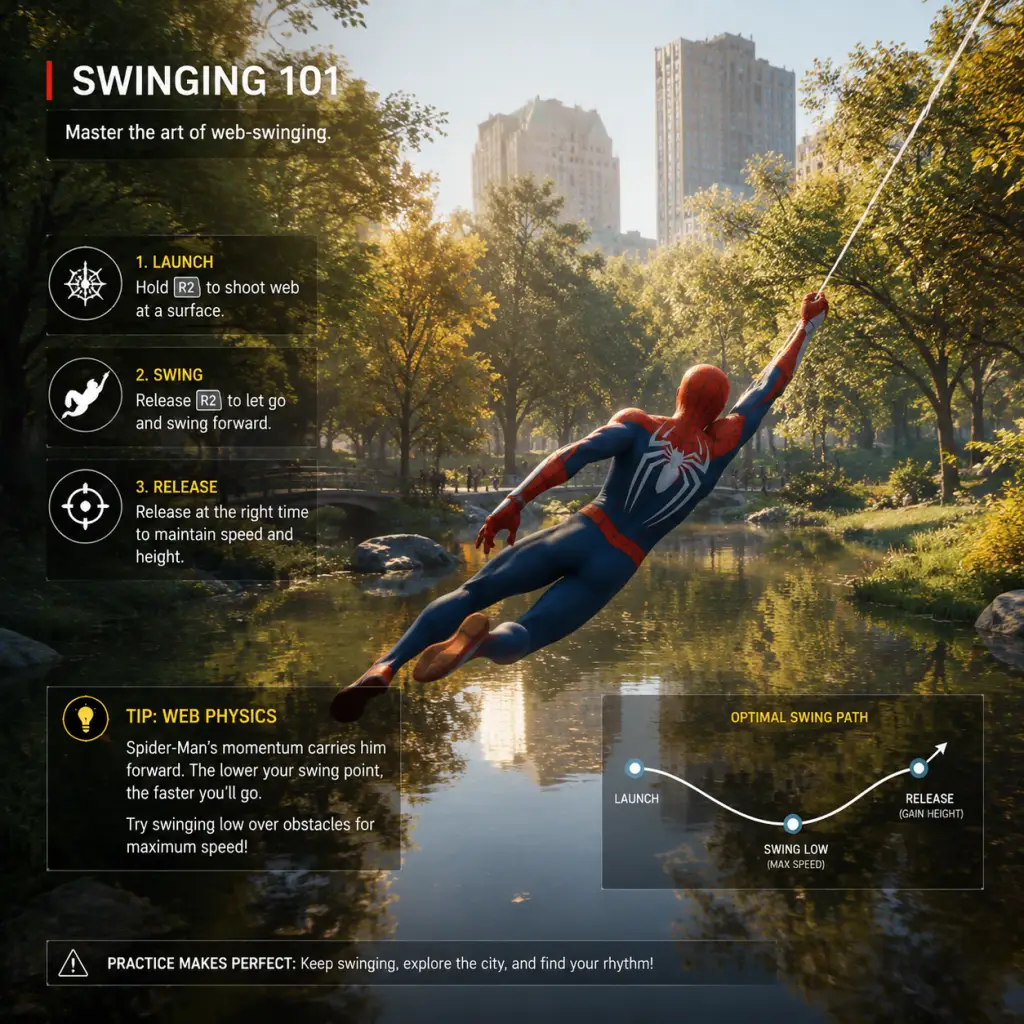
Game Tips
Game Tips
Beginner Tips
#### 1. Master the Basics of Web-Swinging Early
- Tip: Spend your first hour in the open world just swinging without a destination. Practice holding R2 to launch a web, then releasing at the right moment to gain speed. Use L2+R2 to zip to a point while airborne.
- Why: Web-swinging is the core traversal mechanic; learning the rhythm of web attach, release, and momentum conservation will make all activities faster and more fun.
- When: Use this every time you travel. Avoid fast travel until you’re comfortable—swinging builds muscle memory.
- Tip: While swinging, press L2+R2 to fire a web and pull yourself toward a nearby surface. This instantly changes your vector and can be used to avoid obstacles or gain height.
- Why: It’s faster than re-swinging and allows you to steer precisely in dense areas.
- When: Use when approaching a building corner, to quickly ascend, or to catch a ledge.
- Tip: Press Circle to dodge. The game gives a generous window—dodge just as an enemy's attack icon flashes. Use the dodge to cancel any animation.
- Why: Dodging is your primary defensive tool. It also builds focus for healing and is required for Perfect Dodge (which slows time) against certain attacks.
- When: Always be ready to dodge. Against large groups, dodge cancel after a punch to avoid counter-attacks.
- Tip: Tap R1 to quickly web-stun a nearby enemy. This doesn’t require ammo (it’s unlimited).
- Why: It instantly disables a single thug, giving you breathing room. Combos with air attacks.
- When: Against crowds, stun the most aggressive enemy first, or use it to interrupt an attack.
- Tip: Use the map to locate Peter’s backpacks (white backpack icons). They are scattered throughout the five districts.
- Why: They give XP, unlock suits, and provide lore. Most are easy to grab while swinging, and they count toward district progression for upgrades.
- When: As soon as you have free roam after the first mission, start collecting. The XP helps unlock early suit powers.
- Tip: Launch an enemy into the air with L1+X then perform aerial attacks (Square). While they’re airborne, other enemies are usually less aggressive. Use web zip to stay airborne.
- Why: Air combos give you invincibility while attacking and prevent you from being surrounded. You can also throw enemies into others.
- When: Start fights with an air launch if you’re outnumbered. Keep one enemy in the air as long as possible.
- Tip: Equip Spider-Drone (unlocked early) and Impact Web (L1+Triangle). The drone distracts multiple enemies; the Impact Web instantly ties a foe to a wall.
- Why: Gadgets have a short cooldown and can turn a 5v1 into a 1v1. Impact Web removes a heavy enemy from the fight completely.
- When: Use Impact Web on brutes or shielded enemies first. Drone is great for groups or to buy time for a gadget recharge.
- Tip: Spend upgrade tokens on the “Threat Sensor” skill in the Spider-Sense tree. This highlights enemies attacking you. Then focus on getting Perfect Dodge (dodge at the last frame).
- Why: Perfect Dodge slows time, letting you counterattack with a heavy combo. It also fills focus faster.
- When: Against bosses and large groups. You can chain Perfect Dodges to constantly attack and heal.
- Tip: You can stick to walls and ceilings. Use stealth takedowns from above. During open combat, you can web-sling enemies into walls or off roofs.
- Why: Environmental kills are instant and don’t spend resources. Hanging from a ceiling lets you see the whole area and plan.
- When: In enemy bases, clear the first few guards stealthily from high perches. In combat, throw enemies into explosive barrels.
- Tip: Focus is built by dealing damage and taking damage. You can spend one bar to heal (hold Triangle) or execute a finishing move (Square when enemy is low).
- Why: Healing is crucial because you have limited health packs. Finishers make you invulnerable during the animation and refill a bit of focus.
- When: Don’t heal unless below 50% health. Use finishers on brutes or disrupted shield guys to save focus for emergencies.
- Tip: Different suits grant different powers (e.g., Spider-Bro for combat, Low Gravity for traversal). Later suits like the Anti-Ock suit have powerful passive abilities. Combine suit power with appropriate suit mods (e.g., “Increased damage after web strike”).
- Why: Some suit powers trivialize certain encounters: “Web Blossom” (from the Stark suit) knocks back all nearby enemies. “Battery” (from the Electrically Insulated suit) adds electric damage to punches.
- When: For base clearing, equip a crowd control power like “Web Blossom”. For boss fights, use “Quips” (distracts) or “Blitz” (speed boost). Change suits between story missions for optimal effect.
- Tip: In the Remastered PS5 version and PC, you can glide using web wings (hold L2+R2 while falling then press R2 to keep altitude). Draft behind buildings for extra speed.
- Why: Gliding is faster than swinging for long distances if you catch wind currents (indicated by blue lines).
- When: Use gliding when you need to cross the whole map quickly. Combine with swinging to maintain momentum.
- Tip: Always take down enemies in this order: 1) Shielded brutes (use Impact Web or vault over), 2) Jetpack enemies (they are agile and can shoot from above), 3) Snipers (high damage), 4) Standard thugs.
- Why: Eliminating high-threat enemies first reduces incoming damage and prevents you from being overwhelmed.
- When: In every combat encounter, quickly scan and prioritize. Use the scanner (L3) to highlight all enemies.
- Tip: After performing a stealth takedown, enemies will become alert. Quickly web-zip to a high perch and wait. They will reset to unalerted after a short time if you remain hidden.
- Why: You can clear entire bases without triggering full combat by repeatedly hiding and striking.
- When: Use this in demon hideouts and prisoner camps. It’s slower but safer on high difficulty.
- Tip: There are four token types: Base (from missions), Landmark (photos), Research (science puzzles), and Crime (from random crimes). Prioritize upgrading the Web-Shooter capacity and the “Expanded Memory” suit mod early.
- Why: More web fluid means more combos; Expanded Memory gives you more gadget slots. These are foundational for both combat and exploration.
- When: Always buy the first upgrade in each category that increases capacity or reduces cooldown. Save crime tokens for suit mods that boost damage or defense.
- Tip: Activate the “Web Trip” gadget (unlocked from research stations) to create ziplines between two points. Use them to traverse quickly across broad plazas.
- Why: It’s faster than running and more fun. Also useful for setting up combat perches.
- When: Use in Central Park or financial district where buildings are far apart.
- Tip: Complete the “Pigeon Mysteries” (side quest) to unlock the ability to carry and release pigeons. Not essential but adds flavor and XP.
- Tip: Fast travel is unlocked per district only after clearing that district’s crimes. Until then, rely on swinging. Fast travel loads instantly on PS5, but on PS4/PC it may take a few seconds—still faster than long distance.
- Beginner Build: Focus on Spider-Sense tree for dodge and focus generation. Suit power: Spider-Bro (auto attacks). Mods: “Increased Health” and “Greater Healing”. This makes you very tanky.
- Intermediate Build: Web Blossom suit power + Impact Web gadget + “Discharge” mod (electric damage on web strikes). Use air combos to build focus.
- Advanced Build: Anti-Ock suit + “Quips” power + “Battery” mod + “Increase damage when low on health”. Play aggressively, use Perfect Dodges to chain finishers.
- Tip: Research tokens are earned by completing science puzzles. If you find them tedious, skip the harder ones and come back later. They are not required for main story progression.
- Tip: The “Marked Men” suit mod increases damage to faction enemies. Equip the appropriate mod before raiding a base (Demons, Prisoners, etc.).
- Tip: You can replay missions via the pause menu. This is great for farming challenge tokens if you need more upgrade points for a specific suit.
- Tip: Disable motion blur and chromatic aberration for clearer visuals and slight performance gain.
- Tip: Cap frame rate at 60 FPS if you experience dips—the game feels smooth and is less demanding on GPU.
- Tip: On lower-end PCs, turn down shadow quality and ambient occlusion before lowering textures.
#### 2. Use the Web-Zip (L2+R2) for Quick Direction Changes
#### 3. Dodge Early, Dodge Often
#### 4. Use the Web-Shooters to Stun Basic Enemies
#### 5. Collect Backpacks First
Intermediate Strategies
#### 6. Chain Air Combos for Crowd Control
#### 7. Use Gadgets to Create Openings
#### 8. Perfect Dodge and Threat Sensors
#### 9. Use the Environment—Walls, Ceilings, and Objects
#### 10. Manage Your Focus Meter
Advanced Optimizations
#### 11. Suit Power Synergies
#### 12. Master the Web-Wing Glide (Remastered only)
#### 13. Enemy Priority System
#### 14. Stealth Takedown Reset
#### 15. Economy: Spend Tokens Wisely
Exploration Tips
Builds
Economy & Resources
Combat Flow Example
1. Start stealth: take down snipers and shield enemies from above.
2. Once detected, air launch a brute, then combo them away from the group.
3. Use Impact Web on the second brute.
4. Dodge the next attack—Perfect Dodge triggers slow motion.
5. While slowed, web-stun two standard thugs, then throw a gadget like Spider-Drone to distract.
6. Finish the stunned enemies with air combos.
7. Use finisher on remaining brute to regain focus.
8. Heal if needed with focus. Clean up.
Performance Tips (PC version)
Conclusion
With these tips, you’ll transition from a clumsy web-slinger to a masterful Spider-Man. Remember to experiment with different suit powers and gadgets to find your own style. Happy swinging!
Game Settings
Introduction
This guide provides a comprehensive overview of all settings available in Marvel's Spider-Man (2018 original and Remastered). Whether you’re playing on PlayStation 4, PlayStation 5, or PC (Remastered), understanding each option allows you to tailor the experience to your hardware, preferences, and accessibility needs. We cover Graphics, Audio, Controls, Accessibility, Language, Network, and Gameplay settings. For each category, we recommend optimal configurations for Performance (higher frame rates) and Quality (higher visual fidelity), and highlight common pitfalls.
---
Graphics Settings
Platforms & Global Variations
- PS4 / PS4 Pro: Fixed hardware; limited options (resolution, HDR, brightness).
- PS5 (Remastered): Offers Performance (60fps, lower resolution) and Fidelity (30fps, ray tracing) modes.
- PC (Remastered): Full range of graphics presets and individual toggles.
#### PS5 Graphics Modes (Remastered)
| Mode | Resolution | Frame Rate | Ray Tracing | Best For |
|---|---|---|---|---|
| Fidelity | Dynamic 4K (1800p-2160p) | 30fps | Yes | Visual screenshots, single-player story |
| Performance | Dynamic 2160p (1440p-2160p) | 60fps | No (or reduced) | Smooth gameplay, high response |
| Performance RT | Dynamic 1440p-1800p | 60fps | Yes | Balance of smoothness and ray tracing |
#### PC Graphics Settings (Remastered)
| Setting | Recommended for Performance (60fps) | Recommended for Quality (4K 30fps) | Important Notes |
|---|---|---|---|
| Display Mode | Fullscreen (dedicated) | Fullscreen | Borderless can introduce input lag. |
| Resolution | 1920x1080 or 2560x1440 | 3840x2160 | Use native display resolution. |
| VSync | Off (use FreeSync/G-Sync) | On (if no adaptive sync) | Off reduces input lag; screen tearing may occur. |
| Upscaling Method | DLSS / FSR 2 Quality | DLSS Quality or Native | DLSS/FSR improve FPS with minimal quality loss. |
| Anti-Aliasing | TAA (or DLSS handles it) | TAA | SMAA can soften but is less effective. |
| Texture Quality | Medium (4GB VRAM) or High (6GB+) | Very High (8GB+) | VRAM heavy; use high only if you have enough VRAM. |
| Shadow Quality | Medium | High | Shadows are performance intensive. |
| Ambient Occlusion | SSAO | HBAO+ | Hard HBAO+ can reduce FPS 10–20%. |
| Ray Tracing | Off | On (medium/high) | Drops FPS by 30–50% even with RT cores. |
| Field of View (FOV) | 70–75 | 70–75 | Wide FOV increases peripheral vision but reduces performance. |
| Motion Blur | Off | On (Personal) | Can hide low frame rate judder but may cause dizziness. |
| Depth of Field | Off | On | Subtle effect; little performance impact. |
| Bloom | On (low impact) | On | Adds visual flare; negligible performance. |
| Chromatic Aberration | Off | On (subjective) | Can degrade image clarity; many turn off. |
| Film Grain | Off | Off or subtle | Often removed for clarity. |
- Low (1080p 60fps on GTX 1060/RX 580)
- Medium (1440p 60fps on RTX 2060/RX 5700)
- High (4K 30fps or 1440p 60fps on RTX 3060 Ti/RX 6700 XT)
- Very High (4K 30–60fps on RTX 3080/RX 6800 XT+
- Ultimate (4K 60fps+ with RT on RTX 4090)
- Upscaling Sharpness: Too high (>0.70) creates oversharpened artifacts. Stick to 0.50–0.65.
- VRAM Limit: Setting Texture or Shadow to Very High on a 6GB card causes stuttering. Monitor VRAM usage.
- Ray Tracing Reflections Only: Medium ray tracing provides a huge improvement over low with half the penalty of high.
- Master Volume: Game audio (0–100)
- Music Volume: Background score (0–100)
- SFX Volume: Sound effects (punching, web shooting, explosions) (0–100)
- Dialogue Volume: Character speech (0–100)
- Voice Language: Choose language (affects lip sync if available)
- Subtitles: Off / On + speaker name / On + background
- Closed Captions: For cutscenes only / Always
- Audio Output: Stereo, 5.1 Surround, 7.1 Surround (PC/PS5)
- Dynamic Range: Low (night) / Medium / High (Home theater)
- Dialogue Volume > SFX > Music: Especially during busy combat, keep dialogue at 80–100, SFX at 70–90, music at 50–70.
- Subtitles: Enable if you plan to play with ambient noise or have hearing difficulties.
- Auditory Cues: The game uses audio for enemy alerts (e.g., "Spidey!" sound). Ensure SFX is loud enough.
- Headphones: Use surround virtualisation (set output to 7.1) for better spatial awareness when swinging.
- Dynamic Range: If using TV speakers or headphones, select Low or Medium. For a sound system, High compresses less.
- Voice Language vs Subtitle Language: Subtitle language can differ from voice. Verify both under Language settings if you want English voices with French subtitles, for example.
- Audio Output Format: Selecting 5.1 on stereo headphones will cause some channels to be missing. Set to Stereo unless you have appropriate equipment.
- PS4/PS5: Default DualShock 4/DualSense layout; remapping available system-wide.
- PC: Keyboard & mouse fully customisable; supports Xbox, PlayStation, and third-party controllers.
- Controller Vibration: On/Off (affects haptics on DualSense)
- Trigger Effects: On/Off (DualSense adaptive triggers for web swinging)
- Invert Y Axis: On/Off (for camera and aiming)
- Camera Sensitivity: Horizontal and Vertical (0–10)
- Aiming Sensitivity: Separate slider for web shooters
- Swing Assist: On / Off (auto-correction of web swing momentum)
- Swing Camera: Static / Free (camera auto-adjustment during swing)
- Sprint Toggle or Hold: Toggle (press once to run) / Hold (must hold button)
- Crouch Toggle or Hold: Similar
- Quick Gadgets: Pull-up radial menu vs. hold to cycle
Common Misconfigurations:
---
Audio Settings
Available Options
Recommended Settings
Easily Misconfigured:
---
Controls Settings
Platform-Specific Input
Key Control Options (In-Game)
Recommended Settings
| Setting | Recommendation | Reason |
|---|---|---|
| Swing Assist | On (default) | Off makes swinging require precise aim; On is more forgiving for newcomers. Advanced players may turn Off. |
| Camera Sensitivity | 5–7 horizontal, 4–6 vertical | Allows quick turns while fighting, but not too twitchy. |
| Aiming Sensitivity | 4–5 | Easier to precisely target weak points. |
| Invert Y | Off (unless you prefer flight sim-style) | Most third-person games default to not inverted. |
| Trigger Effects | On (if DualSense) | Adds immersion; can be turned off if too fatiguing. |
| Sprint Toggle | Toggle | Easier on hands during extended traversal. |
- Bind web swing to Mouse Button 4/5 (side buttons) for easier access.
- Dodge: Map to a comfortable key like Q or Left Alt.
- Gadgets: Assign specific keys for each gadget (e.g., 1–4) instead of the default Q menu.
- FOV: Increase with a mouse thumb button if you prefer quick zoom toggle.
- Swing Camera set to Static can feel restrictive during vertical dives. Set to Free for full manual control.
- Aim Down Sights (if using a weapon) is not available; instead, web shooters have a separate sensitivity. Adjust separately for sniping puzzles.
Common Pitfall:
---
Accessibility Settings
Important for Inclusivity
Marvel’s Spider-Man (Remastered on PS5/PC) includes robust accessibility features.
| Setting | Description | When to Use |
|---|---|---|
| Subtitles & Closed Captions | See Audio section; also can be set to include speaker name. | Hearing impaired, noisy environment |
| Colorblind Modes | Protanopia, Deuteranopia, Tritanopia filters | Affect UI elements, enemy highlights, and mini-map colors. |
| High Contrast Mode | Makes enemies, objectives, and interactive objects pop more | Visually impaired, or for better clarity during fast combat |
| Motion Sickness Reduction | Disables camera shake, motion blur, and excessive vignette | Prone to dizziness during swinging |
| Audio Cues for Enemy Alerts | Visual indicator when an enemy is about to attack (icon above head) | Hearing impaired, or as alternative to audio cues |
| Button Mashing to Mash | Turn quick time events (QTE) into single button presses | Players with motor difficulties |
| Auto-Complete Puzzles | Solves environmental puzzles automatically | For those who want story progression without cognitive load |
| Traversal Assistance | Auto-swing, auto-sprint, and reduced fall damage | Younger players or those with coordination challenges |
| Controller Remapping | System-level on console; in-game on PC | Any preference |
| Text Size | Small, Medium, Large (for menus, subtitles, mission text) | Visual clarity |
- Enable Motion Sickness Reduction if you feel nauseous after 15 minutes of swinging.
- Activate Enemy Attack Indicators (under audio cues) even if you have good hearing—they help during chaotic fights.
- Set Button Mashing to Hold or Toggle if you struggle with rapid inputs.
- High Contrast Mode can be turned on temporarily during stealth sections.
- In-Game Text Language: Menus, subtitles, dialogue text
- Voice Language: English, French, German, Italian, Spanish, Portuguese, Japanese, etc. (varies by region)
- Subtitle Language: Independent of voice language
- Audio Description: Available for cutscenes in some versions (narrates on-screen action for visually impaired).
- Decide before starting the game; changing voice language mid-playthrough may reset the audio database on console.
- If you are learning a language, set voice to that language and subtitles to your native language.
- On PC, you may need to install additional language packs via Steam/Epic (usually as free DLC).
- Changing subtitle language only affects text, not voice. If you want English voice with Japanese subtitles, set Voice to English, Subtitle to Japanese.
- Some PC versions default to system language; verify in the launcher or settings menu.
- Photo Mode sharing (uploading photos)
- Leaderboards for challenge scores (PC/PS5)
- Automatic updates & DLC downloads
- Fake news collectibles (easter eggs that rely on current real-world events, minor)
---
Language Settings
What You Can Change
Setup Advice
Common Misconfiguration:
---
Network Settings
Online Features in Marvel’s Spider-Man
The game is primarily single-player with no multiplayer mode. Online connectivity is used for:
Recommended Settings
| Setting | Recommendation | Note |
|---|---|---|
| Allow Photo Mode Upload | On (optional) | No impact on gameplay; can be disabled if data privacy is a concern. |
| Automatic Updates | On | Ensures you have latest patches. |
| Online Connection | On | Required for leaderboards (optional). |
---
Gameplay Settings
Immersion & Difficulty
- Difficulty: Friendly Neighborhood (Very Easy), Amazing (Easy), Spectacular (Normal), Ultimate (Hard) – changes enemy damage, aggression, and health.
- Automatic Healing: On / Off (if On, health regenerates after not taking damage).
- Quick Time Events: Auto-Succeed / Normal / Disable (auto-completes).
- Hint Frequency: Frequent / Occasional / Rare / Off (tips during combat and traversal).
- Mission Waypoints: Always Show / Show on Map / Off (on-screen arrow to objective).
- Combat Notifications: Show damage numbers, combo count, finisher prompts.
- Photo Mode Access: Map once you unlock it (no setting).
Recommended Gameplay Tweaks
| Setting | Recommendation | Why |
|---|---|---|
| Difficulty | Spectacular (Normal) for first playthrough | Balanced challenge; not frustrating. |
| Automatic Healing | On for beginners; Off for challenge | Off forces you to dodge more and use gadgets. |
| Hint Frequency | Occasional | Avoids constant hand-holding but helps when stuck. |
| Mission Waypoints | Show on Map | On-screen arrows can clutter; checking map is immersive. |
| Combat Notifications | Numbers On, Combo On | Provides feedback on performance. |
- Quick Time Events are used in boss fights and dramatic moments. If you have slow reflexes, set to Auto-Succeed to avoid repeated failures.
- Automatic Healing can make the game too easy; if you want to conserve resources, turn it off to use suits with healing mods more tactically.
---
Summary of Optimal Presets
| Category | Performance Focus | Quality/Immersive Focus |
|---|---|---|
| Graphics (PC) | High FPS (60+): Reduce RT, Shadows, Reflections. Use DLSS Performance. | 4K 30fps with RT, Very High textures, HBAO+. |
| Audio | Dialogue priority; subtitles off (if not needed) | Surround output, subtitles on, music up. |
| Controls | Turn off Swing Assist for full control; high sensitivity | Leave Swing Assist On; lower sensitivity for precision |
| Accessibility | Disable motion blur, enable enemy attack indicators | Enable all assists if needed; otherwise minimal. |
| Gameplay | Spectacular difficulty, auto-heal Off for challenge | Friendly or Amazing difficulty, auto-heal On for story |
Final Tips for Setup
1. Adjust Audio Before Starting: Many players miss the subtitles toggle and then miss story beats. Check it in the first loading screen.
2. Swing Sensitivity: If you overshoot corners, lower camera sensitivity by one point.
3. Disable Film Grain and Chromatic Aberration: These post-process effects degrade clarity at little performance cost. Turn them off for a cleaner image.
4. On PC: Run the built-in benchmark tool after changing settings. Aim for at least 45fps minimum for playability.
5. For PS5 with VRR: Leave VSync off in-game and rely on system VRR. Set Fidelity mode with 120Hz output for smoothest 30fps.
By carefully tuning these settings, you can ensure that Marvel’s Spider-Man runs beautifully on your hardware and presents the story in the most accessible and enjoyable way possible.

Important Notes
Important Notes – Marvel's Spider-Man (2018 / Remastered)
This section covers critical information every player should know before diving into Marvel's Spider-Man. Understanding these pitfalls, missable content, and best practices will save you time, frustration, and regret.
Warnings & Pitfalls
1. Autosave Overwrites – Manual Save Often
- The game uses a single autosave slot that automatically overwrites when you start a new story mission, fast travel, or trigger major events. If you accidentally start a mission you aren't ready for, you may be locked into it until completion. Always create a manual save before starting story missions, especially on higher difficulties.
- Manual saves can be made from the pause menu (Options → Save). Use multiple save slots to keep backups before bosses or key story beats.
2. No Irreversible Story Choices
- Marvel's Spider-Man is a linear narrative with no branching dialogue or permanent choices that alter the story outcome. However, some optional conversations and environmental interactions change depending on which suit you wear (e.g., unique dialogue when wearing the Iron Spider suit vs. the classic suit). These are small flavor differences and do not affect the main plot.
3. Difficulty Spikes – Be Prepared
- Early boss (Kingpin Fisk): If you rush the main story, you may face Kingpin around level 6 with only basic gadgets. This fight demands frequent dodging and gadget use. Recommendation: Complete at least 5–6 side missions (especially Research Stations and Backpacks) to level up and unlock web shooter upgrades before tackling the first story arc.
- Late-game boss (Doc Ock final battle): Requires fast reaction times and maximum health/armor upgrades. Recommendation: Fully upgrade your health (2 bars) and at least one suit power (e.g., Electric Punches or Web Blossom) before the final mission.
- Sable Trooper encounters: After Act 2, roaming Sable soldiers are extremely aggressive and can stun-lock you. Avoid large groups until you have a few suit mods unlocked (like the “Web Bed” or “Blast Radius”).
Missable Content
4. Post-Story Clean-Up is 100% Safe
- The game does not lock you out of any content after the main story ends. You can freely continue exploring New York City, completing all side missions, finding hidden collectibles (Backpacks, Landmarks, Tokens), and replaying challenges. There are no time-limited events or choices that become permanently unavailable.
- Exception: The photo mode challenge “Snapshots” requires you to take specific pictures of story-related objects (e.g., the particle accelerator during the lab scene). These can only be captured during the mission. You can still complete the challenge by replaying the mission via Chapter Select, but you cannot do it in the post-game open world. Advice: Keep an eye out for photo prompts during story missions.
5. Hidden Suits – Unlock via Story Progression
- All suits are unlocked by earning story tokens (Spider-Man), completing side content, or progressing the main story. No suit is missable. However, the Iron Spider (Post-Act 3) and Anti-Ock Suit (Automatic) are story-gated. Don’t stress about missing them.
Grinding Traps & Efficiency
6. Don’t Grind Crimes for XP – They Scale Poorly
- Random street crimes (e.g., car thefts, gang fights) give minimal experience and tokens compared to story missions and sidequests. Avoid spending hours repeatedly doing crimes unless you need specific Crime Tokens for suit upgrades. Instead, prioritize:
- Research Stations (gadget tokens + XP)
- Hideouts (clear each region’s hideout for tokens)
- Backpacks (collectible XP + cosmetics)
- After completing the story, you can quickly finish all crimes in an area by repeatedly tracking them via the map.
7. Token Economy – Prioritize Gadget Upgrades
- You earn several types of tokens: Base Tokens (story), Landmark Tokens (photos), Challenge Tokens (taskmaster challenges), Research Tokens (science puzzles), Crime Tokens (street crimes), and Backpack Tokens (collectibles). Don’t spend all your tokens on suits early. You need Base Tokens for the crucial “Web Shooter” gadget upgrades (faster reload, multi-target), and Challenge Tokens for the “Trip Mine” and “Mine Launcher” upgrades. Buy suits only after you have essential gadget mods.
8. Suit Powers Are Game-Changing – Equip One That Fits Your Playstyle
- Many players forget to change suit powers. You can swap suit powers freely from the menu. For example:
- Electric Punches (Unlocked early) – Great for crowd control.
- Web Blossom (Late game) – Stuns all enemies in a radius.
- Iron Spider Arms (Post-game if you buy DLC) – Offensive ability.
- Regret tip: Equip a suit power before difficult boss fights. You can also change powers mid-fight if you die (before respawn).
Save Management Best Practices
9. Use Multiple Save Slots
- The game provides three manual save slots. Use all three – rotate saves before major story milestones (e.g., before the final mission, before a boss, after acquiring a new gadget). This allows you to revert if you accidentally trigger a cutscene or want to replay a section without starting a New Game+.
- New Game+ Advice: If you plan to play New Game+, complete all side content and collectibles in your first playthrough. NG+ carries over all suits, gadgets, upgrades, and tokens, but not story progress or collectible counts (backpacks, landmarks reappear). Don’t start NG+ until you have 100% completion if you are a completionist.
10. Cloud Saves (PS4/PS5/PC)
- On PlayStation, ensure cloud saving is enabled so you can restore a save if corrupted. On PC (Steam), the game uses Steam Cloud saves. If you switch devices, your saves sync automatically. Warning: Do not manually edit save files on PC unless you are an experienced modder – corrupting a save can break trophy/achievement progression.
Online Etiquette & Anti-Cheat (PC Only)
11. Single-Player Only – No Online Features
- Marvel’s Spider-Man is strictly single-player. There is no multiplayer, leaderboards, or online interaction. No need for etiquette. When playing on PC, you may encounter mods that alter gameplay, but these are unofficial and can interfere with achievements. Disable mods before attempting achievement hunting.
12. No Anti-Cheat Software
- The Remastered version on PC has no built-in anti-cheat (like Denuvo). You can use trainers or cheats for fun without risk of bans. However, using cheats to unlock achievements is against Steam’s Terms of Service only if you explicitly modify save files – but there is no automated detection. Tread lightly if you value your achievement stats.
Things Players Commonly Regret Not Knowing Earlier
- Web-Swinging Canceling: If you press Circle (or B on Xbox controller) near the end of a swing arc, you cancel the momentum. Tap R2 quickly after to resume swinging. This is essential for maintaining speed.
- Aerial Combat is OP: Hold Square mid-air to perform a multi-hit air combo that knocks enemies away. This makes crowd fights trivial.
- Gadget Wheel – Don’t Ignore It: The gadget wheel slows time while selecting gadgets. Use it before entering combat to set up web traps or mines.
- Fast Travel Unlock: You can fast travel to any unlocked subway station immediately. Stations are unlocked by completing the story mission that introduces them, but you can also unlock all stations by completing Research Station side missions in each district. Do this early to save travel time.
- DLC Content (The City That Never Sleeps) – The DLC episodes are included in the Remastered version. They contain new suits, enemies, and a new story that has missable trophies (like “Gold in all Taskmaster challenges”). Complete these before the final DLC mission, as the post-DLC world does not lock anything.
- [ ] Manual save before starting a main mission.
- [ ] Equip your best suit power and gadget loadout.
- [ ] If above recommended level for boss (check online guides), grind side missions for XP/tokens.
- [ ] Ensure you have at least 2 levels of web shooter upgrades.
- [ ] Unlock a few combat skills (especially “Perfect Dodge Follow-Up” and “Air Trick”).
Final Checklist Before Major Story Steps
By keeping these notes in mind, you’ll avoid the most common frustrations and enjoy a smooth, spoiler-free experience through New York City.

All Game Items
All Game Items
This section catalogs every major item type in Marvel's Spider-Man (2018 original and Remastered), including gadgets, suits, suit mods, materials, currencies, collectibles, and key equipment. Everything is grouped logically with explanations on acquisition, optimal use, and important synergies where applicable.
###

Character Skills
Introduction
This guide covers every skill, ability, and special move available to Spider-Man (Peter Parker) in Marvel's Spider-Man (2018) and the Remastered version. Since Spider-Man is the only playable character in the core game, this guide focuses exclusively on his extensive moveset, including innate abilities, three skill trees, suit powers, and combat techniques. Each entry includes effects, unlock requirements, cooldowns, upgrades, combos, synergies, and practical use cases. Whether you are a beginner or a veteran looking to optimize your build, this guide has everything.
Playable Character: Spider-Man (Peter Parker)
Spider-Man is an agile, web-slinging hero with a versatile combat style that mixes acrobatics, web-based attacks, and gadget usage. He has no traditional spells or talents but instead learns skills through Skill Points earned by leveling up (max level 50) and completing certain challenges. Skills are categorized into three trees: Web Blossom, Takedown, and Suit Tech. Additionally, he can equip one active Suit Power at a time and up to three passive Suit Mods.
Core Abilities (Always Available)
These are the fundamental moves Spider-Man can perform from the start, though many can be enhanced via skills.
- Web-Swinging: Hold R2 to shoot a web line and swing. Release at the apex for momentum. No cooldown; depends on web fluid (infinite in open world).
- Wall Crawling: Hold R2 near walls to climb. Can sprint on walls (default R2 + X). No cost.
- Dodge: Tap Circle to dodge. Perfect dodge (timed correctly) activates a slow-motion window (upgradeable). No cooldown.
- Web Strike: While aiming with L2, press R1 to shoot a web and pull yourself to an enemy or point. Costs 1 web fluid per use.
- Basic Attacks: Square for light punches/kicks; Triangle for heavy attacks (can be charged). Create combos by alternating.
- Aerial Combat: Jump (X) then attack in air. Can chain web strikes to stay airborne.
- Stealth Takedown: From behind, triangle to instant-kill unaware enemies. Does not trigger combat mode.
- Web Shooters: Default web blasts. Hold L1 to shoot webs at enemies, can web them up over time.
- Ground Combo: Square x4 → Triangle (launch) → Air combo (Square x3) → Web Strike (R1) → Ground Pound (Triangle while falling).
- Aerial Chain: Jump → Square x2 → Web Yank (R1) → Web Strike → repeat.
- Stealth Chain: Wall Takedown → Chain Takedown → Aerial Takedown.
- Gadget Burst: Web Bomb → Electric Web → Sonic Boom → Finisher.
- Focus Build: Equip Air Tricks, Takedown Mastery, and Focus Efficiency. Use Air Tricks to generate Focus, then use Finisher or Web Blossom. Combine with Battle Focus Suit Power for instant full Focus.
- Crowd Control Build: Max Web Blossom tree, equip Web Bomb Upgrade, Spider-Drone, and Impact Web. Use Web Bomb to group enemies, then Web Glide or Web Flourish to finish.
- Stealth Build: Max Takedown tree, equip Invisibility Suit Power, and Stealth Expertise. Use Wall Takedowns and Chain Takedowns to clear rooms silently.
- Boss DPS Build: Equip Quad Damage Suit Power, accumulate Focus from Perfect Dodges, then unleash Finisher during Quad Damage window. Pair with Takedown Efficiency for faster animations.
- Priority: Perfect Dodge (WB), Air Tricks (WB), Stealth Takedown (TK), Web Shooter Capacity (ST), Impact Web (ST).
- Why: These provide basic survivability, Focus generation, and gadget utility.
- Prioritize: Web Bomb, Aerial Web Takedown, Chain Takedown, Electric Web, Gadget Efficiency, and Focus Efficiency.
- Why: Unlock powerful crowd control and chain takedowns.
- Unlock all Mastery skills. Prioritize Web Flourish, Web Blossom Ultimate, and Takedown Mastery.
- Why: Max out power and efficiency. Invest leftover points into Suit Tech for resource improvements.
- Perfect Dodge: Use against fast attackers (e.g., shotgun soldiers) to create windows.
- Air Tricks: While swinging or evading, spam to generate Focus; do it away from enemies.
- Web Bomb: When facing 3+ enemies grouped.
- Impact Web: Instant disable on heavy enemies (e.g., brutes) except shielded.
- Chain Takedown: In stealth, when two enemies are close.
- Finisher: Use when Focus is full and near a high-value target or when health is low (can heal instead).
- Suit Powers: Use Spider-Sense Overload against multiple enemies; Quad Damage on bosses; Invisibility in mandatory stealth stealth sections.
Skill Trees
Skills are purchased with Skill Points. Each tree has 12 skills (total 36). Unlocking all skills requires level 50 and all challenge tokens. Below are all skills grouped by tree.
Web Blossom Tree
Focuses on web manipulation, aerial mobility, and crowd control.
1. Web Shooters Upgrade I
- Effect: Increases web shooter capacity by 5 (total 30).
- Unlock: 1 Skill Point.
- Use: Essential for heavy gadget users; allows more web shots before reloading.
2. Perfect Dodge
- Effect: Successful dodge slows time for 2 seconds, allowing counterattacks.
- Unlock: 2 Skill Points.
- Upgrade: None, but affects timing window.
- Combo: Dodge → web strike → ground pound. Synergizes with Air Tricks.
3. Air Tricks
- Effect: While airborne, holding Circle performs a trick that generates Focus. Each trick costs 1 web fluid.
- Unlock: 3 Skill Points.
- Use: Best for building Focus during traversal or evading ground combat. Can chain 3 tricks per jump.
4. Web Yank
- Effect: While aiming, press R1 to shoot a web that pulls a distant enemy toward you, staggering them.
- Unlock: 4 Skill Points.
- Cooldown: 2 seconds.
- Combo: Yank → air combo → ground pound. Excellent for initiating aerial chains.
5. Zip Line
- Effect: While airborne and aiming, press R1 to create a web line to a point. Press X to zip along it.
- Unlock: 5 Skill Points.
- Use: Traversal tool and combat repositioning. Can zipline to enemies for faster approach.
6. Web Bomb
- Effect: L1+R1 throws a web grenade that explodes on contact, webbing all enemies in a small radius.
- Unlock: 6 Skill Points.
- Cooldown: 5 seconds.
- Upgrade: Increased radius via Suit Tech tree.
- Use: Crowd control; excellent for disabling groups before finishing moves.
7. Aerial Web Takedown
- Effect: While airborne, press Triangle near an enemy to web them to the ground (takedown). Costs 1 Focus.
- Unlock: 7 Skill Points.
- Use: Stealthy elimination from above; no alert.
8. Wall Combat
- Effect: While wall crawling, attacks become faster and deal 50% more damage. Press Square or Triangle.
- Unlock: 8 Skill Points.
- Combo: Sprint on wall → flying kick → chain attacks.
9. Web Glide
- Effect: Hold R2 while in air after a swing to glide short distance. Costs 1 web fluid.
- Unlock: 9 Skill Points.
- Use: Extended air time; useful for traversing between swings.
10. Web Flourish
- Effect: Finisher move that webs multiple enemies in a cone. Costs 1 Focus.
- Unlock: 10 Skill Points.
- Cooldown: None, but requires Focus.
- Use: Excellent for crowd clearing when overwhelmed.
11. Web Blossom Ultimate
- Effect: Press L1+R1 while Focus is full to unleash a web burst that damages and webs all nearby enemies.
- Unlock: 11 Skill Points.
- Cooldown: 30 seconds. Costs all Focus.
- Use: Panic button or room clear. Pair with Focus-generating mods.
12. Mastery: Web Fluid Efficiency
- Effect: Reduces web fluid consumption for all web-based attacks by 25%.
- Unlock: 12 Skill Points.
- Use: Mandatory for heavy web users; allows longer combos without reload.
Takedown Tree
Focuses on stealth takedowns, finishers, and efficient enemy elimination.
1. Stealth Takedown
- Effect: From behind, press Triangle to instantly eliminate an unaware enemy. No sound.
- Unlock: 1 Skill Point.
- Use: Core stealth move. Upgrades allow faster animation.
2. Aerial Takedown
- Effect: While in air above an enemy, press Triangle to web them to ground (similar to Web Blossom version but uses no Focus).
- Unlock: 2 Skill Points.
- Use: Stealth from high ground; no alerts if no witnesses.
3. Ground Takedown
- Effect: After knocking an enemy to ground, press Triangle near them to web them down (takedown).
- Unlock: 3 Skill Points.
- Use: Finishing move after ground-pound or web yank.
4. Wall Takedown
- Effect: While on a wall, press Triangle near an enemy to perform a silent takedown from wall.
- Unlock: 4 Skill Points.
- Use: Ambush from walls; excellent for patrol routes.
5. Chain Takedown
- Effect: After a stealth takedown, press Triangle again within 2 seconds to perform a second takedown on a nearby enemy (if possible).
- Unlock: 5 Skill Points.
- Use: Eliminate two enemies in quick succession. Must be within range.
6. Takedown Efficiency
- Effect: Reduces the time to perform a stealth takedown by 20%.
- Unlock: 6 Skill Points.
- Use: Speeds up stealth sequences; reduces chance of detection.
7. Takedown Mastery
- Effect: Performing a stealth takedown grants 1 Focus.
- Unlock: 7 Skill Points.
- Synergy: Great with Focus-dependent abilities like Healing or Finishers.
8. Concussion Strike
- Effect: L1+Square launches a web ball that stuns enemies (can be charged for wider radius).
- Unlock: 8 Skill Points.
- Cooldown: 4 seconds.
- Use: Quick stun to set up takedowns.
9. Sprint Attack
- Effect: While sprinting on ground, press Triangle to perform a powerful flying kick that knocks back enemies.
- Unlock: 9 Skill Points.
- Use: Initiate combat with crowd control.
10. Finisher
- Effect: When Focus is full, press Triangle near an enemy to perform a cinematic finisher that instantly kills (or webs) them. Consumes all Focus.
- Unlock: 10 Skill Points.
- Use: High-damage execute; can also heal if Focus is used for healing.
11. Takedown Recovery
- Effect: After a takedown, brief invulnerability for 1 second.
- Unlock: 11 Skill Points.
- Use: Prevents interruption during groups.
12. Mastery: Stealth Expertise
- Effect: Detection radius of enemies reduced by 30% when crouching or wall crawling.
- Unlock: 12 Skill Points.
- Use: Essential for stealth-only playthroughs.
Suit Tech Tree
Focuses on gadget upgrades, suit power enhancements, and utility.
1. Web Shooter Capacity Up
- Effect: Increases web shooter capacity by 10 (total 40).
- Unlock: 1 Skill Point.
- Use: Foundation for gadget-heavy builds.
2. Impact Web
- Effect: L1+Triangle fires a high-impact web that instantly webbed enemies to surfaces. One-shot on all but brutes.
- Unlock: 2 Skill Points.
- Cooldown: 8 seconds.
- Upgrade: More ammo via Suit Tech.
3. Spider-Drone
- Effect: L1+R1 deploys a drone that attacks nearby enemies for 10 seconds.
- Unlock: 3 Skill Points.
- Cooldown: 20 seconds.
- Use: Distraction and chip damage; can draw aggro.
4. Web Bomb Upgrade
- Effect: Increases Web Bomb radius by 50% and damage by 100%.
- Unlock: 4 Skill Points (requires Web Bomb from Web Blossom).
- Use: Enhances crowd control.
5. Electric Web
- Effect: L1+Circle fires a shocking web that stuns enemies and chains to two others.
- Unlock: 5 Skill Points.
- Cooldown: 10 seconds.
- Use: Non-lethal crowd control; good vs. shielded enemies.
6. Trip Mine
- Effect: L2+R1 places a web trip mine that explodes when an enemy walks over it, webbing them.
- Unlock: 6 Skill Points.
- Cooldown: 6 seconds. Max 2 active.
- Use: Defensive zone control.
7. Sonic Boom
- Effect: L1+R1 (while grounded) creates a shockwave that staggers nearby enemies.
- Unlock: 7 Skill Points.
- Cooldown: 12 seconds.
- Use: Breaks enemy guard; knocks back crowds.
8. Gadget Efficiency
- Effect: Reduces cooldowns of all gadgets by 20%.
- Unlock: 8 Skill Points.
- Use: Essential for frequent gadget usage.
9. Suit Power Efficiency
- Effect: Reduces cooldown of equipped Suit Power by 25%.
- Unlock: 9 Skill Points.
- Use: Maximize uptime of suit powers like Web Blossom.
10. Focus Efficiency
- Effect: Increases Focus gain from all actions by 20%.
- Unlock: 10 Skill Points.
- Use: Faster access to finishers and healing.
11. Health Recovery
- Effect: Automatically recovers 1 HP per second out of combat.
- Unlock: 11 Skill Points.
- Use: QoL for exploration; not useful in combat.
12. Mastery: Resourceful
- Effect: Increases starting web fluid by 20 and all gadget ammo by 25%.
- Unlock: 12 Skill Points.
- Use: Great for extended encounters.
Suit Powers (Active Abilities)
Suit Powers are special moves that can be equipped one at a time from the Suits menu. Each has a cooldown. They are unlocked via story progression, side missions, or crafting specific suits. Below are all available Suit Powers.
1. Web Blossom (default, no suit required)
- Effect: Unleash a burst of webs in all directions, dealing damage and webbing nearby enemies. Costs 1 Focus.
- Cooldown: 30 seconds.
- Use: Emergency crowd control.
2. Battle Focus (unlocked from Advanced Suit)
- Effect: Instantly fills Focus gauge to maximum.
- Cooldown: 60 seconds.
- Use: Quickly access finishers or healing.
3. Quad Damage (unlocked from Spider-Armor MK I)
- Effect: All attacks deal 4x damage for 10 seconds.
- Cooldown: 50 seconds.
- Use: Boss DPS burst.
4. Electric Punch (unlocked from Electro-Suit)
- Effect: Next heavy attack unleashes a devastating electric punch on one enemy.
- Cooldown: 15 seconds.
- Use: Single-target stun & damage.
5. Concussive Blast (unlocked from Spider-Punk suit)
- Effect: Fires a shockwave that knocks back enemies in a line.
- Cooldown: 20 seconds.
- Use: Interrupts enemy attacks and creates space.
6. Web Shield (unlocked from Noir suit)
- Effect: Creates a web barrier that absorbs up to 300 damage for 15 seconds.
- Cooldown: 25 seconds.
- Use: Tank special attacks.
7. Speed Boost (unlocked from Scarlet Spider suit)
- Effect: Increases movement speed, swing speed, and attack speed by 50% for 15 seconds.
- Cooldown: 40 seconds.
- Use: Traversal and combat buff.
8. Invisibility (unlocked from Stealth suit)
- Effect: Become invisible for 10 seconds. Attacking breaks stealth.
- Cooldown: 30 seconds.
- Use: Stealth missions or escape.
9. Spider-Sense Overload (unlocked from Advanced Suit later upgrade)
- Effect: Dodging enemies triggers a slow-motion effect that lasts 3 seconds and increases counter damage.
- Cooldown: 45 seconds.
- Use: Parry-heavy playstyle.
10. Anti-Ock Suit Power (unlocked in final act)
- Effect: Temporarily disables all enemy gadgets and reduces damage taken by 50% for 15 seconds.
- Cooldown: 50 seconds.
- Use: During boss fights with projectile spam.
Combat Techniques and Combos
Basic Combos (Inputs)
Synergistic Strategies
Recommended Skill Point Allocation
Early Game (Levels 1-15)
Mid Game (Levels 16-30)
Late Game (Levels 31-50)
When to Use Each Skill
Conclusion
Mastering Spider-Man's full arsenal of skills is key to dominating both combat and traversal in New York. Experiment with different tree combinations and suit powers to find a playstyle that suits you. Remember to upgrade gadgets and suits to further enhance these abilities. Happy swinging!

Characters & Roles
Characters Overview
Marvel's Spider-Man (2018 / Remastered) features a single main playable character—Spider-Man (Peter Parker)—alongside two brief playable segments as Mary Jane Watson and a short sequence as Miles Morales. The game also offers extensive suit and gadget customization that effectively creates multiple playstyles or roles for Spider-Man. This guide covers every major character, their backgrounds, strengths, weaknesses, unlock conditions, recommended builds, and how they complement each other.
---
Main Characters
Spider-Man / Peter Parker
- Background: Peter Parker is a 23-year-old scientist and part-time vigilante. After being bitten by a radioactive spider, he gained superhuman strength, agility, and the ability to cling to walls. He invents web-shooters to swing across New York and fights crime. In the game, he has been Spider-Man for eight years and works with Dr. Otto Octavius as an assistant.
- Strengths:
- Weaknesses:
- Playstyle: Highly versatile. You can adapt to any situation—brawling groups, picking off enemies from the shadows, or using gadgets to control crowds. The game rewards constant movement and chaining attacks.
- Unlock Conditions: Available from the start.
- Recommended Equipment / Builds:
- Team Synergy: In story missions, Spider-Man works alongside Mary Jane and Miles. Mary Jane provides intel from a journalist perspective, and Miles occasionally assists with hacking or distraction. The relationships drive the narrative, though there is no co-op gameplay.
- Background: Mary Jane (MJ) is a skilled investigative journalist working at the Daily Bugle. She is Peter’s ex-girlfriend and a close friend. She is determined and resourceful, often sneaking into dangerous places to uncover the truth.
- Strengths:
- Weaknesses:
- Playstyle: Pure stealth. Use environmental hiding spots, plan routes, and avoid line of sight. Rely on patience and observation.
- Unlock Conditions: Playable during three main story missions: "The Invisible Man" (investigating the Demon hideout), "The Devil's Breath" (sneaking into Osborn's lab), and a later segment in the Fisk Tower.
- Recommended Equipment: None to customize; each segment provides mission-specific gadgets (e.g., a USB drive to hack, pepper spray). Use them wisely.
- Team Synergy: MJ’s discoveries often lead Spider-Man to the next objective. Her reports help him understand enemy plans. She is a narrative support character.
- Background: Miles is a teenage friend of Peter’s, son of police officer Jefferson Davis. He is intelligent, tech-savvy, and later develops his own spider powers (post-credits). In the main game, he is a regular human.
- Strengths:
- Weaknesses: Same as MJ: no combat, fragile.
- Playstyle: Stealth with a tech focus. Uses an EMP to temporarily disable electronics and enemies.
- Unlock Conditions: Playable in one main story mission: "The Noose Tightens" (infiltrating a Fisk construction site). Also appears in stealth segments in the DLC "The Heist" (as a playable character). In the Remastered version, includes the DLC.
- Recommended Equipment: Mission-provided EMP and hacking tools.
- Team Synergy: Miles assists Spider-Man by gathering evidence and providing tech support. His eventual powers set up the sequel.
- Focus: Maximize dodge, air combat, and momentum.
- Best Suits: Classic Suit (balanced), Advanced Suit (focus gains), Velocity Suit (speed).
- Mods: Kinetic Eject (dodge regen Focus), Air Marshal (air combo damage), Perfect Dodge Window (extend dodge timing).
- Gadgets: Web Shots (rapid fire), Trip Mines (to set traps mid-air).
- Skills: Unlock Air Tricks, Dodge Chain, and Air Slingshot.
- Playstyle: Stay in the air as long as possible, chain dodges to trigger slowdown, and use aerial attacks to finish enemies.
- Focus: High damage output, health regeneration, and crowd control.
- Best Suits: Spider-Armor MK II (damage resistance), Anti-Ock Suit (gadget cooldown for sustained fighting), ESU Suit (damage boost).
- Mods: Equalizer (damage per consecutive hit), Scavenger (health on kill), Recharge (Focus from damage).
- Gadgets: Impact Web (stun), Concussive Blast (force), Web Bomb (area hold).
- Skills: All Combat skills (especially those that increase damage and web attacks).
- Playstyle: Dive into groups, use charged punches and web burst attacks. Rely on gadgets to control enemies and regenerate health.
- Focus: Invisibility, silent takedowns, and never being seen.
- Best Suits: Noir Suit (noise reduction), Big Time Suit (invisibility gadget), Scarlett Spider (invisibility on dodge).
- Mods: Chameleon (enemies forget faster), Cloak (invisibility after a takedown), Silent (no sound from movements).
- Gadgets: Web Bombs (distraction), Trip Mines (silent elimination), Suspension Matrix (hold enemies).
- Skills: All Stealth skills (especially those that reduce detection radius).
- Playstyle: Use perches, vents, and ledges. Perform per-takedowns and chain them with gadgets. Only fight when necessary.
- Focus: Use every gadget aggressively with fast cooldowns.
- Best Suits: Stark Suit (gadget efficiency), Anti-Ock Suit (cooldown reduction), Mark IV Spider-Armor (extra gadget slots).
- Mods: Gadget Ammo (start with more), Resourceful (refund chance), Utility (gadget radius).
- Gadgets: All—but prioritize Web Bomb, Concussive Blast, Impact Web, and Spider-Drone.
- Skills: All Gadget skills, especially those that enhance gadget effects and reduce costs.
- Playstyle: Open every fight with a gadget barrage, mix with web strikes, and reset cooldowns quickly.
- Focus: Overwhelm enemies with web-based attacks, area denial.
- Best Suits: Web-Shooters (upgraded damage), Practical Suit (web durability).
- Mods: Web Blossom (area web blast), Web Snare (extend hold time), Sticky (web attaches to enemies).
- Gadgets: Web Bomb, Trip Mines, Suspension Matrix.
- Skills: All Combat skills that increase web attack damage (like Web Strike, Web Blossom).
- Playstyle: Keep enemies webbed at all times, use web bombs to create clusters, then finish with web-strike finishers.
- Background: Crime lord with immense strength, uses a specially armored suit. He is the first major boss.
- Strengths: Powerful punches, shockwave stomps, can destroy cover.
- Weaknesses: Slow, vulnerable during charge attack, can be webbed to walls.
- Fight Strategy: Stay mobile, dodge his charges, web him to the environment to open him up for attacks.
- Background: Charitable owner of the F.E.A.S.T. shelter, secretly a crime boss with negative energy powers.
- Strengths: Teleportation, energy blasts, can corrupt civilians.
- Weaknesses: Leaves himself open after teleporting, avoid his dark projectiles.
- Fight Strategy: Use gadgets to interrupt his energy attacks, dodge the corruption wave, and hit him with quick combos.
- Background: Former mentor of Peter, now a bitter villain with powerful mechanical arms.
- Strengths: Long-range tentacle attacks, energy shields, can grab and throw objects.
- Weaknesses: Arms have limited maneuvering; hitting the arms disables them temporarily.
- Fight Strategy: Stay near the edges to avoid his grab, target his arms during attack windows, and use web gadgets to slow him.
- Background: Aleksei Sytsevich, a brute with a nearly indestructible rhino costume.
- Strengths: Extremely fast charges, can break through obstacles.
- Weaknesses: Turns slowly, vulnerable when stunned after hitting walls.
- Fight Strategy: Lead him into walls or obstacles, then attack his exposed back. Use impact webs to stop his charges.
- Background: Mac Gargan, a private investigator turned cyborg with a venomous tail.
- Strengths: Long-range tail attacks, poison clouds, relentless aggression.
- Weaknesses: Tail is a weak point; interrupts his attack patterns with web shots.
- Fight Strategy: Keep your distance, shoot his tail when it glows, and dodge his lunges.
- Background: Adrian Toomes, an elderly inventor with powerful wings.
- Strengths: Flight, dive bombs, razor-sharp feathers.
- Weaknesses: Struggles in tight spaces, relies on open areas.
- Fight Strategy: Wall-crawl to lock onto him, use web gadgets to ground him, then attack while he recovers.
- Background: Maxwell Dillon, a former electrician turned living battery.
- Strengths: Area-of-effect lightning attacks, can electrify surfaces, teleport.
- Weaknesses: Leaves energy orbs that can be reflected back at him.
- Fight Strategy: Avoid water puddles, reflect his energy balls, and use gadgets to stun him.
- Background: A mercenary with the ability to copy fighting styles. He appears in challenge missions.
- Strengths: Uses various weapon sets, adapts to your attacks.
- Weaknesses: Predictable patterns after a few rounds; can be countered.
- Fight Strategy: Vary your attack types (ground, air, gadgets) to break his adaptation, and use focus-driven finishers.
- Web-Swinging: Fast traversal across the city.
- Combat: Fluid acrobatic combos with punches, kicks, and web strikes.
- Gadgets: A variety of web-based gadgets (web bombs, trip mines, impact webs, etc.) that can control crowds and disable enemies.
- Stealth: Wall-crawling and perch takedowns allow silent eliminations.
- Dodge: Near-perfect dodge ability that triggers slowdown.
- Vulnerable to Gunfire: Many armored enemies require breaking shields first.
- Limited Ranged Attack: Only gadgets and web shots provide ranged damage; no traditional firearms.
- Energy Management: Gadgets and the special Focus meter require careful usage.
- Stealth Build: Suit: Noir Suit (for noise reduction) or Big Time Suit (invisibility). Mods: Chameleon (enemies forget you faster), Cloak (invisibility after a takedown). Gadgets: Web Bombs (distraction), Trip Mines (silent elimination).
- Brawler Build: Suit: Spider-Armor MK II (increased damage resistance) or Velocity Suit (speed boost). Mods: Equalizer (damage up after consecutive hits), Scavenger (health from defeated enemies). Gadgets: Impact Web (stun), Concussive Blast (knockback).
- Gadget Master Build: Suit: Stark Suit (gadget efficiency) or Anti-Ock Suit (gadget cooldown reduction). Mods: Gadget Ammo (increased capacity), Resourceful (chance to refund gadgets). Use all gadgets liberally.
- Web Dominator Build: Suit: Web-Shooters (upgraded). Mods: Web Blossom (area web attack), Web Snare (extend web duration). Gadgets: Web Bombs, Trip Mines, Suspension Matrix.
---
Mary Jane Watson
- Stealth: Can crawl through vents, hide in lockers, and sneak past enemies.
- Pepper Spray: A one-use item that temporarily blinds enemies.
- Distraction: Can throw objects or use her phone to lure guards.
- Hacking: Can disable cameras, open doors, and retrieve information.
- No Combat: MJ cannot directly fight; if spotted, she must run and hide.
- Fragile: Takes only one hit before failing the mission.
- Limited Abilities: No special powers, only limited-use items.
---
Miles Morales
- Stealth: Like MJ, he can sneak, hide, and use distractions.
- Hacking: Can hack terminals and bypass security.
- Electric Abilities? Not yet in 2018; he relies on gadgets like the EMP device (given in his segment).
---
Playable Roles (Spider-Man Builds)
Because Spider-Man’s suits and mods drastically change his playstyle, you can adopt distinct roles throughout the game. Below are the most effective archetypes and how to achieve them.
The Agile Acrobat
The Brawler
The Stealth Phantom
The Gadget Master
The Web Dominator
---
Key Villains (Boss Fights & Enemies)
While not playable, each villain presents unique challenges and requires different tactics.
Wilson Fisk / Kingpin
Martin Li / Mr. Negative
Dr. Otto Octavius / Doc Ock
Rhino
Scorpion
Vulture
Electro
Taskmaster
---
Supporting Non-Playable Characters
Yuri Watanabe
Captain of NYPD’s Special Task Force, she works closely with Spider-Man and provides mission briefings. She is a loyal ally and later plays a larger role in the DLC.
May Parker
Peter’s aunt, who runs the F.E.A.S.T. shelter. She serves as an emotional anchor and provides moral support.
J. Jonah Jameson
The loud mouthed host of the podcast "Just the Facts" who constantly criticizes Spider-Man. Though not helpful gameplay-wise, his commentary adds flavor.
Jefferson Davis
Miles’ father and a police officer involved in the Kingpin investigation. He provides some intel early on.
---
Summary
Marvel's Spider-Man offers a single hero but an incredible variety of playstyles through suits, mods, and gadgets. Mary Jane and Miles provide tense stealth breaks that deepen the story. Boss fights demand adaptability, while open-world activities let you perfect your chosen role. By mastering the roles described above, you can experience the game in different ways and take on any challenge New York throws at you.

Cheats & Secrets
Introduction
Marvel's Spider-Man (2018 / Remastered) does not contain conventional cheat codes (e.g., invincibility, infinite ammo, level skips) in the style of older games. Insomniac Games focused on a polished, narrative-driven experience. However, the game is rich with hidden content, Easter eggs, unlockable suits, and developer-intended secrets. This guide covers every known secret, from suits you can unlock through in-game tokens (not codes) to Easter eggs referencing Marvel lore, other Insomniac games, and pop culture. If you're looking for secret areas, suit unlocks, or fun discoveries, this is your complete resource.
---
Official Unlock Codes & Suit Cheats
There are no traditional cheat codes or button combinations to unlock abilities, money, or suits. All suits are earned through story progression and collecting:
- Base Tokens (from story missions, side quests, crimes)
- Landmark Tokens (scanning landmarks)
- Research Tokens (doing research stations)
- Backpack Tokens (collecting backpacks)
- Challenge Tokens (completing Taskmaster challenges)
- No debug console exists on PlayStation 4/5 or PC (Remastered).
- On PC, you can access the game’s configuration files (folder: `[Steam]/config/`), but these only adjust graphics settings—not gameplay cheats.
- Photo Mode is the only “cheat-like” feature: pausing real-time action to frame shots.
- Web Blossom (Anti-Ock Suit) – Unlocked in story.
- Quips – Dozens of one-liners triggered randomly in combat.
- Location: Greenwood Cemetery (southwest part of the map, near the river).
- Description: A gravestone reads: “Benjamin Parker – The world is better because you were in it.” Interacting triggers a short scene. Peter says a few words. A must-see for lore fans.
- Location: In front of the NYPD station on the Upper West Side.
- How to trigger: Wear any black suit (e.g., Noir, Classic Black Suit, or Anti-Ock) and stand near the police station entrance. Peter will occasionally perform a few dance moves mimicking the infamous emo Peter Parker dance from Spider-Man 3.
- Location: A billboard on top of the F.E.A.S.T. building (Greenwich) during the “Where’s Howard?” side mission.
- Description: A duck wearing a mask – a nod to Howard the Duck.
- Location: In secret rooms behind locked doors in the underground hideouts.
- One room near the Fisk Hideout contains a tiny spaceship model of the Aphelion from Ratchet & Clank.
- Another room in a subway tunnel has a plush toy of “Phoenix” (a character from Sunset Overdrive, also by Insomniac).
- Location: On the roof of the OsCorp building (Midtown).
- How to trigger: Use the cell phone scanner and tune to a specific frequency (88.00 MHz or similar – player-identified). You hear a faint signal that spikes – a reference to the 1977 Wow! signal.
- Location: Inside the “Darkforce” dimension during the Otto Octavius boss fight (Spider-Man Noir suit equipped).
- Description: If you wear the Noir suit during the final boss, Peter narrates in film-noir style.
- Location: Avengers Tower (corner of 42nd & Madison).
- Description: On the rooftop you can find a tiny model of the Quinjet. There’s also a sign reading “Stark Industries” and a security robot that looks like Iron Man’s helmet.
- While swinging, listen to all of Jameson’s rants. Some contain secret references to other Marvel heroes (e.g., “a man in a metal suit”, “a big green guy”).
- Throughout the city, newspaper boxes show headlines that change based on your progress. One headline reads: “Spider-Men? Web-Slinger Not Alone?” – hinting at Miles Morales.
- Location: In the F.E.A.S.T. center (after “Where’s Howard?”), pick up a guitar and Peter plays a few notes from the classic 1967 theme.
- In a subway station, a poster shows a documentary titled “To the Bone” – referencing the 2017 film starring Lily Collins.
- Requirement: Complete all Landmark scans.
- Reward: A hidden trophy “My Community” and a special photo filter.
- Location: In the The Heist DLC, after escaping Black Cat’s museum, there’s a hidden room behind a false wall in the sewers containing schematics for the Spider-Trainer gadget (not usable, but a fun find).
- After completing the main story, visit Miles’s apartment in Harlem. Inside his bedroom, you can find a drawing of Spider-Man with the words “Peter Rules!” – a heartwarming detail.
- Unlock: Collect 5 Stamp Tokens (from the Turf Wars DLC) – the suit replicates the animation style from the movie.
- Secret: Wearing this suit in cutscenes changes the visual style subtly (not official, but many players report a fun effect).
- Location: Rooftop of the Empire State Building – a hologram of the Avengers logo.
- Timing: Only appears after reaching 100% story completion.
- Availability: Part of the Silver Lining DLC – unlock via challenges.
- Hidden interaction: While wearing the suit, dialogue with civilians sometimes includes remarks about a “talking pig”.
- Requirement: Complete all 100% of the game’s districts, including collectibles.
- Reward: A special suit modification “Ultimate Power” (not hidden in menus, but only available after full completion).
- After finishing all story missions, return to Peter’s apartment. The living room now has a framed photo of him and Aunt May from the ending – a subtle but emotional Easter egg.
- DLC Suits are unlocked via challenges in the The Heist, Turf Wars, and Silver Lining packs. No codes exist.
- Updates added Photo Mode filters and the ability to change time of day – not cheats, but optional settings.
Each suit costs a specific number of tokens; no hidden code can bypass this.
---
Secret Commands and Developer Cheats
---
Hidden Features
Suit Powers & Triggered Abilities
While not hidden, some suit powers are only available after unlocking the associated suit:
Fast Travel Unlock
After completing a certain number of crimes in a district, you unlock fast travel; it's not a cheat but a gradual unlock.
New Game+ (Ultimate Difficulty)
Finish the main story once to unlock New Game+, which lets you replay with all suits, gadgets, and upgrades from the start.
---
Easter Eggs (Developer-Intended Secrets)
Marvel's Spider-Man is packed with Easter eggs referencing Marvel comics, movies, other Insomniac games, and real-life pop culture. Here are the most notable:
1. Uncle Ben's Grave
2. The "Spider-Man 3" Dance Scene
3. Howard the Duck Cameo
4. Insomniac's Ratchet & Clank References
5. The Wow! Signal (Secret Radio Broadcast)
6. Spider-Man Noir’s Monologue
7. The “Avengers Tower” Easter Egg
8. J. Jonah Jameson Podcasts
9. The “Daily Bugle” Headlines
10. 1960s Spider-Man Theme Song
11. “To the Bone” Movie Reference
---
Exploit-Safe Secrets (Legitimate Hidden Content)
1. The Secret Photo Op
2. Secret Lab in the Underground (The Heist DLC)
3. Miles Morales’s Room (Post-Game)
4. The “Spider-Man: Into the Spider-Verse” Suit
---
Developer-Intended Hidden Content
1. The “Marvel’s Avengers” Teaser
2. The “Spider-Ham” Suit (DLC)
3. Secret Achievement: “You Can’t Escape”
4. The “Parker’s Apartment” Changes
---
Notes on DLC & Update Cheats
---
Conclusion
While Marvel’s Spider-Man lacks classic cheat codes, its world is full of secrets waiting to be discovered. From emotional nods to Uncle Ben to hilarious fourth-wall break dance moves, these Easter eggs and hidden features reward exploration. For players on PC, custom mods can alter gameplay (e.g., infinite jump, slow motion) but those are unofficial and not sanctioned by Insomniac. This guide covers all officially intended secrets – if you want to feel like a true web-slinger, seek them all out.