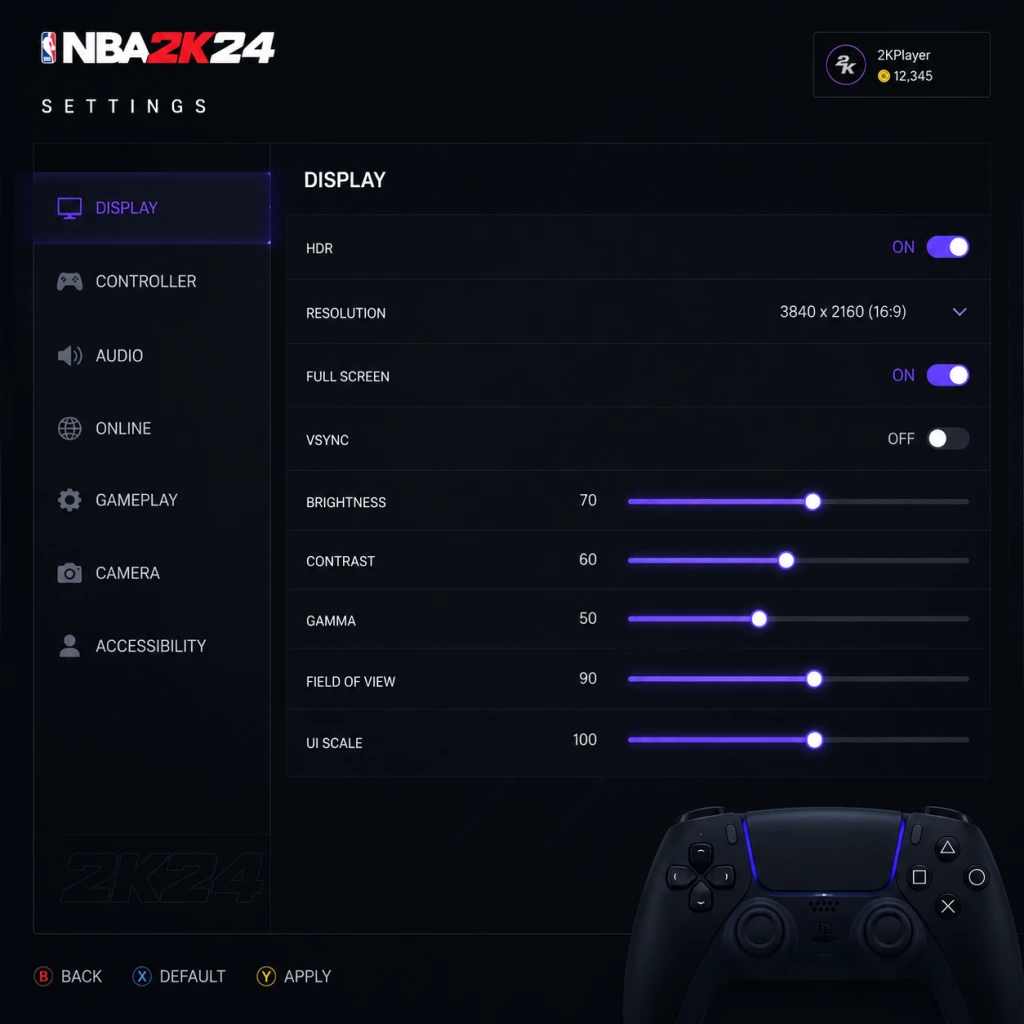
Game Settings
Game Settings
This section details every major setting in NBA 2K24 across all platforms. We provide recommended configurations for performance and quality on PC (low/mid/high-end), PlayStation 5, Xbox Series X|S, PlayStation 4, Xbox One, and Nintendo Switch. Pay close attention to the misconfiguration warnings – a few wrong choices can ruin your experience.
Graphics Settings (PC Only)
| Setting | Low-End (GTX 1050 / RX 560) | Mid-Range (RTX 2060 / RX 5700) | High-End (RTX 3080 / RX 6800 XT) | Misconfiguration Warning |
|---|---|---|---|---|
| Display Mode | Fullscreen | Fullscreen | Fullscreen | Borderless can cause input lag. Always use Exclusive Fullscreen for lowest latency. |
| Resolution | 1920×1080 | 2560×1440 | 4K (3840×2160) | Running below native reduces sharpness; avoid scaling in Windowed mode. |
| Refresh Rate | 60 Hz | 120 Hz (if monitor supports) | 144 Hz or higher | Ensure refresh rate matches your monitor’s max in Windows display settings. |
| V‑Sync | Off | Off | Off | V‑Sync adds 1-3 frames of input lag. Use G‑Sync/FreeSync instead if you have it. |
| Graphics Preset | Low | Medium | High / Ultra | Manually tweak below if preset causes stuttering. |
| Texture Quality | Low | Medium | High | Low textures look blurry on big screens; VRAM of 2GB+ needed for Medium. |
| Shadow Quality | Low | Medium | High | High shadows cost ~10 FPS. Disable “Contact Shadows” on low-end. |
| Anti‑Aliasing | FXAA (Low) | TAA (Medium) | TAA (High) | TAA can cause ghosting; try SMAA if available. |
| Ambient Occlusion | Off | Low (SSAO) | High (HBAO+) | Heavy on GPU; disable on low-end. |
| Motion Blur | Off | Off | Off | Always turn off – causes nausea and hides details. |
| Depth of Field | Off | Off | Off | Can blur distant players; unnecessary for gameplay. |
| Crowd Quality | Low | Medium | High | Low crowd detail improves FPS with minimal visual loss. |
| Court Reflections | Off | Off | On (Ultra) | Reflections are shiny but demanding; turn off for 20% more FPS. |
---
Audio Settings
| Setting | Recommendation | Why / Attention |
|---|---|---|
| Master Volume | 70-80% | Leaves headroom for sudden loud sounds (whistles, crowd). |
| Music Volume | 50% | Keeps you humming without drowning out footsteps / dribbles. |
| Sound Effects (SFX) | 100% | Critical for hearing ball bounce, player movements, and opponent’s dribble. |
| Commentary Volume | 70% | Lower if commentary repeats often. |
| Crowd Volume | 70-80% | Adds atmosphere but can mask opponent sounds in online play. |
| Voice Chat | 50% (or Off) | Avoid toxic chat; set to party-only in settings. |
| Audio Output | Headphones (Stereo) | The “Headphones” profile enhances spatial awareness – footsteps and ball direction. |
| 3D Audio (PS5 / Xbox) | Enabled | Provides directional cues for off‑screen players. |
---
Controls Settings
| Setting | Recommended Value | Pitfall |
|---|---|---|
| Controller Vibration | Off (competitive) / On (immersion) | Vibration disturbs precise aiming and timing. |
| Stick Sensitivity | 75-85% | Too low → slow reactions; too high → jerky movement. |
| Dead Zone (Left Stick) | 10-15% | Higher values (e.g., 30%) make dribbling unresponsive. |
| Dead Zone (Right Stick) | 5-10% | Critical for shooting and dribble moves. |
| Button Layout | Default (NBA 2K) or Custom | Avoid changing mid‑session – muscle memory matters. |
| Shot Meter | Shot Meter On (if you struggle) / Off (pro) | Off gives a green window bonus but requires practice. |
| Pro Stick Function | Dribble Moves (default) or Shooting | Choose based on comfort – shooting with stick is harder. |
| Controller Type (PS5) | DualSense (adaptive triggers on/off) | Adaptive triggers drain battery; disable for longer sessions. |
---
Accessibility Settings
| Setting | Description / Recommendation |
|---|---|
| Subtitle Display | On – Captions for commentary and cutscenes. |
| Subtitle Size | Large (if playing on TV far away). |
| Colorblind Mode | Protanopia / Deuteranopia / Tritanopia – changes player indicators and energy bars. |
| Controller Remapping | Fully customizable – useful for one‑handed play. |
| Visual Cues | On – adds icons for loose balls, rebounds, etc. |
| Auditory Cues | On – sound effects for shot clock, fouls, buzzer (redundant with SFX but helpful). |
| High Contrast Mode | Off (unless needed) – can make court look odd. |
---
Language Settings
| Setting | Options |
|---|---|
| In‑Game Language | English, French, German, Spanish, Italian, etc. |
| Commentary Language | Separate from menus – can be in a different language. |
| Subtitle Language | Follows commentary language if available. |
---
Network Settings
| Setting | Recommendation |
|---|---|
| Online Region | Choose your closest server region (e.g., North America West). |
| Cross‑Play | On (PS5/Xbox Series) – larger matchmaking pool. |
| Voice Chat | Party Only or Off to avoid toxicity. |
| 2K Account Linking | Connect – required for cloud saves and cross‑progression. |
| Network Status Indicator | On – shows ping and packet loss during games. |
---
Gameplay Settings (Core)
| Setting | Recommended (Beginner) | Recommended (Competitive) | Misconfiguration Warning |
|---|---|---|---|
| Difficulty | Pro / All‑Star | Hall of Fame | Too easy → lazy habits; too hard → frustration. |
| Quarter Length | 8 minutes | 6 minutes (online) / 12 minutes (sim) | Quarter length affects fatigue and stat realism. |
| Game Speed | 50 (default) | 55‑60 (faster pace) | Speed >60 breaks animations online. |
| Fatigue | On | On | Off leads to unrealistic stamina. |
| Injuries | On (sim) / Off (casual) | On | Off removes strategic depth. |
| Free Throw Difficulty | 50 (default) | 65‑70 (harder) | Lower → easy green releases; higher forces timing. |
| Shot Timing | Real Player % (arcade) / User Timing (skill) | User Timing | “Real Player %” ignores your input – terrible for practice. |
| Shot Contest Feedback | On | On | Shows how open you are – leave on. |
| Adaptive Coaching Engine | Off | Off | On causes AI to change your defensive schemes unexpectedly. |
| Defensive Assist Strength | 0‑30 (manual) | 0 (full manual) | High values make defender stick too much, causing blow‑bys. |
| Boxout Assist | 20% (default) | 0% | High assist messes up manual rebounding. |
| Controller Vibration | Off | Off | As mentioned earlier. |
1. Adaptive Coaching Engine – turn OFF unless you want the AI to randomly switch your defense in the middle of a MyCAREER game.
2. Shot Timing Profile – set to User Timing for realistic shooting. “Real Player %” makes your aim irrelevant and is only recommended for absolute beginners or very young players.
---
Optimized Presets by Platform
| Platform | Graphics / Performance Mode | Comments |
|---|---|---|
| PS5 / Xbox Series X | Performance Mode (60 fps) or Quality Mode (30 fps with ray tracing) | I prefer Performance for smoother gameplay; Quality for screenshots. |
| PS4 / Xbox One | Default – all sliders medium. No ray tracing. | Capped at 30 fps on base consoles; 60 on PS4 Pro / One X. |
| Nintendo Switch | Docked: 1080p 30fps, Handheld: 720p 30fps. All effects low. | Use “Performance” preset in handheld to avoid frame drops. |
| PC Low‑End | Custom preset (as table above). | Crucial: set resolution to 1080p, disable shadows and reflections. |
| PC Mid‑Range | Custom preset – Medium textures, high shadows, TAA. | 1440p with DLSS Quality recommended. |
| PC High‑End | Ultra preset, 4K DLSS Quality, all extras on. | Enjoy! Disable motion blur anyway. |
Final Setup Checklist
- [ ] Graphics: Fullscreen, V‑Sync off, motion blur off.
- [ ] Audio: SFX 100%, Music 50%, Headphone mode.
- [ ] Controls: Dead zones 10% (left) / 5% (right), vibration off.
- [ ] Accessibility: Subtitles on, visual/auditory cues on.
- [ ] Language: Set commentary language (changes cannot be reverted mid‑career).
- [ ] Network: Link 2K account, enable cross‑play, region correct.
- [ ] Gameplay: Adaptive coaching OFF, User Timing, defensive assist 0%.
Taking these five minutes to configure will dramatically improve your NBA 2K24 experience and prevent hours of frustration later.