Game Tips
Game Tips for Roblox
This guide covers universal tips that apply across the majority of Roblox experiences. Whether you're a new player or a seasoned veteran, these strategies will help you perform better, progress faster, and enjoy the platform safely.
Beginner Tips (Foundation)
#### 1. Always Check the Game's Description and Rules
- Explanation: Before diving into any game, read the description, rules, and any linked tutorials. Many experiences have unique mechanics, controls, or starter guides written by the developer.
- Why it works: Avoids confusion, teaches basic objectives, and prevents accidental rule-breaking. For example, in Jailbreak, the description explains the role of cops and criminals; in Adopt Me!, the starter guide shows how to take care of pets.
- When to use: Every time you join a new game for the first time.
- Explanation: Learn to use the third-person camera controls (right-click and drag, scroll wheel to zoom, or pinch on mobile). In many games, camera positioning is crucial for spotting enemies, navigating obstacles, or finding resources.
- Why it works: Better situational awareness. In Tower of Hell, a good camera angle helps you see upcoming jumps. In Arsenal, a zoomed-out view reveals enemy positions.
- When to use: Constantly during gameplay, especially in movement-heavy or PvP games.
- Explanation: Press `/` to open chat. Use abbreviations like `t` for team chat (if supported). Learn common acronyms: `gg` (good game), `brb` (be right back), `afk` (away from keyboard).
- Why it works: Quick communication improves teamwork. In Jailbreak, criminals can coordinate escapes. In Phantom Forces, call out enemy locations.
- When to use: In multiplayer experiences where coordination matters.
- Explanation: Your avatar's appearance can affect gameplay in some experiences (e.g., hitbox size in Natural Disaster Survival). Use smaller hats or no bulky accessories to reduce your visual footprint.
- Why it works: Certain games calculate collision based on avatar accessories. A smaller avatar can fit through tight gaps. In The Maze, smaller avatars might avoid detection.
- When to use: In games where hitbox matters; otherwise, cosmetic preferences are fine.
- Explanation: While shooting, move left and right (strafe) rather than standing still. Combine with jumping occasionally to throw off enemy aim.
- Why it works: Movement makes you a harder target. Most Roblox shooters have projectile-based weapons (bullets travel with delay) or hitscan (instant). Strafe pattern disrupts prediction.
- When to use: Almost any PvP game (Arsenal, Phantom Forces, Bad Business). Adjust strafe speed according to weapon type (slow strafe for snipers, fast for SMGs).
- Explanation: Different weapons have different accuracy patterns. For example, in Phantom Forces, the AK-12 has high first-shot accuracy but significant recoil. Wait for the crosshair to reset between shots for burst firing.
- Why it works: Controlled bursts increase hit probability at medium to long range. Spraying leads to wasted bullets and reveal your position.
- When to use: Learn recoil patterns in the game's shooting range or practice mode. Apply in combat based on distance.
- Explanation: Always stay near walls, crates, or obstacles. When engaging, pop out quickly, fire a burst, and return to cover. This minimizes exposure time.
- Why it works: Peeker's advantage: the player who peeks first sees the enemy slightly before the enemy sees them due to latency. Use this to pre-fire common angles.
- When to use: In any shooter with fast TTK (time-to-kill). Works well on defense in Arsenal or Counter Blox.
- Explanation: Melee attacks in games like Murder Mystery 2 or The Strongest Battlegrounds have windup animations and hitboxes. Practice the delay to land hits reliably.
- Why it works: Many players panic-swing. By counting the animation timing (e.g., 0.5 seconds before hit registers), you can attack just as the enemy enters your range.
- When to use: In any game with a melee weapon or skill. Essential for stealth kills in MM2.
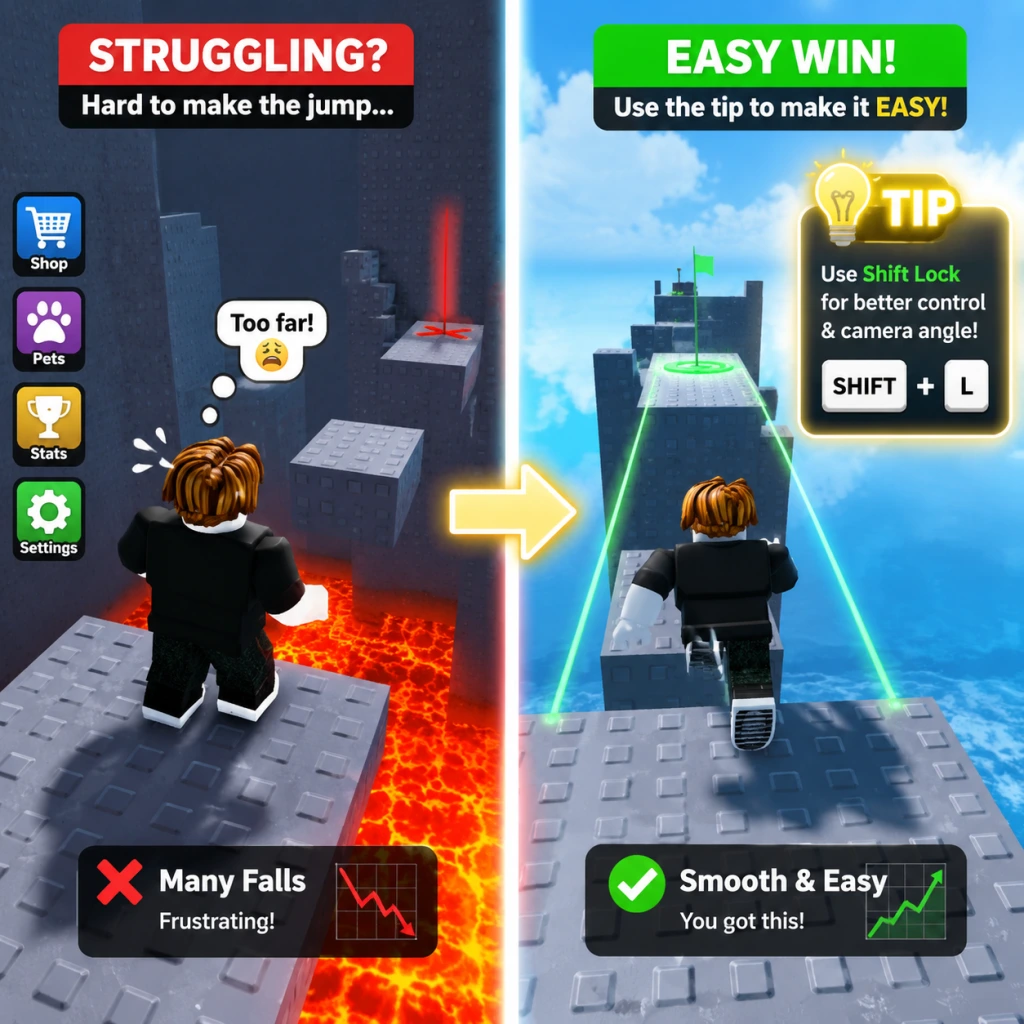
- Explanation: Press `Shift` to lock your camera behind your character, allowing movement-based aiming. This is critical in parkour and some PvP games.
- Why it works: Improves directional control. In Tower of Hell, shift lock makes bhopping (holding shift and jumping repeatedly) easier. In Jailbreak, it helps when driving.
- When to use: Whenever you need precise forward movement while looking around (e.g., climbing, driving).
- Explanation: Jump repeatedly while holding the forward key and strafing slightly. In many Roblox games, this preserves momentum and increases speed.
- Why it works: Roblox's physics engine doesn't apply friction when landing a perfectly timed jump. This allows faster traversal than running.
- When to use: In movement-based games (Tower of Hell, Parkour, Flood Escape 2). Not effective in games that cap speed or have no momentum mechanics.
- Explanation: Many games (e.g., Jailbreak, Adopt Me!) include a minimap. Learn to read it to find key locations, objectives, or teammates. Some games allow you to place waypoints.
- Why it works: Reduces confusion and travel time. In Jailbreak, the minimap shows nearby police and escape routes. In Adopt Me!, it helps locate the toy shop or nursery.
- When to use: Always keep an eye on the minimap; use markers to coordinate with friends.
- Explanation: Some games allow wall jumping (jumping off walls) or have variable jump heights. Test the limits of your character's jump in a safe area.
- Why it works: Knowing exact jump distances helps avoid falling into pitfalls. In Ninja Legends, wall jumping is essential for progression.
- When to use: At the start of any platforming game, practice jumps on easy obstacles.
- Explanation: In games with economies (e.g., Mining Simulator, Bee Swarm Simulator), spend the first few minutes collecting basic resources before attempting challenges.
- Why it works: Upgrading tools and equipment early gives a multiplicative return on time investment. A better pickaxe in Mining Simulator increases ore value per hit.
- When to use: Immediately after spawning. Use the collected resources to buy speed, strength, or luck upgrades first.
- Explanation: As you progress, low-tier tasks become inefficient. For example, in Bee Swarm Simulator, collecting from basic flowers after the first upgrade yields diminishing returns.
- Why it works: Time is better spent on mid-tier activities that unlock new abilities. Use an opportunity cost mindset: focus on the highest EXP or currency per minute.
- When to use: Once you unlock a new area or tool that provides significantly better rewards.
- Explanation: Many games have limited inventory (e.g., Jailbreak: only 4 items as a criminal). Keep essential tools (keycard, weapon, grapple) and drop duplicates.
- Why it works: Prevents missed opportunities. In Jailbreak, if you pick up a second weapon, you might lose the keycard needed for the bank.
- When to use: Continuously while looting. Learn which items are critical for the current objective.
- Explanation: When building your own game or place, enable snapping (View → Snap to Grid) and use constraints (e.g., hinges, motors) for moving parts.
- Why it works: Grid snapping ensures alignment and prevents gaps. Constraints make interactive builds like doors or elevators possible without scripting every detail.
- When to use: Any time you build structures or vehicles in Studio. Also applicable in Theme Park Tycoon or Restaurant Tycoon.
- Explanation: Use `BasePart` for simple blocks, `MeshPart` for complex shapes (imported models), and `UnionOperation` to combine parts subtractively.
- Why it works: Union operations reduce polygon count and improve performance. For example, carving a window out of a wall using `Negate` creates a single part instead of multiple.
- When to use: Optimizing your build for performance. Use unions sparingly on static objects.
- Explanation: Scripts are essential for interactivity. Start with `ClickDetector` to make a block that gives coins on click, or `TouchTransmitter` for triggers.
- Why it works: Minimal scripting knowledge lets you add functionality without relying on external codes. Prevents common bugs like infinite loops (always use `wait()`).
- When to use: When you need simple mechanics like a teleporter, shop, or NPC dialog.
- Explanation: Robux is the premium currency. Limited items (e.g., limited hats or faces) can be bought from the catalog and resold. Prices fluctuate based on supply and rarity.
- Why it works: Buying limiteds at release or during low-demand periods then selling later can yield profit. Use third-party sites (like Rolimon's) to track price history.
- When to use: Only if you have spare Robux and understand the risks. Treat it like real stock investing—diversify and avoid hype trains.
- Explanation: These games have internal trading systems. Learn the values of items/pets through community tier lists or in-game demand.
- Why it works: Trading allows you to get rare items without grinding. For example, in Adopt Me!, a fly potion might buy a common pet, but a neon legendary trades for multiple legendaries.
- When to use: When you have duplicate rare items or want to upgrade. Always check the trade window carefully to prevent scams.
- Explanation: Never click links promising free Robux, never trade items outside the official systems, and be wary of "trust trades" (giving an item first expecting return).
- Why it works: Most scams rely on social engineering. Roblox's economy is secure if you stay within the game's trade interface. Scammers often use fake websites or impersonators.
- When to use: Always follow this rule. If an offer seems too good to be true, it is.
- Explanation: Add friends you enjoy playing with. Join groups related to your favorite games for exclusive builds, private servers, or community events.
- Why it works: Playing with friends increases enjoyment and coordination. Many games reward group play (bonus XP, shared loot). In MM2, a friend can be a trusted bystander.
- When to use: Actively invite friends to private servers for grinding or practice. Use groups to find like-minded players.
- Explanation: If a player is spamming, harassing, or breaking rules, mute them (click their name in chat → Mute Player). For severe violations (scamming, exploiting), report via the in-game menu.
- Why it works: Preserves your enjoyment. Roblox moderation may take action on reports, keeping the community safer.
- When to use: Immediately when you encounter toxicity; don't engage.
- Explanation: In games like Jailbreak (police vs criminals) or Phantom Forces (attack vs defend), assign roles: a driver, a scout, a support. Use voice chat (Discord) if possible.
- Why it works: Specialization increases efficiency. A dedicated driver in Jailbreak can escape faster. In Arsenal, a support player watches the flank while others push.
- When to use: Before the round starts; agree on a simple plan.
- Explanation: In Roblox settings (Esc → Settings → Graphics), set auto quality on or manually adjust to 2-5. Disable shadows, smooth terrain, and particle effects.
- Why it works: Roblox's engine is CPU-heavy. Reducing graphics lowers lag, especially in complex games like Royale High or Adopt Me! with many players.
- When to use: If you experience stuttering. For competitive shooters, lower settings for smoother frame rates.
- Explanation: Common shortcuts: `Shift` (lock camera), `Ctrl+D` (duplicate in Studio), `Ctrl+G` (group parts), `F` (toggle full screen). In many games, `M` mutes sound, `L` opens leaderboard.
- Why it works: Faster actions reduce downtime. In Studio, Ctrl+D copies immediately. In gameplay, quick mute prevents distractions.
- When to use: Learn them gradually. Start with camera and chat shortcuts.
- Explanation: Roblox caches game assets locally. If games fail to load or update, clear cache by deleting the `Roblox` folder (appdata/local/robles). Reinstall if needed.
- Why it works: Corrupted cache files cause loading errors. Fresh installation resolves version conflicts.
- When to use: After major updates or if a specific game crashes repeatedly.
- Explanation: Roblox will never ask for your password outside the login page. Two-factor authentication (2FA) codes are for logins only. Scammers may impersonate staff.
- Why it works: Accounts are stolen when users share credentials. Enable 2FA in account settings for extra protection.
- When to use: Always. If someone asks for your password in-game, report them immediately.
- Explanation: Set a parent PIN (or account pin) to prevent changes to settings, including password resets and privacy settings.
- Why it works: If someone gains access to your account, the pin blocks them from locking you out. It's an additional barrier.
- When to use: Setup once when you create the account. Do not use the same pin as other services.
- Explanation: In account settings, restrict who can message, invite, or join your games. Set inventory to private to hide friends and items.
- Why it works: Limits exposure to strangers. Especially important for children. Prevents stalkers or scammers from gathering personal info.
- When to use: Configure before playing; adjust as needed.
- Explanation: Time the bank robbery with others. One person opens the vault (requires keycard from a police officer), another watches for cops. Use the getaway vehicle (preferably a fast car like the Ferrari or the Jet).
- Why it works: Splits the risk. More players mean faster bag filling and more eyes on incoming cops. The jet is the fastest escape.
- When to use: When you have at least one teammate. Always check the bank's security level first.
- Explanation: To age pets faster, sit in a vehicle with your pet (pet automatically gains XP). Use age-up potions from tasks. Focus on one neon/mega pet at a time.
- Why it works: Vehicle aging bypasses manual interaction. Stacking age-up potions on a single pet reduces total time to neon.
- When to use: While doing other activities (like taking care of in-game tasks). Prioritize common and uncommon pets first for easier trades.
- Explanation: Practice each tower's jumps individually. Focus on completing a tower without falling, even if slow. Speed comes with muscle memory.
- Why it works: Rushing causes mistakes. Many obstacles are about timing (e.g., spinning platforms). Learning the sequence reduces failure.
- When to use: When you first encounter a new tower or after failing multiple times. Use practice mode (if available) or join on a private server.
- Explanation: Learn the effective ranges of each weapon. Use automatic weapons for close quarters, burst-fire for midrange, and snipers for long range. Swap weapons to match the map.
- Why it works: Correct weapon choice reduces time-to-kill. For example, on map "Metro" (close quarters), use SMGs; on "Highway" (long sightlines), use assault rifles or snipers.
- When to use: At the start of each round, adjust based on the map name shown.
#### 2. Master the Camera Controls
#### 3. Use the Roblox Chat Efficiently
#### 4. Customize Your Avatar for Utility
Combat Tips (Intermediate)
#### 5. Master the Strafe-and-Shoot Technique
#### 6. Understand Weapon Spread and Recoil
#### 7. Use Cover and Peeker's Advantage
#### 8. Learn Melee Timing
Exploration & Movement Tips (All Levels)
#### 9. Master the Shift Lock (PC)
#### 10. Learn Bhopping (Bunny Hopping)
#### 11. Use the Minimap and Markers
#### 12. Understand the Jump Gap and Wall Jumping
Resource Management Tips (Intermediate)
#### 13. Prioritize Early-Game Resource Gathering
#### 14. Avoid Over-Grinding Low-Reward Activities
#### 15. Manage Your Inventory Space
Building & Creation Tips (Advanced)
#### 16. Use Roblox Studio's Snap-to- Grid and Constraints
#### 17. Understand Part Roles (BaseParts, MeshParts, Unions)
#### 18. Learn Basic Lua Scripting for Gameplay
Economy & Trading Tips (Advanced)
#### 19. Understand Roblox's Premium and Limited Items Market
#### 20. Use Trading in Games like Adopt Me! or Pet Simulator X
#### 21. Avoid Common Scams
Social & Multiplayer Tips (All Levels)
#### 22. Use the Friend and Group System Effectively
#### 23. Mute Toxic Players and Use Report
#### 24. Coordinate Roles in Team Games
Advanced Optimization Tips
#### 25. Optimize Graphics Settings for Performance
#### 26. Use Keyboard Shortcuts for Efficiency
#### 27. Clear Cache and Reinstall If Issues Persist
Safety & Security Tips (Essential)
#### 28. Never Share Your Password or 2FA Codes
#### 29. Use a Secure Pin for Account Settings
#### 30. Understand Privacy Settings for Younger Players
Specific Game Examples
#### 31. Jailbreak: Bank Heist Strategy
#### 32. Adopt Me!: Pet Aging Strategy
#### 33. Tower of Hell: Consistency Over Speed
#### 34. Arsenal: Weapon Prioritization
Conclusion
These tips cover a broad spectrum of Roblox gameplay. The key is to adapt general strategies to the specific game you're playing. Practice movement, learn economy systems, and always prioritize safety. Remember that Roblox is a platform of endless variety—experiment and have fun!
Last updated: 2025