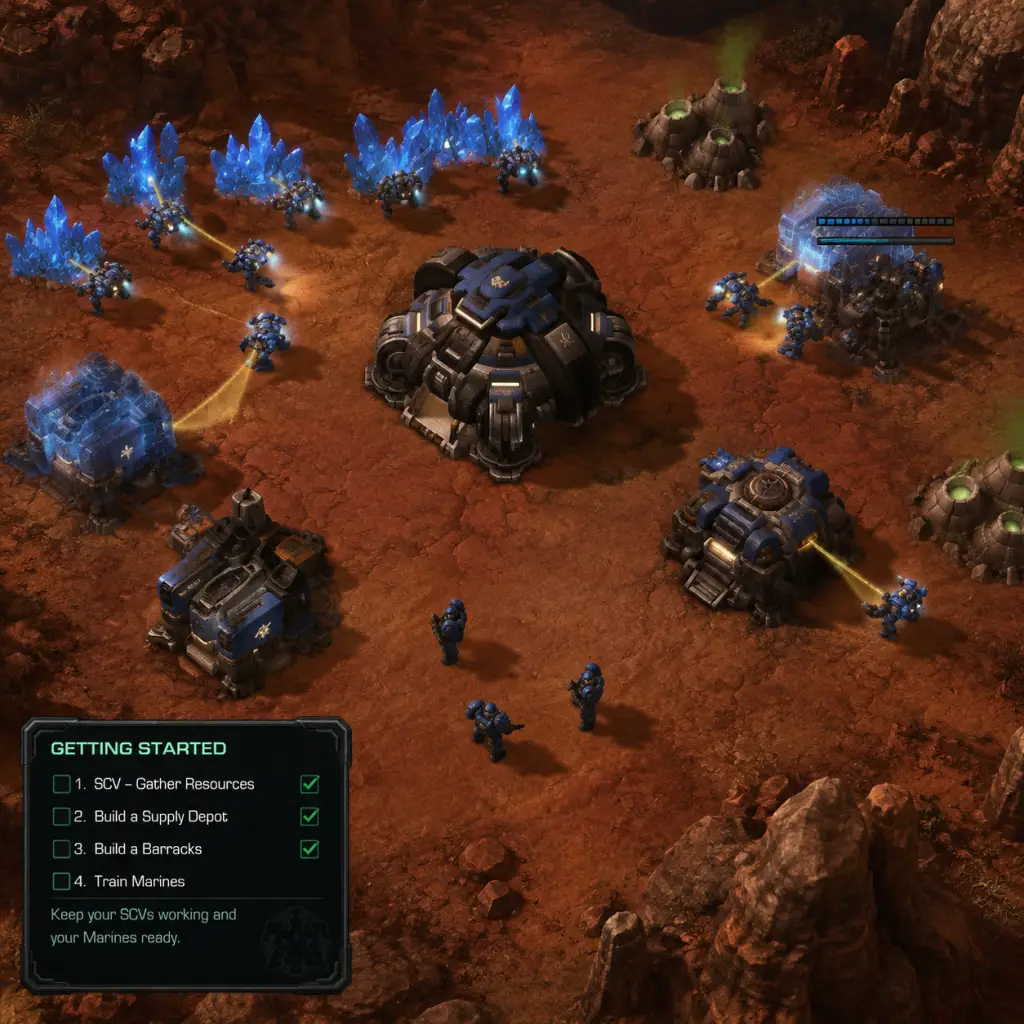
Getting Started
Getting Started with StarCraft II: Wings of Liberty
Welcome to the Koprulu Sector, Commander. StarCraft II is a real-time strategy (RTS) game where you build bases, gather resources, and command armies to destroy your opponent. This guide is designed to get you through your first hour with confidence and avoid the most common pitfalls.
Important Note: No Character Creation
StarCraft II does not have a character creation system. Instead, you choose a race (Terran, Protoss, or Zerg) each with unique units, buildings, and playstyles. As a beginner, the Terran race is often recommended because its mechanics (buildings that lift off, straightforward production) are the most intuitive. You can start the campaign as Terran immediately.
First Hour Walkthrough
1. Launch the Game – After installation, open Battle.net, select StarCraft II, and click Play. You’ll see the main menu.
2. Start the Campaign – Click Campaign → Wings of Liberty. You begin on the Hyperion, your command ship. Follow the introductory cutscene. You’ll soon be thrown into your first mission: "Liberation Day."
3. Complete the Tutorial – The campaign itself serves as an excellent tutorial. The first few missions teach you:
- How to select units (click or drag)
- How to gather minerals and vespene gas
- How to build structures and train units
- Basic combat: attack-moving and using abilities
4. If you want to skip the campaign, go to Versus → vs. AI – Select a map (e.g., Lost Temple) and start against a Very Easy AI. This is the fastest way to learn mechanics solo.
5. In your first game, focus only on this:
- Build SCVs (workers) continuously from your Command Center
- Send SCVs to mine minerals immediately (the yellow crystal nodes)
- Build a Supply Depot at 9 supply to avoid being blocked
- Build a Barracks at around 12-13 supply
- Train a few Marines and attack the AI. That’s it.
Controls on All Platforms
StarCraft II is exclusively on PC (Windows/Mac). There are no console versions. The entire game is designed for keyboard + mouse.
#### Essential Keyboard Shortcuts (Memorize These):
| Action | Default Key | Why It Matters |
|---|---|---|
| Build SCV | `S` (with Command Center selected) | Never stop producing workers |
| Attack Move | `A` then left-click on ground | Units move and attack automatically |
| Hold Position | `H` | Stops units from chasing, good for defense |
| Stop | `S` | Cancels current action |
| Select all army | `F2` | Convenient but can pull defenders away; use carefully |
| Set control group | `Ctrl+[1-9]` | Group units for quick selection |
| Jump to selected group | Double-tap `[1-9]` | Instantly centers screen on that group |
| Camera hotkeys | `F5-F8` (default for bases) | Quickly switch between bases |
User Interface (UI) Overview
1. Top of Screen:
- Resources Bar: Displays Minerals (left) and Vespene Gas (right). Supply is shown as a fraction (e.g., 18/20). Turn yellow/orange when approaching max.
- Game Timer & FPS (optional, enable in settings).
- Score & APM (Actions Per Minute) – ignore as a beginner.
2. Bottom of Screen:
- Command Card: Shows available actions for the selected building or unit (e.g., build SCV, move, stop).
- Selection Panel: Lists all selected units and their HP bars.
- Mini-map: Shows the entire map. Green dots = your units, red dots = enemies, purple = neutral. Click on mini-map to jump camera there.
3. Left/Right Sidebars:
- Objectives Panel (campaign only): Shows mission goals.
- Production Queue: Click a Barracks to see the training progress bar and cancel unit if needed.
Essential Early Objectives (First 5 Minutes)
If you play solo vs. AI or in multiplayer, follow this strict checklist:
1. 0:00 – Build an SCV from the Command Center (you start with 12 workers; your goal is always to be building one more).
2. 0:15 – Rally your starting SCVs to minerals. Right-click on a mineral patch. Keep the Command Center rally point near the minerals.
3. 0:30 – When you have 50 minerals, build a Supply Depot near your base. Place it close to your mineral line but with room to expand.
4. 0:45 – Build a Refinery on a Vespene Geyser (purple gas vent) with 3 SCVs. This is critical for advanced units but not for first few Marines.
5. 1:00 – Build a Barracks (costs 150 minerals). Place it near your Command Center but not blocking anything.
6. 1:15 – Continue producing SCVs non-stop until you have around 16-20 on minerals.
7. 1:30 – From your Barracks, build a Marine (50 minerals). Keep producing Marines one by one until you have 10+.
8. 2:00 – Build a second Command Center (or for beginners, just focus on attacking).
9. Attack with all your Marines by right-clicking on an enemy structure or unit. Use `A`-move to avoid pathing issues.
What To Do First vs. What To Avoid
| Do This First | Avoid |
|---|---|
| Constantly build SCVs | Idling your Command Center (never stop producing workers) |
| Build Supply Depots before reaching max supply | Getting supply blocked (e.g., stuck at 18/18) |
| Scout the map early with an SCV or Marine | Ignoring the opponent – even vs. AI, send a unit to see what they’re doing |
| Spend all your minerals immediately | Saving large amounts of resources – unspent minerals rot |
| Use `A`-move to attack | Using right-click on an enemy (units may chase and get separated) |
| Build production buildings (Barracks, Factory, Starport) | Building unnecessary defensive structures early (e.g., Bunkers before army) |
Early Resource Priorities
1. Minerals are king – You need them for everything: workers, supply, basic combat units. Always have 16-20 SCVs mining minerals.
2. Vespene Gas becomes important later – For most basic units (Marines, Marauders) you need gas. Start with 1 Refinery, then add more once you have ~20 workers.
3. Supply – Every time your supply hits 0/10 you need a Depot. Build one at 9/10, 19/20, 29/30, etc. Missing supply stops production instantly.
4. Expansion – After you have stabilized with 2-3 Barracks and an army, expand to a new mineral line (build another Command Center) to double your income.
Common Beginner Mistakes (And How to Fix Them)
1. Not building workers constantly – Solution: Always queue at least one SCV per Command Center. Use hotkey `S` to build and `Shift+right-click` on minerals to set rally.
2. Getting supply blocked – Solution: Build a Supply Depot when your current supply is at 9, 18, 27, etc. Check your supply number every few seconds.
3. Idle army – Solution: If you aren’t scouting or attacking, your army should be defending a choke point or moving to pressure the enemy. Use `F2` to select all and send them somewhere useful.
4. Trying to micro before macro – Beginner priority: Build workers, spend resources, maintain supply. Micromanagement (splitting Marines, using abilities) is secondary.
5. Not watching the minimap – Solution: Get in the habit of glancing at the minimap every five seconds. Red dots mean danger.
6. Panicking and spamming units – Solution: Stick to a simple opening (e.g., 1 Barracks, then expand). Chaos leads to wasted resources.
Day-One Checklist
- [ ] Play the first campaign mission (Liberation Day) to learn basics.
- [ ] Memorize the hotkeys for SCV, Attack Move, and building Supply Depots.
- [ ] Play a vs. AI match on Very Easy. Try to build workers constantly and never get supply blocked.
- [ ] Watch the replay of your game. Look for times your Command Center was idle or you had unspent minerals.
- [ ] Learn one simple build order (e.g., 1 Barracks Expand for Terran) from a reputable source like TeamLiquid or YouTube.
- [ ] Familiarize yourself with the UI: find the mini-map, resource count, and command card.
- [ ] Experiment with the other races (Protoss, Zerg) in a custom game to understand their feel.
- [ ] Join a beginner-friendly community (e.g., StarCraft II Discord) to ask questions.
Final Pro Tip
StarCraft II is a game of macromanagement (economy and production) first, micro (unit control) second. If you can out-produce your opponent with sheer numbers, you will win many early games. Keep your base building, workers constantly flowing, and always look to spend your resources. Good luck, Commander.