Getting Started
Getting Started
This guide is your first-hour roadmap for The Sims 4 on PC, Mac, PlayStation 4/5, and Xbox One/Series X|S. If you haven't installed the game yet, refer to the Download & Installation section. If you're completely new, start here to avoid confusion and get your Sim thriving fast.
---
First Hour Walkthrough: What to Expect
1. Launch the Game – After installation, you'll see the Main Menu. Click Play (or New Game on console).
2. Choose a Household – You can start with a premade family (like the Goths or Pancakes) or create your own. For beginners, premade families have balanced skills and jobs, but creating your own lets you tailor everything.
3. Select a Lot – You'll be placed in a neighborhood (e.g., Willow Creek, Oasis Springs). Pick an empty lot (cheapest are $0) or move into a furnished house. Start with a furnished house to avoid building from scratch.
4. First Control – Immediately pause the game by pressing Spacebar (PC) or Options/Start (console) so you can take your time.
5. Explore the UI – Hover over buttons. The bottom bar shows your Sim's needs, skills, and career. The top bar has speed controls, money, and Sim info.
6. Fulfill Needs – Unpause and click your Sim to queue actions like Use Toilet, Get Food, Sleep. The game runs in real-time (speed 1).
7. Assign a Career – Click your Sim or the job icon (briefcase) on a phone/computer to Find a Job. Choose a career that matches your Sim's traits (e.g., Athletic Sim → Athlete).
8. Build Skills – While not working, have your Sim read skill books, practice instruments, or cook. Skills are essential for promotions and crafting.
9. Socialize – Introduce yourself to neighbors. The game will guide you with tutorial pop-ups—read them!
10. Save Often – Press Ctrl+S (PC) or use the menu to save every 15 minutes.
---
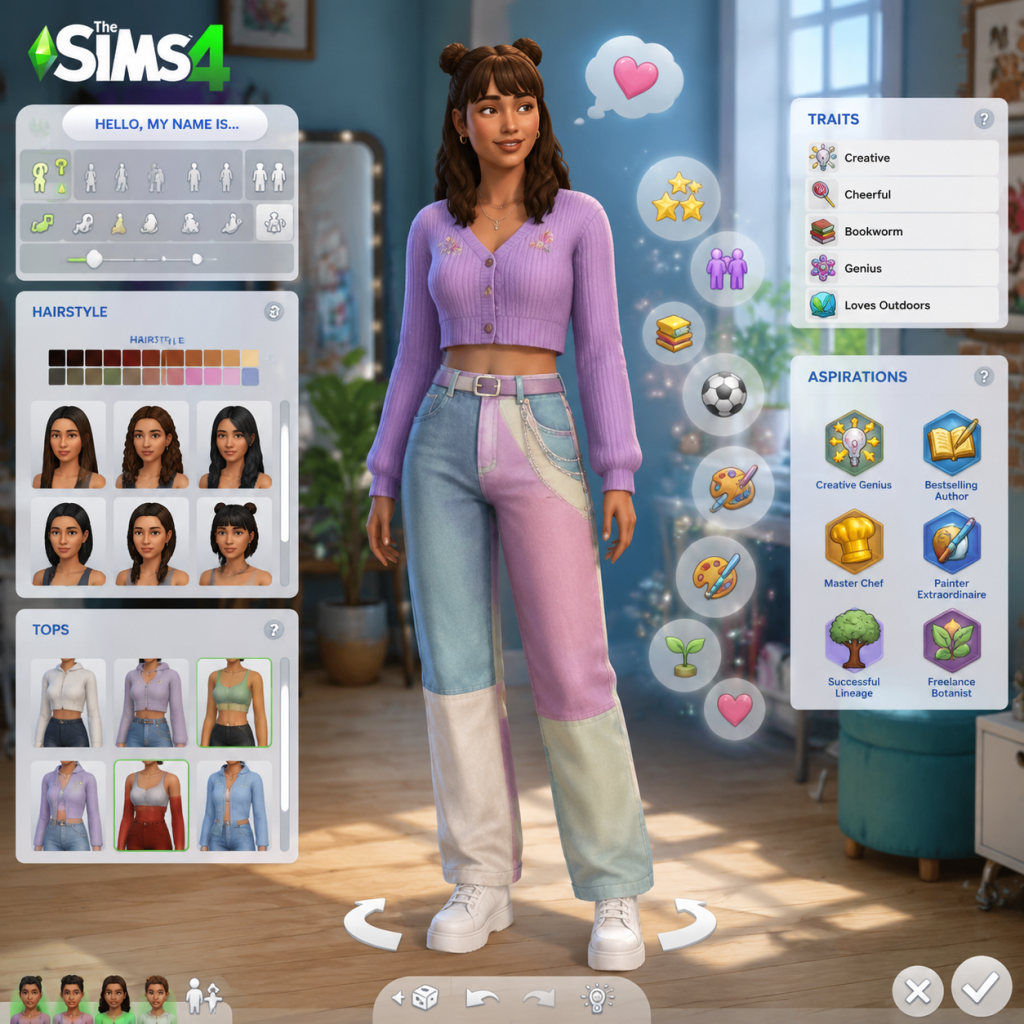
Character Creation (Create-a-Sim)
- Access – Click Create-a-Sim (CAS) from the main menu or while editing a household.
- Basic Options – Choose gender, age (Young Adult is best for starting careers), voice, walk style.
- Appearance – Customize face (eyes, nose, mouth) and body (weights, muscle tone). Use the Room camera to rotate.
- Traits – You get 3 traits for Young Adults. Beginner-friendly traits: Cheerful (makes friends easily), Ambitious (faster promotions), Neat (cleaner house without effort). Avoid Loner unless you want solitude.
- Aspiration – A long-term goal (e.g., Renaissance Sim (learn many skills), Fabulously Wealthy). Aspirations guide your gameplay and give rewards.
- Outfits – You can change clothes later in a mirror or dresser, so don't stress.
- Tip: Spend only 15 minutes in CAS. You can edit your Sim later using a mirror (Change Appearance).
---
Controls on All Platforms
| Action | PC/Mac | PlayStation | Xbox |
|---|---|---|---|
| Move camera | Right-click & drag, or WASD | Left stick | Left stick |
| Rotate camera | Hold right mouse button + drag | Right stick | Right stick |
| Zoom | Scroll wheel or + / - | L2/R2 | LT/RT |
| Select Sim | Left-click | A | A |
| Queue action | Click on object/Sim | Hold A then select | Hold A then select |
| Pause/Play | Spacebar | Options → Pause/Play | Menu → Pause/Play |
| Speed up | 1, 2, 3 keys | D-pad up | D-pad up |
| Save | Ctrl+S | Options → Save | Menu → Save |
| Open Build/Buy | F2 on keyboard or click hammer | Touchpad or D-pad down | View button |
| Manage Worlds | F5 on keyboard or click globe | Options → Manage Worlds | Menu → Manage Worlds |
- Pro tip on console: Use the radial menu (hold A/X) to quickly queue actions like 'Go Here' or 'Chat'.
- All platforms: You can adjust camera speed, edge scrolling, and rotation in Game Options > Controls.
- Bottom Panel (Needs) – Green bars for Hunger, Bladder, Energy, Fun, Social, Hygiene. Keep them at least half full. If any turns red, your Sim will refuse to do other tasks.
- Top Left – Sim portrait, mood (emotion icon), age, career level, and household funds (simoleons).
- Top Right – Speed controls (play/pause/1x/2x/3x), time, calendar.
- Build Mode (hammer icon) – Furnish houses, add walls, rooms, and decorations.
- Buy Mode (shopping bag icon) – Purchase furniture, appliances, and decor. Use bb.moveobjects cheat (cheats are optional) for flexible placement.
- Library (book icon) – Save your builds, households, and rooms to reuse.
- Notifications (mailbox icon) – Click to see incoming messages like promotion offers or event invites.
- Phone (bottom-right on PC; D-pad left on console) – Use for quick actions: call a friend, order pizza, find a job.
- Take your time in paused mode.
- Place a fire alarm and smoke detector in the kitchen (safety!).
- Buy a cheap shower (not the most expensive).
- Use the whims (small bubbles above Sim's head) to guide your actions—they give satisfaction points.
- Read the Tutorial pop-ups carefully; they teach essential mechanics.
- Overspending – Don't buy expensive items like a $5,000 painting or $3,000 stereo on day one. Stick to basic necessities.
- Neglecting Needs – If your Sim collapses from exhaustion, they miss work and get fired.
- Cooking while Hungry – If your Sim is hungry, they might burn the kitchen if their cooking skill is low. Eat a quick meal (fruits, salad) first.
- Starting with Too Many Sims – A single Sim or a couple is easiest. Large families are stressful for new players.
- Ignoring Work – Your Sim must go to work on time. Check the career panel (briefcase icon) for daily tasks.
- Buying Pets or DLC Items – Stick to base game content until you're comfortable.
---
UI Overview
---
Essential Early Objectives (Your To-Do List for Day One)
1. Create or Choose a Sim – Pick traits that complement each other (avoid conflicting ones like Active and Lazy).
2. Move into a House – If you chose an empty lot, immediately enter Build/Buy mode and place essential objects:
- Toilet, Shower/Sink, Bed (minimum)
- Fridge, Stove, Counter, Trash Can
- Chair, Table (for eating)
3. Fulfill Needs – Your Sim will be hungry, tired, etc. Queue actions to bring them to green.
4. Get a Job – Use the phone or computer. Choose a career that matches one of their traits (e.g., Creative trait → Painter or Writer).
5. Improve a Skill – Spend at least 1 hour reading or practicing a skill related to their career or aspiration. This leads to promotions.
6. Make a Friend – Knock on a neighbor's door or visit a community lot (park, gym). Social boosting helps promotions and unlocks social rewards.
7. Save the Game – Press Ctrl+S (PC) or go to Menu → Save. Do this before quitting.
---
What to Do First vs. What to Avoid
✅ Do First:
❌ Avoid:
---
Early Resource Priorities
| Resource | Priority Level | Why & How |
|---|---|---|
| Simoleons (Money) | High | Earn via job, selling harvested plants, or painting. Avoid luxury spending until you have a $10,000 buffer. |
| Needs (Bladder, Hunger, etc.) | Critical | Letting any need drop to red causes mood debuffs. Queue actions to address them first when you unpause. |
| Skills (Cooking, Charisma, etc.) | Medium | Skills unlock new recipes, social interactions, and job promotions. Practice daily. |
| Relationships | Medium | Maintain friendships for promotions and social events. Call friends or invite them over. |
| Satisfaction Points | Low initially | Earned from whims and aspirations. Save them for useful rewards like Savvy Sculptor (faster skill building) or Steel Bladder (need decay slower). |
Common Beginner Mistakes
1. Not Saving – The game doesn't auto-save by default. Enable auto-save in Game Options > Other or manually save frequently.
2. Ignoring the Needs Panel – When you micromanage one task, other needs crash. Check needs every few in-game hours.
3. Buying Too Much Too Fast – New players often drain their funds on decor. Stick to functional items first.
4. Forgetting to Pay Bills – Bills arrive every Monday. If you don't click the bill (mailbox icon) and pay, utilities get shut off (no power/water).
5. Overcomplicating Build Mode – Don't spend hours building a perfect house. Use a premade room from the Gallery or start with a simple box.
6. Trying to Do Everything – Focus on one Sim or one aspiration at a time. Multi-tasking will overwhelm you.
7. Not Using the Gallery – The Gallery (online community) has free, pre-built houses, rooms, and Sims. Access it from the Library icon. Saves time.
8. Ignoring Whims – Whims give you a clear next step to focus on. They're optional but helpful.
---
Day-One Checklist (Printable)
- [ ] Launch the game and create a Sim (or pick premade).
- [ ] Move into a furnished house (or build essentials on an empty lot).
- [ ] Pause the game and explore the UI.
- [ ] Fulfill all initial needs (use toilet, eat, sleep, shower).
- [ ] Find a job via phone or computer.
- [ ] Purchase a cheap stove, fridge, toilet, shower, and bed (if empty lot).
- [ ] Start learning a skill (cooking is most useful day one).
- [ ] Make at least one friend (neighbor or club member).
- [ ] Check and pay the first bill (if Monday has passed; bills are weekly).
- [ ] Save the game.
---
> Remember: The Sims 4 is a sandbox. There is no winning—only having fun. If you break something, undo is your friend (Ctrl+Z on PC). Refer to the Game Introduction for the overall concept, and enjoy your simulation journey!