Getting Started
Getting Started
First Hour Walkthrough
Step 1: Launch & Main Menu
After installing (see Download & Installation section), boot up Tekken 7. You'll see the title screen; press any button to reach the main menu. The menu includes:
- Arcade Battle – Quick fights vs. AI
- Versus Mode – Local vs. human
- Online Mode – Ranked, Player, or Tournament
- Treasure Battle – Single-player grind for customization items
- Story Mode (The Mishima Saga) – Cinematic story
- Practice – Training room
- Customization – Edit character appearance
Step 2: Begin with Practice Mode
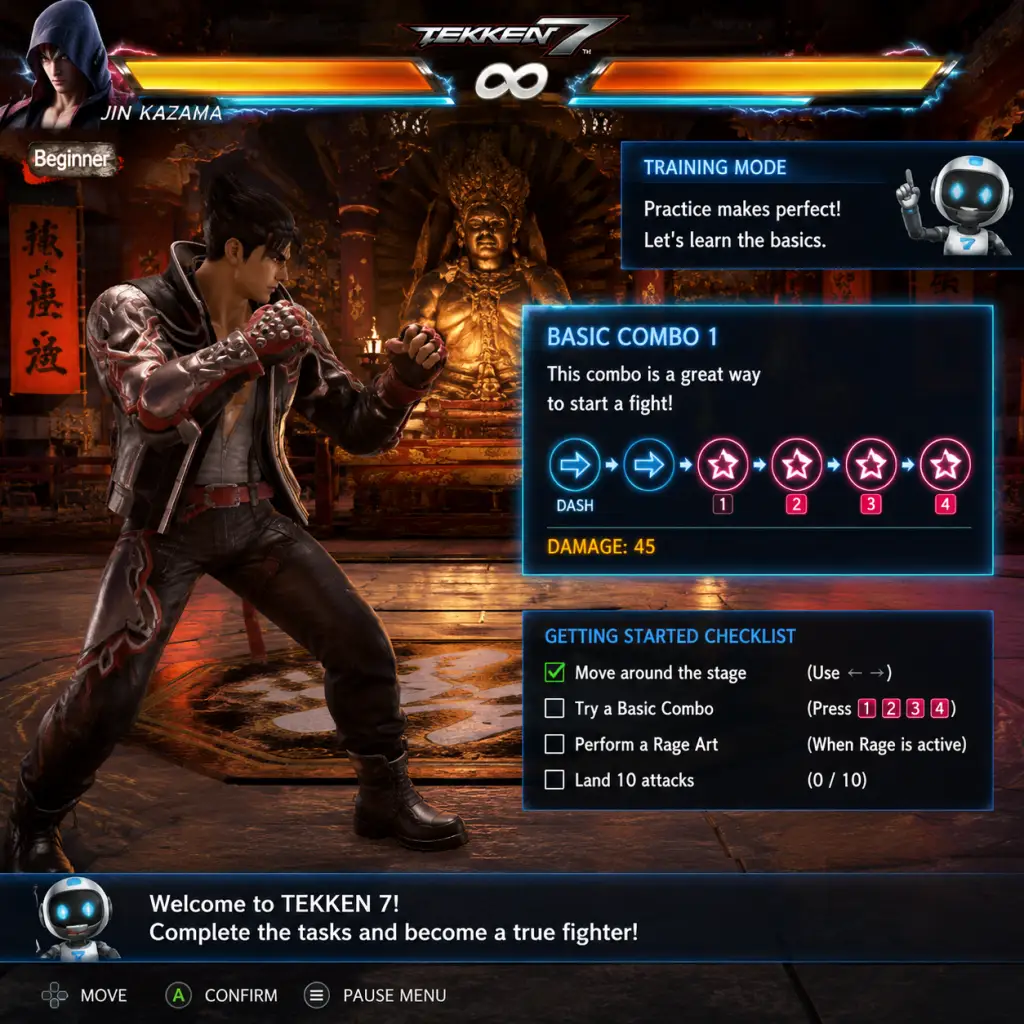
Select Practice immediately. This is the safest place to learn without pressure. The default character is Kazuya Mishima. For your first five minutes, just move: walk forward/backward, sidestep (up/down on directional inputs), and block (hold back). Try each punch and kick button to see the basic moves.
Step 3: Explore the Move List
While in Practice, pause (Options/Menu button) and select Move List. Scroll through the available attacks. Focus only on 10-hit combos (just do the full string) and Rage Arts (see controls below). Don't memorize everything yet.
Step 4: Quick Treasure Battle (15 minutes)
Return to main menu and start Treasure Battle. Choose any character you like – the game will recommend a beginner-friendly one (like Paul Phoenix or Asuka Kazama). Play a few matches against AI. This mode gives you customization items (costumes, accessories) for winning. Don't worry about losing; just get comfortable with the controls.
Step 5: Story Mode – Episode 1
Select Story Mode and play the prologue (first chapter). It takes about 10 minutes and introduces key characters and mechanics through cutscenes and simple fights. After finishing, you'll have a basic feel for the game.
Character Customization (No Creation)
Tekken 7 does not include a character creator where you build a fighter from scratch. Instead, you customize the existing roster by changing outfits, hairstyles, accessories, and even special intro/win animations. To customize:
1. From main menu, select Customization.
2. Choose a character you own.
3. Spend Fight Money (earned in matches) to buy items from the Item Shop.
4. Apply items in the Customize screen: costumes, headgear, glasses, etc.
5. Your customized look appears in Versus, Online, and Treasure Battle.
Controls on All Platforms
| Platform | Controller Layout (default) |
|---|---|
| PlayStation 4/5 | □ = Left Punch, △ = Right Punch, ✕ = Left Kick, ○ = Right Kick |
| **Xbox One/Series X | S** |
| PC (Keyboard) | Default: A = Left Punch, S = Right Punch, Z = Left Kick, X = Right Kick. (Customizable in settings) |
| PC (Xbox/PS Controller) | Same as console layout depending on controller type |
- Block – Hold back (←) or press no direction against low attacks.
- Sidestep – Press up or down to dodge linear attacks.
- Rage Art – When health is low ( health bar flashes red and Rage icon appears), press all four attack buttons simultaneously (□+△+✕+○ or X+Y+A+B) to unleash a powerful cinematic move. Can be used once per round.
- Rage Drive – Input a character-specific command while in Rage (e.g., forward+triangle for some characters). Consumes Rage but has different properties.
- Throw – Forward + Right Punch (1+2) for generic throw.
- 10-Hit Combo – Each character has a preset string; input the displayed sequence from the Move List.
- Top bar shows your Fight Money (currency) and Player Level.
- Center lists all modes.
- Bottom right shows settings and profile.
- Health Bars – Located at top of screen; your bar is on the left, opponent on the right. When health drops to a red threshold, Rage is activated.
- Rage Indicator – A small icon (red fist) appears next to your health bar when Rage is ready.
- Timer – Center top; counts down from 60 seconds per round.
- Round Score – Below timer; shows wins (e.g., 1-0).
- Special Icons – Health bar sparkles during Rage; Power Crush moves have a blue sheen.
- Start in Practice Mode for 15 minutes.
- Play Treasure Battle on easy difficulty.
- Watch the Story Mode prologue for context.
- Set your Controller Layout to your preference (e.g., change button mapping if needed).
- Jumping into Online Ranked until you can consistently land basic combos and block.
- Button mashing – It forms bad habits. Instead, press deliberately.
- Spending Fight Money on random items – Save for items you actually want (check the shop first).
- Ignoring defense – Blocking lows and punishing mistakes is more important than flashy combos.
- Character Levels – You gain XP per match. Leveling up unlocks new customization items but no gameplay advantages.
- Tekken Points – Not used in this game; disregard.
- Not blocking low attacks – Many new players only block mid. Practice reacting to low pokes.
- Using unsafe moves repeatedly – Moves that are -10 or worse on block let the opponent punish you. Check move list for "On Block" recovery frames.
- Forgetting to sidestep – Tekken is a 3D fighter; sidestepping evades many linear moves.
- Overusing Rage Art – It’s slow and punishable if blocked. Use it only as a combo ender or on reaction to a whiff.
- Ignoring the opponent’s health – Don’t go for risky attacks when you’re ahead.
- Not using throws – Throws beat blocking and are essential to open up turtles.
- [ ] Install and launch Tekken 7.
- [ ] Watch the optional tutorial in Practice mode.
- [ ] Spend 10 minutes in Practice with one character (recommended: Paul Phoenix, Asuka Kazama, or Lars Alexandersson).
- [ ] Play through Story Mode Chapter 1.
- [ ] Win 3 Treasure Battle matches on Easy.
- [ ] Customize your character with any default item (costume color change is free).
- [ ] Set your controller layout to comfortable buttons (if needed).
- [ ] Review the Move List for your chosen character – pick 5 moves to focus on.
- [ ] Try a single player match in Arcade Mode to feel the flow.
- [ ] Exit the game; you’re ready for Day Two.
UI Overview
Main Menu:
In-Match HUD (Heads-Up Display):
Essential Early Objectives
1. Complete Practice Tutorial – The game offers a basic tutorial in Practice mode; do it.
2. Learn One Character’s Top 5 Moves – Don’t memorize the entire movelist. Find out your character’s key moves (e.g., Paul’s Deathfist, Asuka’s reversal). Use online resources or the Move List filter for "Recommended".
3. Master Movement – Practice sidestepping and backdash cancelling (quick backdash repeatedly). Movement is more important than combos early on.
4. Win 10 Treasure Battle Matches – This unlocks customization and gives you feel for AI patterns.
5. Play Character Episode Mode – Every character has a short 3-fight story; it teaches their playstyle and rewards Fight Money.
What to Do First and What to Avoid
DO this first:
AVOID:
Early Resource Priorities
Your main currency is Fight Money (gold coins). Priorities:
1. Unlock all characters – If you own the base game, all base characters are unlocked. If you have DLC, you may need to buy them? No, DLC characters are automatically available if purchased. So Fight Money is for customization only.
2. Buy one costume set for your main – Customization items don't affect gameplay, but having a cool look is fun.
3. Save 20,000 FM for future content – Bandai Namco sometimes adds items.
Other resources: