Getting Started
Call of Duty: Modern Warfare II (2022) - Getting Started Guide
Welcome to Call of Duty: Modern Warfare II (2022), a tactical FPS from Infinity Ward. This guide is designed for brand-new players to help you survive your first hour, understand the fundamentals, and avoid common pitfalls. Whether you jump into Campaign, Multiplayer, Spec Ops, or the free-to-play Warzone 2.0, these tips will get you ready.
Important: There is no character creation. Instead, you choose from pre-made Operators (characters with unique skins and voice lines) unlocked via gameplay or purchased from the store. Your progression revolves around weapon levels, Battle Pass tiers, and cosmetic unlocks.
---
First Hour Walkthrough
1. Boot Up & Main Menu
- After installation, you’ll see the iconic live-action intro (can be skipped).
- The main menu presents key modes: Campaign, Multiplayer, Spec Ops, Warzone 2.0 (if installed), and Store.
- Start with Campaign – it teaches basic mechanics in a safe environment. Select "Campaign" > "New Game" > pick any difficulty (Recruit or Regular for beginners).
- You play as Task Force 141 members. The first mission is an on-rails shooting gallery with guided prompts.
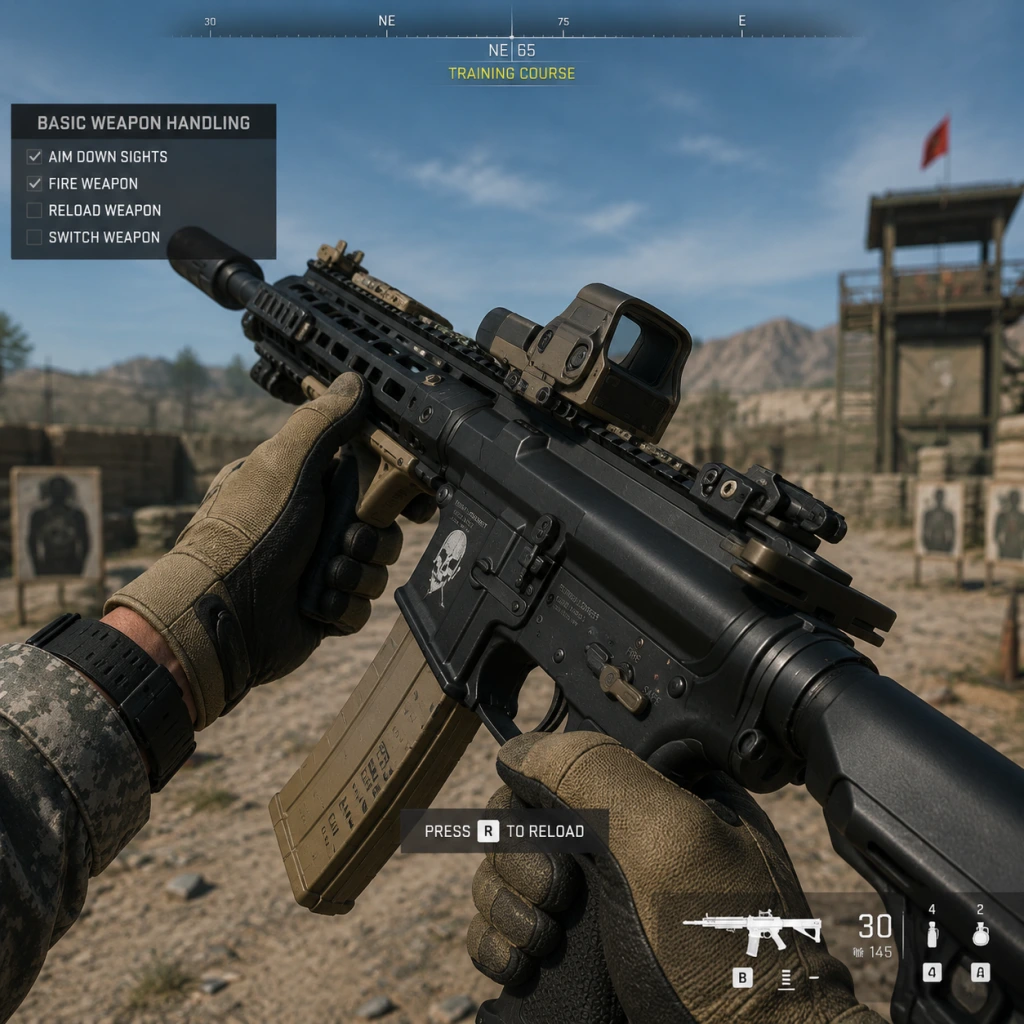
- This teaches: moving (left stick / WASD), looking (right stick / mouse), shooting (R2 / left click), reloading (square / R), and using equipment (L1 / left bumper for tactical, R1 for lethal).
- Pay attention to cover mechanics (peek and lean around corners using L2/L2 - hold to aim down sights).
- After the opening sequence, you’ll get a brief free-form section to practice sprinting and mantling.
- After the campaign intro (≈15 minutes), head to Multiplayer > Quick Play > select Team Deathmatch (best for beginners).
- You start with the default M4 assault rifle – a solid all-rounder.
- The match will last about 10 minutes. Focus on staying with teammates, checking corners, and using your minimap (red dots when enemies fire unsuppressed).
- You earn XP and weapon XP. Return to Weapons tab in the main menu to create custom loadouts.
- Spend any earned Tokens on the Battle Pass (optional; cosmetics only – do not buy tiers with real money yet).
2. Campaign Tutorial – Mission: "Strike"
3. First Multiplayer Match (Optional but Recommended)
4. Post-Match & Loadouts
---
Controls (All Platforms)
PlayStation (PS5/PS4)
| Action | Input |
|---|---|
| Move | Left Stick |
| Aim Down Sights (ADS) | L2 (hold) |
| Fire | R2 |
| Reload | Square |
| Interact / Use | Triangle (tap) – also for picking up items |
| Crouch / Slide | Circle (tap to crouch, hold to slide) |
| Prone | Circle (hold) |
| Sprint / Tactical Sprint | R3 (click once to sprint, double-click for tactical sprint) |
| Jump / Mantle | Cross (X) |
| Tactical Equipment | L1 |
| Lethal Equipment | R1 |
| Ping | Up on D-Pad |
| Killstreaks | D-Pad (L/R) + confirm with R1 |
| Melee | R3 (while sprinting or close to enemy) |
| Focus (Hold Breath) | L3 (while ADS with sniper scope) |
Xbox (Series X|S / One)
| Action | Input |
|---|---|
| Move | Left Stick |
| ADS | LT (hold) |
| Fire | RT |
| Reload | X |
| Interact | Y |
| Crouch / Slide | B (tap/hold) |
| Prone | Hold B |
| Sprint / Tactical Sprint | Right Stick Click (double-click for tac sprint) |
| Jump / Mantle | A |
| Tactical | LB |
| Lethal | RB |
| Ping | Up on D-Pad |
| Killstreaks | D-Pad (L/R) + RB |
| Melee | Right Stick Click (in close quarters) |
| Hold Breath | Left Stick Click (while ADS with scope) |
PC (Keyboard + Mouse)
| Action | Input (Default) |
|---|---|
| Move | W/A/S/D |
| ADS | Right Mouse Button (hold) |
| Fire | Left Mouse Button |
| Reload | R |
| Interact | F |
| Crouch / Slide | C (tap/hold) |
| Prone | Hold C (or press Z in some configs) |
| Sprint | Left Shift (hold) – double-tap for tactical sprint |
| Jump / Mantle | Spacebar |
| Tactical | Q |
| Lethal | E |
| Ping | Mouse Button 3 (scroll wheel click) or ‘1’ |
| Killstreaks | Number row keys (1-4) or scroll wheel |
| Melee | V |
| Hold Breath | Shift (while ADS with scope) |
---
UI Overview
- Health Bar: Bottom center – red segments when damaged. Automatically regenerates after a few seconds if not hit again.
- Mini-Map: Top left – shows friendly positions (blue dots) and enemy fire (red dots) only when enemies fire unsuppressed weapons. Use a suppressor to stay off the minimap.
- Compass: Top center – shows cardinal directions and enemy pings/indicator when nearby (yellow ping).
- Ammo Counter: Bottom right – current ammo / total magazines. Red when low.
- Kill Feed: Top right – lists recent eliminations and deaths.
- Equipment & Killstreaks: Bottom left – icons for tactical, lethal, and available killstreaks (press assigned keys to deploy).
- Objective Marker: Floating icon in world (yellow for default objective).
- Adjust Settings Immediately: Go to Settings > Audio > Audio Mix > “Home Theater” for better footstep clarity. Turn on “Automatically Sprint” or “Auto Sprint” (not tac sprint) if you find holding shift tiring.
- Play the Tutorial Firing Range: Accessible from Multiplayer lobby > “Firing Range” (unlocked after first multiplayer match). Practice recoil patterns and test attachments.
- Stick to One or Two Weapons: Early on, focus on the M4 (assault rifle) and maybe the Vel 46 (SMG). Avoid snipers or marksman rifles until you understand map flow.
- Complete Daily Challenges: Under the Challenges tab – they reward bonus XP and sometimes weapon blueprints. Easy ones like “get 5 kills with an assault rifle” give quick level boosts.
- Use Double XP Tokens Wisely: Activate them during extended play sessions when you plan to grind a specific weapon.
- Don’t Buy Store Bundles or Battle Pass Tiers: You earn Battle Pass tokens just by playing. Spending real money early is unnecessary.
- Don’t Play Ranked Play (CDL) Until Level 55: You need to know all maps, weapons, and teamplay rules. Jumping in early will frustrate you and your teammates.
- Avoid Over-Reloading: Empty your magazine before reloading unless you are in a safe corner. Reloading mid-fight gets you killed.
- Don’t Use High-Recoil Weapons Early: Weapons like the Lachmann-556 or SP-X 80 require specific builds. Stick to easy-to-control guns.
- Avoid Rushing in Warzone 2.0: If you play the battle royale, don’t hot-drop (land in highly contested areas) until you learn looting and circle rotations. Play Plunder first for practice.
- Weapon XP is your most valuable resource. It unlocks attachments that drastically improve weapon performance. Use the M4 as your primary until you unlock a better alternative.
- Player XP (Career Rank) – unlocks create-a-class slots, perks, field upgrades, and killstreaks. Reach Rank 10 as quickly as possible.
- Battle Pass Tokens – used to unlock cosmetic rewards. Ignore early tiers; save tokens for later seasons if you want specific items.
- In-Game Cash (Warzone only) – used to buy killstreaks and equipment at buy stations. In Multiplayer, there is no currency to manage.
- [ ] Install the full game – ensure Campaign, Multiplayer, and Warzone 2.0 packs are downloaded (check in-game file management).
- [ ] Complete Campaign mission “Strike” – 15-minute tutorial.
- [ ] Spend 10 minutes in the Firing Range – test M4 recoil, practice snapping to targets.
- [ ] Set Audio to “Home Theater” – best for hearing footsteps.
- [ ] Enable “Automatic Sprint” (optional) in Settings > Controller/Mouse.
- [ ] Play 5 Team Deathmatch matches – focus on staying alive and using cover.
- [ ] Unlock first 5 M4 attachments – prioritize a reflex sight, angled grip, and extended mag.
- [ ] Watch a 5-minute beginner video on YouTube (search: "MWII minimap tips") – reinforces key concepts.
- [ ] Do not spend any real money – resist store bundles or Battle Pass tier skips.
---
Essential Early Objectives
1. Complete the Campaign Tutorial – unlocks familiarity with movement, shooting, and basic mechanics.
2. Level Up the M4 to at least Level 10 – unlocks essential attachments like a red dot sight, foregrip, and larger magazine.
3. Unlock the “Tactical Sprint” perk (if not already) – via leveling your weapon or player rank 10.
4. Play 5 Multiplayer Matches – to earn enough XP to create a custom loadout with two perks and a field upgrade.
5. Learn the Minimap – understand that unsuppressed shots reveal your position. Use suppressors in objective modes.
---
What to Do First (Priorities)
---
What to Avoid
---
Early Resource Priorities
---
Common Beginner Mistakes
1. Not Checking Corners – always sprint with caution. Pre-aim around corners.
2. Reloading After Every Kill – you might have 15 bullets left; use them. Only reload when empty or in cover.
3. Not Pinging Enemies – press Up D-pad (or ping key) to mark enemy locations for teammates. Crucial for team play.
4. Ignoring the Minimap – red dots = enemy location. Blue dots = teammates. Use it constantly.
5. Standing Still While Reloading/Shooting – strafe and move erratically to make yourself harder to hit.
6. Using the Wrong Ammo Type – Standard rounds are fine for most modes. Armor Piercing is only useful against vehicles or through walls. Frangible rounds reduce enemy movement speed but do less damage – avoid them early.
7. Not Adjusting Sensitivity – start with a lower sensitivity (4-5 on controller, 5-6 on mouse) and gradually increase as you improve.
---
Day-One Checklist
Follow this checklist and you’ll be well-prepared to enjoy Call of Duty: Modern Warfare II without feeling overwhelmed. Good luck, soldier!