Getting Started
Getting Started with Company of Heroes 2
First Hour Walkthrough
When you first launch Company of Heroes 2, you'll arrive at the main menu. For brand-new players, the best way to spend your first hour is to complete the in-game tutorial and then play the first mission of the Soviet campaign, "The Winter War." This mission teaches you core mechanics in a forgiving environment.
0–10 minutes: Main menu → click "Campaigns" → select "Soviet Campaign" → choose "The Winter War." Watch the brief cutscene. You'll start with a few infantry squads and a single truck (HQ).
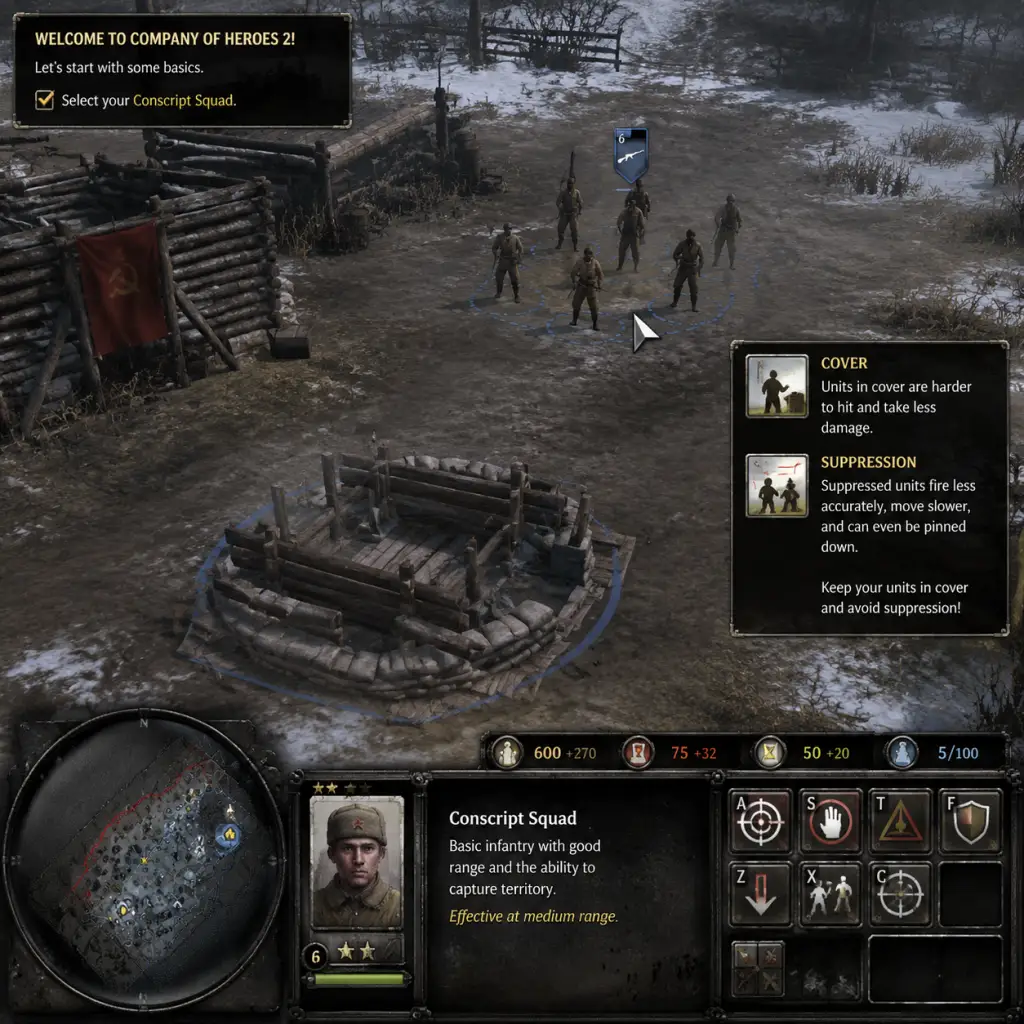
10–30 minutes: Follow the on-screen prompts: move your troops to capture points, build structures (only an HQ can be built here), and learn the basics of combat – use cover, flank enemies, and retreat low-health squads.
30–45 minutes: The mission escalates with German counterattacks. Focus on capturing fuel points (for vehicles) and munitions points (for abilities/upgrades). Build a Command Post to increase population cap and a Mechanized Support Barracks to train Engineers and Conscripts.
45–60 minutes: Use Engineers to lay mines and repair vehicles. Deploy a sniper to pick off enemy infantry from a distance. Hold the central bridge chokepoint to secure victory. The mission ends with a cinematic.
Character Creation?
Company of Heroes 2 does not feature a character creator or RPG-style hero. You control squads and vehicles; there are no named, persistent characters (except some campaign heroes like Isakovich, but they are pre-set). Focus on army composition rather than individual character stats.
Controls (PC – Keyboard + Mouse)
The game is designed for mouse and keyboard. No console versions exist. Mastering hotkeys is essential for efficiency.
#### Basic Mouse Controls
| Action | Command |
|---|---|
| Select unit | Left-click on unit or drag a box |
| Select multiple | Shift + left-click |
| Move / Attack | Right-click on ground / enemy |
| Issue order | Right-click on target (attack, capture, repair) |
| Open context menu | Right-click on building (e.g., HQ to build) |
| Camera pan | Move mouse to screen edge or middle-mouse drag |
| Zoom | Scroll wheel |
| Rotate camera | Middle-mouse button hold + drag |
| Key | Function |
|---|---|
| `W` | Move |
| `S` | Stop |
| `A` | Attack-move (units engage enemies while moving) |
| `D` | Deploy (buildings/defenses) |
| `F` | Focus on selected unit |
| `R` | Retreat (selected infantry returns to base) |
| `T` | Toggle stance (aggressive/defensive/reactive) |
| `1-9` | Select control groups (assign with Ctrl+#) |
| `Tab` | Cycle through squads within the same selection |
| `Space` | Jump to last event (enemy contact, structure complete) |
| `H` | Hold position |
| `Ctrl+A` | Select all units |
| `Ctrl+C` | Select all units on screen |
| `P` | Toggle pause (single-player only) |
UI Overview
The interface is divided into several key areas:
- Top-left: Population cap (current/max), resources: Manpower, Fuel, Munitions. Manpower is the primary currency for infantry; Fuel for vehicles; Munitions for abilities and upgrades.
- Top-right: Mini-map. Shows friendly units (green), enemy contacts (red), and strategic points (flags). Right-click to jump camera. Enable "Map Borders" in options to see unexplored areas.
- Bottom-center: Selection panel. Displays the currently selected squad/vehicle stats, health, veterancy, and abilities. Right-click to use special abilities (mines, snare, etc.).
- Bottom-left: Command panel. Buttons for building structures (when HQ is selected) or issuing squad-specific orders (like planting mines with Engineers).
- Left side: Objectives (campaign) or mission alerts. Often shows primary and secondary goals.
- Right side: Intel (when selected) provides information about the enemy unit or structure.
- Complete the Tutorial (Main Menu → Tutorial) – it takes about 15 minutes and covers movement, capture, cover, and retreat.
- Play the first Soviet Campaign mission ("The Winter War") – it's a gentle introduction.
- Bind hotkeys for Retreat, Attack-move, and Squad selection. Practice using them.
- Use cover (green shield icon when infantry is behind sandbags/walls). It drastically reduces damage.
- Reinforce squads instead of letting them die. Reinforce from a building or by building a medical station.
- Blobbing: Moving all infantry together. One machine gun or mortar can wipe a blob. Spread out and use combined arms.
- Running through open ground without cover. Always move from cover to cover.
- Ignoring retreat. If a squad is under heavy fire, press R to make them sprint back to base – they'll live to fight another minute.
- Building too many buildings early. Your first structure after HQ should be a Command Post (increases pop cap) then a Barracks for infantry. Don't waste resources on defenses before you have a decent army.
- Neglecting fuel points. Fuel is the gateway to vehicles. If you only capture manpower points, you'll be stuck with infantry forever.
- Capture 2-3 MP points + 1 fuel point.
- Build Command Post (costs MP + fuel).
- Build Barracks (Mechanized Support Barracks).
- Produce 2-3 Conscript squads (75 MP each).
- Optional: Build an Engineer (50 MP + 15 fuel) to repair and lay mines.
- Then focus on capturing more fuel points and building a vehicle structure (Light Vehicle Hall) to produce T-70s.
Essential Early Objectives (First Hour)
1. Capture Strategic Points: Always start by capturing manpower and fuel points near your base. These are your lifeline. Use the initial Conscripts to cap quickly.
2. Build a Command Post: Required to increase population cap (from 10 to 20+) and unlock higher-tier buildings.
3. Construct a Mechanized Support Barracks: Needed to produce Engineers (repairs, mines) and Conscripts (reinforcements).
4. Secure Chokepoints: In most missions, holding bridges or narrow roads prevents enemy flanking. Place machine guns (if available) facing enemy approach.
5. Counter the First Wave: Early German attacks are often infantry. Use Conscripts in cover, flank, and retreat when outnumbered. Don't let squads die.
6. Expand to Fuel Cashes: Fuel allows you to build vehicles (T-70 light tanks, ML-20 artillery). Capture all fuel points to gain vehicle advantage.
What to Do First and What to Avoid
#### Do First:
#### Avoid:
Early Resource Priorities (First 15 Minutes)
1. Manpower (MP): Always prioritize capturing MP points. Used for all infantry, reinforcement, and some buildings. Never let it sit idle – spend it on squads.
2. Fuel (F): Second priority. Capture fuel points to unlock vehicles. Even if you don't build tanks immediately, fuel is essential for building upgrades (e.g., Molotov cocktails for Conscripts).
3. Munitions (M): Third priority. Early game, use munitions for abilities like grenades, smoke, or mines. Don't hoard them; spend actively but wisely (e.g., anti-tank grenades vs. vehicles).
Build order for a solid start (Soviet):
Common Beginner Mistakes
| Mistake | Why It Hurts | How to Fix |
|---|---|---|
| Forgetting to retreat | Entire squad wiped = lost XP and MP. | Hit R when health drops below ~30% or under heavy fire. |
| Not using cover | Infantry dies in seconds in open. | Move only between cover points; use attack-move to engage from cover. |
| Ignoring flanking | Frontal assaults fail. | Send one squad to draw fire, another to attack from the side or rear. |
| Overbuilding defenses early | Drains resources needed for units. | Build only 1-2 machine gun nests per chokepoint; focus on mobile units. |
| Blobbing | AoE damage (mortars, grenades) kills entire group. | Split control groups: 1-2 for flankers, 1-2 for main force. |
| Not using Engineers | Mines and repairs win games. After first engagement, build at least one Engineer squad. | Build after initial Conscripts; use to repair tanks and place demo charges. |
| Hoarding munitions | Spending them on abilities (molotovs, sniper shot) turns the tide. | Use abilities as soon as they are available (e.g., Molotov on Conscripts vs. garrisoned infantry). |
Day-One Checklist
- [ ] Download and install Company of Heroes 2 (Steam or standalone).
- [ ] Launch the game; adjust graphics settings (Options → Video) to ensure smooth performance (target 60 FPS).
- [ ] Complete the Tutorial (Main Menu → Tutorial) fully.
- [ ] Play the first Soviet Campaign mission ("The Winter War") and finish it.
- [ ] Spend 10 minutes in Practice Mode (Skirmish vs. AI on Easy) to experiment with build orders.
- [ ] Bind essential hotkeys in Options → Controls (especially Retreat: R, Attack-move: A, Stop: S).
- [ ] Watch the unit tutorial videos (Main Menu → Tutorial → Unit Spotlight) for Soviets and Germans.
- [ ] Join a CoH2 Discord server (e.g., CoH2.org) for beginner-friendly community matches.
- [ ] Read the beginner guide on the sidebar (Steam community hub).
- [ ] Play another campaign mission or an AI skirmish before trying multiplayer.
- Save often in campaign (F6 quick-save, F9 quick-load).
- Veterancy increases squad stats; keep units alive to earn it.
- Use the mini-map constantly. If you see red dots, you're about to be attacked.
- Learn one faction first (Soviets are recommended for beginners because of Conscripts' versatility).
- Never stop capturing. Inactive capture points are wasted resources.
Final Tips for New Players
With this foundation, you'll survive your first few hours and start enjoying the deep tactical gameplay Company of Heroes 2 offers. Good luck, commander!