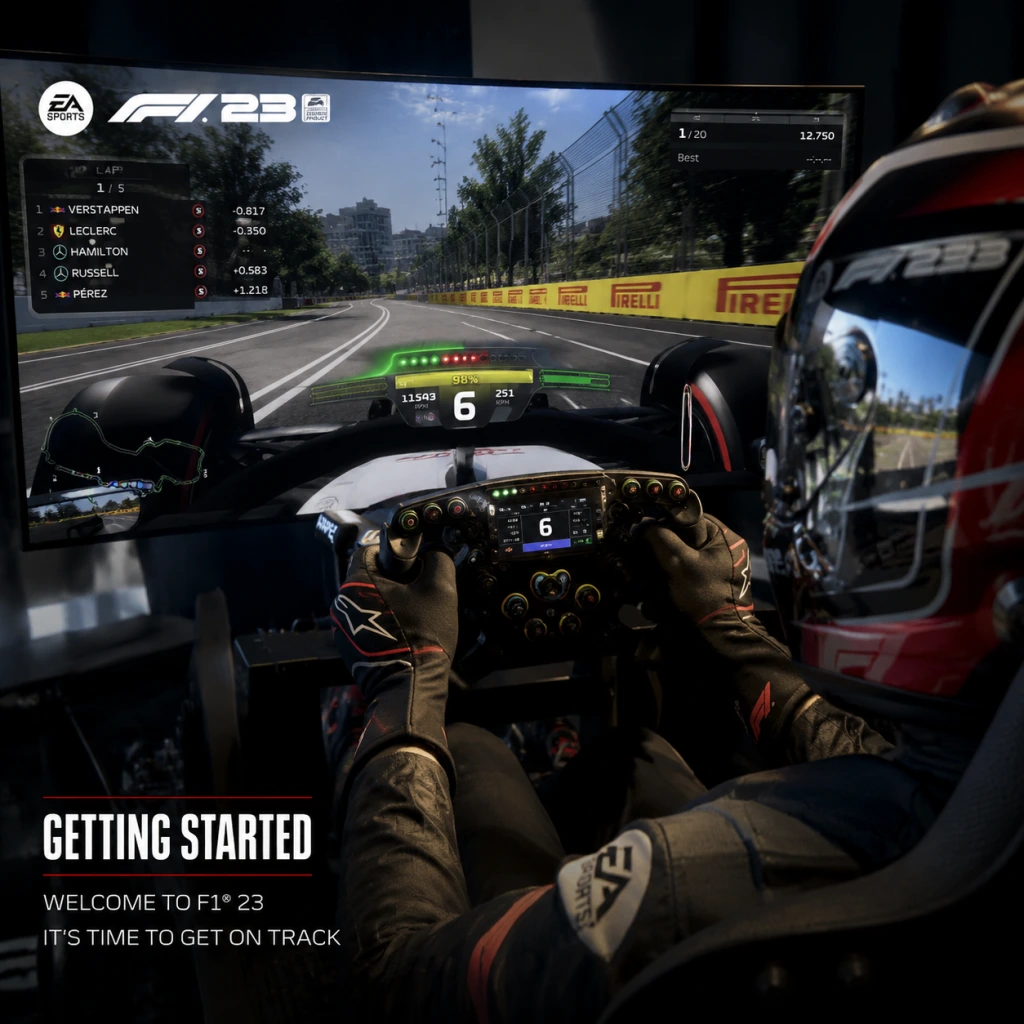
Getting Started
Getting Started
Welcome to F1 23, the most authentic Formula 1 experience yet. This guide will get you racing within your first hour and help you avoid common pitfalls. No character creation exists—you take on the role of an existing F1 driver or create your own in My Team mode. Follow this step-by-step plan to build confidence quickly.
First Hour Walkthrough
1. Launch the game and wait for the splash screens. On first launch, you’ll be prompted to choose a difficulty profile (Casual, Standard, or Expert). Select Casual if you are brand new—this will enable most driving assists.
2. Main Menu – You’ll see options: Grand Prix, Career (My Team / Driver Career), F1 World, Braking Point 2 (story mode), Multiplayer, Time Trial. Do not jump into multiplayer yet.
3. Choose Time Trial first. Pick the Bahrain International Circuit (the first track of the season) and the Red Bull Racing car (easiest to handle). Drive two or three laps just to get a feel for the throttle, braking points, and steering. Use the on-screen HUD to watch your speed, gear, and delta.
4. Exit Time Trial and start a Grand Prix event. Select Bahrain, set AI difficulty to 20 (extremely easy), and enable Flashbacks (rewind) at full (5 seconds, unlimited uses). Race distance: Short (5 laps). Complete the race, even if you spin or crash—use Flashback to retry corners.
5. After the race, go to Settings → Assists. Review your current setup: Traction Control (Full), Anti-lock Brakes (ABS on), Braking Assist (Low), Steering Assist (Full or Medium), Gearbox (Automatic), Pit Assist (On), ERS Assist (On), and DRS Assist (On). These are perfect for beginners.
6. Spend 30 minutes doing one more Grand Prix on a new track (e.g., Monza) to experience high-speed straights and chicanes. Use Flashbacks liberally.
7. Optional: Start Braking Point 2 story mode for a guided narrative with tutorials. It’s a great way to learn context and earn early rewards.
Character Creation (If Any)
There is no driver appearance creation in F1 23. You either:
- Play as an existing real F1 driver (in Grand Prix, Career, etc.)
- Create a My Team – custom team name, livery, logo, and driver suit. You cannot customize the driver’s face or body; you are a helmeted avatar. The driver’s name is entered but not spoken.
- In Braking Point 2, you control the protagonist Aiden Jackson (male) by default; no customization.
Controls (All Platforms)
Below are the default controls for each platform. Beginners should stick to automatic gearbox and assist features. For wheel/pedal users, consult your wheel’s manual for mapping.
| Action | PC (Keyboard) | PC (Gamepad – Xbox/PS) | PlayStation (DualSense) | Xbox (Wireless) |
|---|---|---|---|---|
| Accelerate | W | RT (Right Trigger) | R2 (Right Trigger) | RT |
| Brake | S | LT (Left Trigger) | L2 (Left Trigger) | LT |
| Steer Left/Right | A / D | Left Stick | Left Stick | Left Stick |
| Gear Up | Shift (right) | RB | R1 | RB |
| Gear Down | Ctrl (left) | LB | L1 | LB |
| DRS (Drag Reduction System) | Space | X (Xbox) / Square (PS) | Square | X |
| ERS Overtake | C | Y (Xbox) / Triangle (PS) | Triangle | Y |
| Pit Limiter | Q | D-Pad Down | D-Pad Down | D-Pad Down |
| Look Behind | V | Right Stick Click | R3 | Right Stick Click |
| Flashback (Rewind) | F | View/Back button + Y? (hold) | Touchpad tap? (check menu) | Menu? (check menu) |
| Pause/Esc | Esc | Start | Options | Menu |
UI Overview
Your screen (HUD) shows essential data during a race:
- Speedometer – km/h or mph (right side).
- Gear indicator – current gear number (center-right).
- Rev lights – LED bar above gear, turns red near shift point.
- Delta time – green if you are faster than your personal best, red if slower (top-left).
- Tire icons – front/rear left/right showing temperature (blue= cold, green= optimal, yellow= warm, red= too hot).
- Fuel – remaining laps (e.g., 3.2 shown as a bar).
- Position & gap – current position, time gap ahead/behind (bottom-left).
- DRS status – ‘DRS Available’ or not.
- ERS modes – Battery, Balanced, Overtake, etc. (default is auto).
- Radar – mini-map of nearby cars (top-center).
- Steering wheel (optional) – shows rotation.
- Complete 5 races on easy AI with Short distance to build muscle memory.
- Learn braking points: Aim for 100m boards, then brake zones (usually 50-100m before the turn). Use the track map and visual cues.
- Enable Flashbacks and use them every time you spin or crash – this lets you rewind 5 seconds and try again.
- Unlock the My Team career by reaching Driver Level 5 (do quick Grands Prix or Time Trials).
- Earn Pit Coins (in-game currency) by completing daily and weekly objectives from the F1 World hub.
- Do not jump into Online Multiplayer until you can avoid spinning 90% of the time. You will get hit and frustrated.
- Do not turn off assists – Traction Control Full and ABS On are your friends. Turning them off leads to constant spins.
- Do not ignore tire temperatures – cold tires cause understeer, overheated tires cause blistering. Drive smoothly for the first lap.
- Do not use manual gearbox until you are comfortable with braking points and tracks. Automatic is fine.
- Do not skip the formation lap for your first few races – it helps build track familiarity.
- Do not forget to use DRS in designated zones (press the button when the message appears within 1 second of another car).
- Spend your first Pit Coins on improving the Chassis and Aerodynamics departments at your HQ (these impact car performance the most).
- Upgrade the Power Unit gradually – it reduces engine wear.
- Save Driver perks for later; focus on car upgrades first.
- Complete the introductory ‘Welcome’ challenges to unlock basic car parts and currency.
- Prioritize the ‘Supercar’ events for XP and Pit Coins (they are easier than full GP races).
- [ ] Install the game and all updates (approx. 80-100 GB).
- [ ] Set video/graphics options to your monitor’s refresh rate (e.g., 60 FPS target for 60Hz). Turn off motion blur.
- [ ] Configure controls in Settings → Controls: ensure Flashback is mapped (if using gamepad, assign it to a convenient button like LB+RB).
- [ ] Enable Full Traction Control, ABS, Automatic gearbox, Braking Assist Low, Steering Assist Medium.
- [ ] Set AI difficulty to 20-30 and race distance to Short.
- [ ] Complete 5 laps at Bahrain in Time Trial (any car).
- [ ] Finish one Grand Prix (Bahrain, Short) without restarting – use Flashback if needed.
- [ ] Try Braking Point 2 for 20 minutes to see the story.
- [ ] Access F1 World and claim the starter rewards (usually 5,000 Pit Coins and a car part).
- [ ] Most importantly – have fun and don’t worry about pace; consistency comes before speed.
Essential Early Objectives
What to Do First
1. Set all assists to maximum in Settings → Assists. Then drive 5 laps at Bahrain in Time Trial.
2. Run a full Grand Prix weekend with easy AI (20-30) and short race length. Practice the start procedure (hold RPM at 10,500 and release when lights go out).
3. Try Braking Point 2 – it teaches racecraft, pit stops, and team radio in a low-pressure story.
4. Adjust camera – go with ‘TV Pod’ or ‘T-Cam’ (hood view) for wider awareness. Avoid bumper cam initially.
5. Learn the ”Monza” circuit – it’s fast with a few heavy braking zones; good for practicing chicanes.
What to Avoid
Early Resource Priorities
If you start My Team career:
If you play F1 World (live service hub):
Common Beginner Mistakes
1. Braking too late and turning while braking – Brake in a straight line, then release brake as you turn. Trail braking (light brake into the corner) is advanced.
2. Full throttle too early – Easy causes oversteer and spin. Gradually squeeze the throttle after the apex.
3. Missing apexes – Aim for the inside kerb of the corner; look ahead to where you want the car to go.
4. Ignoring fuel mix – Use ‘Lean’ on straights to save fuel, then ‘Rich’ for overtaking. But with ERS Assist on, it’s not critical at first.
5. Not using Flashbacks when you make a mistake – You are learning; rewind is a tool.
6. Changing too many settings at once – Only adjust one assist at a time (e.g., reduce Traction Control to Medium after 10 hours).
Day-One Checklist
Now you are ready to hit the track. Remember: every F1 champion started as a beginner. Use Flashbacks, keep assists on, and gradually increase AI difficulty when you consistently finish in the top 5. Good luck!