Getting Started
Getting Started Guide for Gang Beasts
Welcome to Gang Beasts, the physics-based multiplayer brawler where the goal is to throw your opponents off the stage while trying not to fall yourself. This guide will help you survive your first hour, understand the basics, and avoid common pitfalls.
First Hour Walkthrough
1. Install and Launch – Ensure the game is installed (see our Download & Installation guide).
2. Main Menu – Upon starting, you’ll see the main menu. Options include:
- Quick Play (jump straight into online matchmaking)
- Local Fight (play with friends on the same screen)
- Tutorial – Do this first! The tutorial teaches basic movements, grabbing, punching, and throwing.
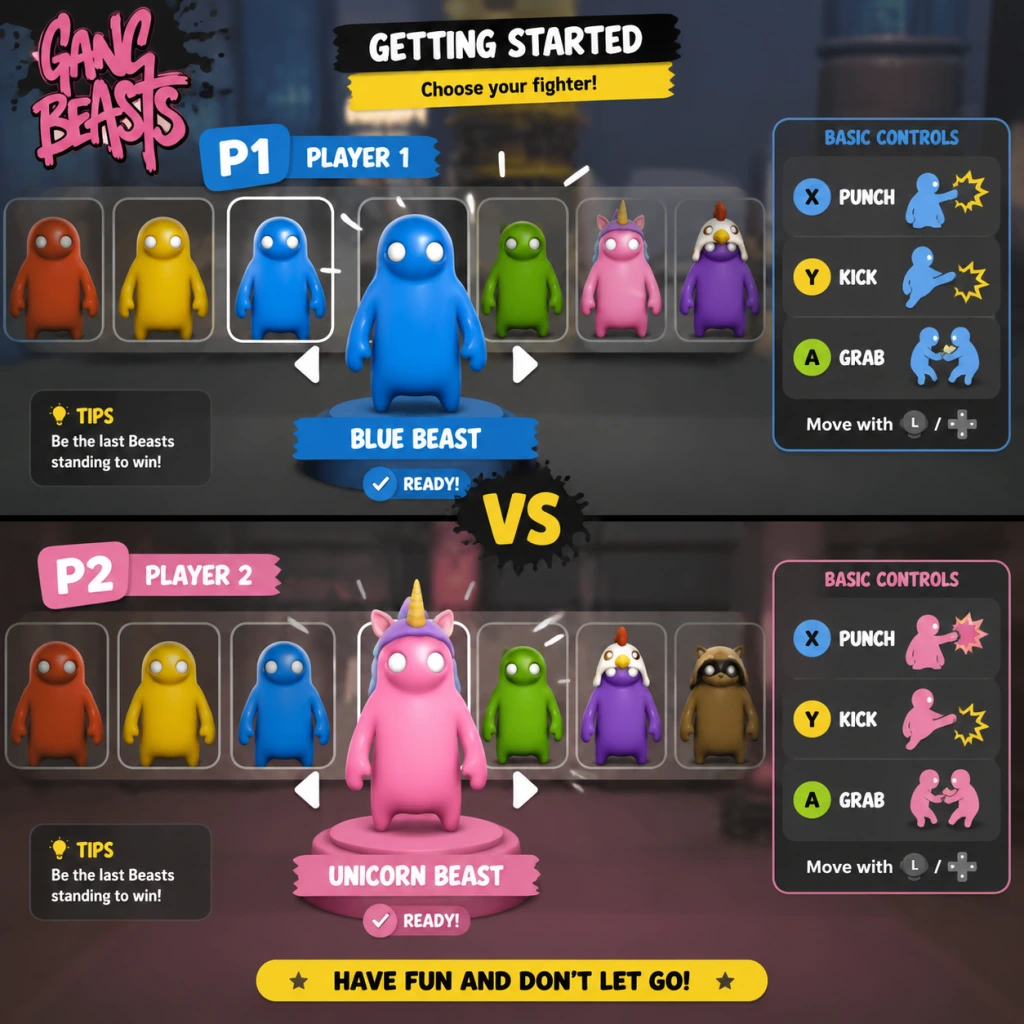
3. Character Selection – After choosing a mode, you’ll enter a character selection screen. You can pick a preset character or customize yours (see below).
4. First Match – You’ll spawn in a ring or platform with other players. Your goal: knock everyone else off. The last one standing wins a round. Best of 3 rounds wins the match.
5. Experiment – Spend your first 15 minutes just moving around, grabbing objects (like barrels or chairs), and trying to toss other players. Expect to fall off a lot—that’s part of the fun.
Character Creation & Customization
Gang Beasts does not have a deep character creator. You customize only your character’s outfit and color:
- Outfits – Unlockable by playing (no microtransactions). Starting outfits include a default jumpsuit, bear suit, and more.
- Colors – Choose from a palette of basic colors (e.g., red, blue, green, yellow) for your character’s clothing.
- Accessories – Some outfits come with hats or masks. You cannot mix and match parts.
To customize: From the main menu, select Customization (or choose a character slot in the selection screen and press the customize button).
Controls on All Platforms
Controls are identical in function but differ by button placement. Here’s the breakdown:
| Action | PC (Keyboard) | PC (Xbox Controller) | PlayStation | Nintendo Switch |
|---|---|---|---|---|
| Move | WASD | Left Stick | Left Stick | Left Stick |
| Jump | Space | A | X | B |
| Grab / Hold | Left Click (hold) | RT (hold) | R2 (hold) | ZR (hold) |
| Punch | Left Click (tap) | RT (tap) | R2 (tap) | ZR (tap) |
| Kick | Right Click | RB | R1 | R |
| Headbutt | E | LB | L1 | L |
| Drop / Release | Release grab button | Release RT | Release R2 | Release ZR |
| Menu / Pause | Esc | Start | Options | + |
UI Overview
The in-game HUD is minimal:
- Top of screen – Round number (e.g., “Round 1”) and countdown timer before match starts.
- During match – No health bars. Each player is shown by their character model. When KO’d, the character turns gray and falls off.
- Post-round – Scoreboard showing wins per player.
- Bottom – Sometimes prompts for pause/menu.
- Learn to Grab and Throw – The core mechanic. Practice grabbing an opponent and walking them toward an edge.
- Master the “Drop” – If grabbed, spam jump and punch to escape. Don’t flail wildly—time your escapes.
- Use Environment – Trapdoors, moving platforms, and spinning beams are your friends. Push enemies into hazards.
- Stay Alive – Avoid excessive jumping near edges. One wrong move and you’re out.
- Complete the Tutorial (accessible from main menu). It takes 5 minutes and saves you from frustration.
- Play Local Fight solo against bots to practice controls without pressure.
- Experiment with all attack types (punch, kick, headbutt) to see their range and speed.
- Use two hands by holding both grab buttons (if using controller: hold both triggers) to lift and throw heavier objects.
- Button mashing – Gang Beasts rewards precision. Random punches will exhaust you (your character gets tired).
- Grabbing the edge – If you’re hanging from a platform, do not press jump repeatedly; instead, climb back up by pressing the grab button while looking toward the platform.
- Fighting near edges – You will get thrown off. Fight in the center of the arena whenever possible.
- Ignoring the opponent’s grabs – If someone grabs you, immediately press punch or kick to break free before they throw you.
- No resource grinding needed. Your only focus is improving skill.
- Unlock outfits by completing matches. No microtransactions.
- No character stats – all characters have identical physics. Outfits are purely visual.
- [ ] Install Gang Beasts from your platform’s store.
- [ ] Launch the game and complete the Tutorial.
- [ ] Customize your first character (choose a color and outfit from the defaults).
- [ ] Play a Local Fight against 3 bots on the easiest difficulty.
- [ ] Win at least one round using a grab-throw combination.
- [ ] Play one Quick Play online match (expect to lose—it’s okay).
- [ ] Unlock your first new outfit by completing 3 matches.
Essential Early Objectives
What to Do First and What to Avoid
Do:
Avoid:
Early Resource Priorities
Gang Beasts has no currency, experience points, or unlockables that affect gameplay. All outfits are cosmetic and earned by simply playing matches (win or lose). Therefore:
Common Beginner Mistakes
1. Flailing uncontrollably – New players often spin around punching air. Keep calm, aim your attacks.
2. Not using the grab mechanic – Many forget to hold the grab button. Grabbing is essential for throwing.
3. Jumping off the stage – Accidentally walking or jumping off the edge. Always watch your footing.
4. Not escaping grabs – Standing still while grabbed leads to quick elimination. Spam punch or kick to break free.
5. Ignoring objects – Barrels and chairs can be thrown to stun opponents or block attacks.
Day-One Checklist
That’s it! You’ve now experienced the chaotic fun of Gang Beasts. Remember: falling is part of the game, so laugh it off and try again.