Getting Started
Overview
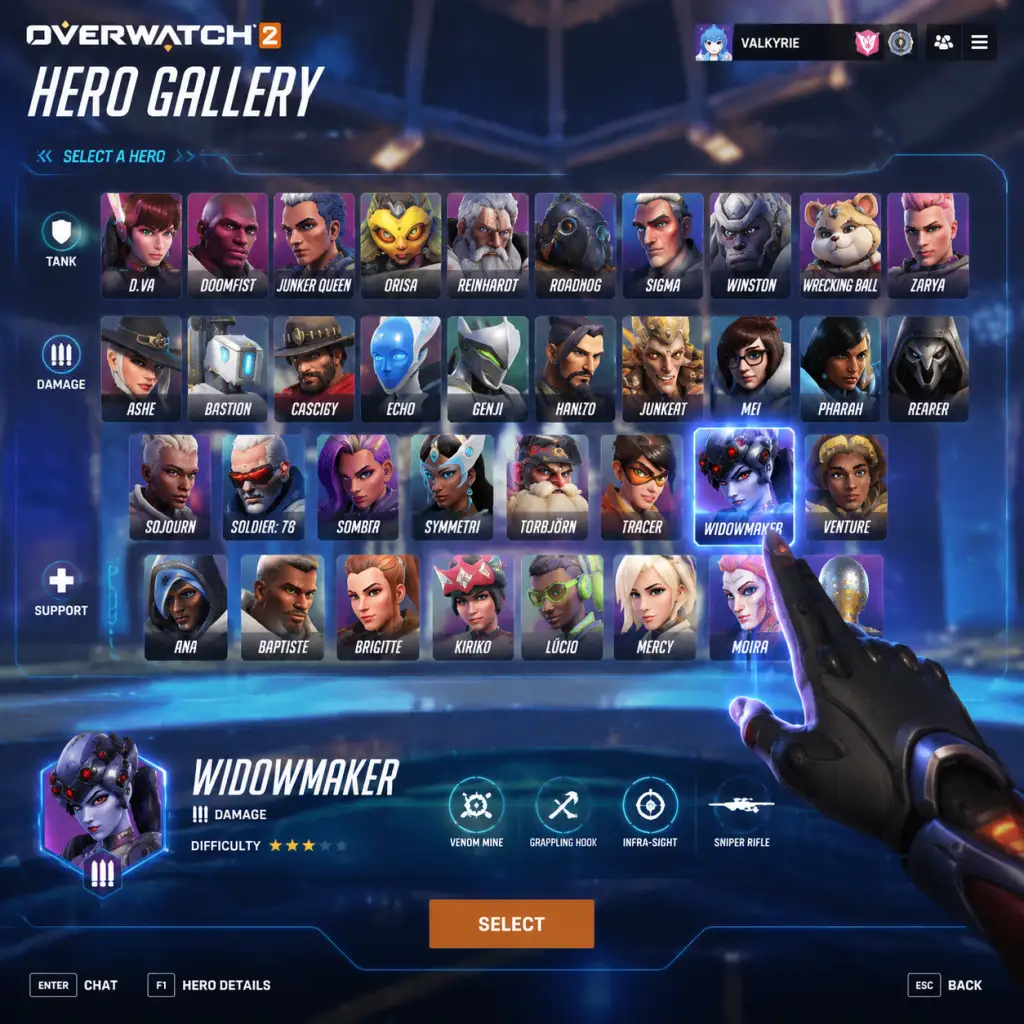
Overwatch 2 is a free-to-play team-based hero shooter. There is no character creation—instead, you choose from a roster of over 36 unique heroes, each with distinct abilities and playstyles. This guide will walk you through your first hour, explain controls on all platforms, break down the UI, and give you a clear day-one plan. Whether you're on PC, PlayStation, Xbox, or Nintendo Switch, these tips will help you avoid common pitfalls and start having fun immediately.
First Hour Walkthrough
Step 1: Complete the Tutorial (5-10 minutes)
- Launch the game and log in with your Blizzard account.
- The game will automatically start the tutorial (a short mission with Soldier: 76). Follow on-screen prompts to learn basic movement, shooting, and abilities.
- Tip: Pay attention to the objective markers and the ping system. The tutorial teaches you how to call out enemies and locations.
- After the tutorial, you’ll be taken to the main menu. From the Play menu, select Training > Practice Range.
- Test different heroes by pressing F1 (PC) to change heroes. Try at least one hero from each role: Damage (e.g., Soldier: 76), Tank (e.g., Reinhardt), Support (e.g., Mercy).
- Learn the ultimate ability timing (press Q on PC, Y/Triangle on console). Practice moving and aiming while using abilities.
- Go to Play > Vs. AI. Select Easy difficulty and any map. This mode has no penalty for losing and lets you practice against bots.
- Focus on the objective: push the payload or capture the point. Don’t just chase kills.
- Try a few different heroes. If you die often, switch to a hero with more survivability (e.g., Soldier: 76 for mobility, Moira for self-heal).
- New accounts have a limited hero pool (19 heroes initially). You must play matches in Quick Play (Role Queue or Open Queue) to unlock the remaining heroes (about 17 more).
- Complete the FTUE challenges (shown on the main menu) to speed up unlocks. These include winning matches, dealing damage, and healing.
- Tip: Stick to the hero you’re unlocking until you get a feel for their kit. Avoid switching heroes every life—commit to learning one per match.
- Go to Play > Quick Play. Choose Role Queue if you want a specific role (Tank, Damage, Support) and guaranteed queue times. Open Queue lets you switch roles freely but matches may be less balanced.
- Warm up by selecting your practiced hero. Communicate with your team using the ping wheel (press G on PC, Up on D-pad console).
- Remember: The objective wins games, not kills. Stay with your team and contest the point.
- Movement: WASD
- Jump: Spacebar
- Crouch: Left Ctrl
- Primary Fire: Left Mouse Button
- Secondary Fire (if hero has one): Right Mouse Button
- Abilities 1,2,3: E, Shift, and sometimes Mouse Buttons (see hero info)
- Ultimate: Q
- Reload: R
- Interact (payload, teleporter): F
- Ping: G
- Communication Wheel: C (hold for quick commands)
- Melee: V
- Push-to-Talk: Y (hold to speak)
- Scoreboard: Tab
- Hero Select: H (during spawn)
- Left Stick: Move
- Right Stick: Look/Aim
- Jump: X (PS4/5)
- Crouch: Circle (hold to toggle)
- Primary Fire: R2
- Secondary Fire: L2
- Ability 1: L1
- Ability 2: R1
- Ultimate: Touchpad (PS4/5) or L1+R1? Actually default: Triangle for ultimate (check settings)
- Reload: Square
- Interact: × (press on objective)
- Ping: D-Pad Up
- Communication Wheel: D-Pad Down/L1? In training it’s Select (Share button) but can be remapped
- Melee: R3 (click right stick)
- Switch Hero: Options button (hold menu)
- Scoreboard: Touchpad (swipe?)
- Left Stick: Move
- Right Stick: Look
- Jump: A
- Crouch: B (hold to toggle)
- Primary Fire: RT
- Secondary Fire: LT
- Ability 1: LB
- Ability 2: RB
- Ultimate: Y
- Reload: X
- Interact: A on objective
- Ping: D-Pad Up
- Communication Wheel: D-Pad Down (or LB+RB? Check)
- Melee: R3
- Switch Hero: View (two squares) or hold Start
- Scoreboard: View or Back button
- Left Stick: Move
- Right Stick: Look
- Jump: B
- Crouch: A (hold)
- Primary Fire: ZR
- Secondary Fire: ZL
- Ability 1: L
- Ability 2: R
- Ultimate: X
- Reload: Y
- Interact: B on objective
- Ping: D-Pad Up
- Communication Wheel: D-Pad Down (or pressing +?)
- Melee: Right Stick click (RS)
- Switch Hero: + Menu
- Scoreboard: – Minus button
- Learn the three roles: Tank (absorb damage and create space), Damage (deal high damage and secure kills), Support (heal teammates and provide utility).
- Master one hero per role before branching out. Start with Soldier: 76 (Damage – straightforward gunplay), Reinhardt (Tank – simple shield and hammer), Mercy (Support – easy healing and mobility).
- Understand game modes: Payload (push a cart), Capture Point (hold a zone), Hybrid (capture then push), Push (control a robot), Clash (capture sequential points – new in Overwatch 2).
- Complete daily and weekly challenges for Battle Pass XP, Overwatch Coins, and hero unlocks. Open the Challenges tab (main menu) to track progress.
- Unlock all heroes ASAP by playing Quick Play and completing FTUE challenges. Avoid spending Overwatch Coins on hero unlocks (they are all free with playtime).
- Play the tutorial – it’s mandatory and teaches the basics.
- Practice alone in the Practice Range to test heroes.
- Play vs. AI until you feel comfortable with a hero’s abilities.
- Use voice lines or pings to communicate – even without a mic, pings are powerful.
- Stay with your team – Overwatch 2 is about teamwork, not lone-wolfing.
- Adjust settings – sensitivity (see below), graphics to achieve 60+ FPS, crosshair style.
- Watch the kill feed – know when your team is outnumbered.
- Learn to counter-pick – if the enemy team has a strong flanker, switch to a hero that can handle them (e.g., if an enemy Tracer is killing your supports, play Brigitte or Moira).
- Playing competitive mode until you are comfortable with at least 2-3 heroes in each role (minimum level 25? Actually competitive unlocks after winning 50 Quick Play matches – but wait until you understand the game).
- Spending Overwatch Coins on cosmetics – save them for Battle Pass premium or limited-time skins. You can earn free cosmetics through events and loot boxes (if still available).
- Toxicity – do not flame teammates. Use constructive pings instead.
- Sticking to one hero – counterpicking is key to winning. If you’re being hard-countered, switch.
- Ignoring objective – kills don’t win matches; capturing/pushing does.
- Wasting ultimate abilities – use them at key moments (team fights, objective pushes), not randomly.
- Overextending – don’t chase kills deep into enemy territory; you’ll die and leave your team vulnerable.
- Overwatch Coins – Premium currency (earned via weekly challenges and Battle Pass). Use them to purchase the Battle Pass (1000 coins per season) or cosmetic items in the shop. Don’t waste on hero unlocks – all heroes are earnable for free.
- Battle Pass XP – Earned by playing matches, completing challenges. Leveling the Battle Pass gives you skins, emotes, and more. Focus on completing weekly challenges for big XP boosts.
- Credits (legacy currency) – Earned from duplicates or events. Can be used to buy older cosmetics in the Hero Gallery. Save these for limited-time events if you really want a skin.
- Overwatch League Tokens (optional) – Earned by watching OWL on YouTube. Used for team skins.
- Complete tutorial and FTUE challenges.
- Play 3 vs. AI matches.
- Try each role at least once.
- Set your mouse/controller sensitivity to a comfortable level (e.g., 800 DPI, 7-10 in-game sens for PC; start at 50% on console and adjust).
- Join the Overwatch 2 Discord or subreddit for beginner tips.
- [ ] Download and install Overwatch 2 via Battle.net (PC), PlayStation Store, Xbox Store, or Nintendo eShop.
- [ ] Create a Blizzard account (if not already done).
- [ ] Complete the in-game tutorial (takes ~10 minutes).
- [ ] Spend 10 minutes in the Practice Range – test at least 3 heroes (one from each role).
- [ ] Play 3 Vs. AI matches on Easy difficulty.
- [ ] Play your first Quick Play match (Role Queue or Open Queue).
- [ ] Check your settings – adjust sensitivity, crosshair, graphics for performance (100% render scale, medium shadows, etc.).
- [ ] Review the scoreboard after each match; look at your eliminations, damage, healing, deaths.
- [ ] Complete at least one daily challenge to earn Battle Pass XP.
- [ ] Watch one beginner guide video on YouTube for the hero you want to main.
- [ ] Set a goal for the first week: unlock all heroes, learn one hero per role to a comfortable level.
- Have fun – Overwatch 2 is chaotic and vibrant. You will die a lot, but every death is a learning opportunity.
- Use the replay system – After a match, you can watch replays from any camera angle. Use this to see why you died and how to improve.
- Communicate positively – A simple “nice try” or “gg” goes a long way.
- Experiment – Don’t be afraid to try weird heroes. Some of the most fun moments come from unexpected plays.
- Remember: The only way to get better is to play. Enjoy the journey from newcomer to seasoned veteran!
Step 2: Explore the Practice Range (5-10 minutes)
Step 3: Play vs. AI (15-20 minutes)
Step 4: Unlock All Heroes via First-Time User Experience (FTUE)
Step 5: Play Your First Quick Play Match (10-20 minutes)
Controls (All Platforms)
PC (Default Keyboard & Mouse)
PlayStation 4/5 (Default Controller)
Xbox One/Series X|S (Default Controller)
Nintendo Switch (Default Controls)
Note: You can customize all controls in Options > Controls. Many players remap abilities to paddles (advanced controllers) or change jump to a bumper (e.g., L1/LB) for easier wall-riding (Lucio, Mercy).
UI Overview
Your Heads-Up Display (HUD) contains critical information:
1. Health Bar (bottom center) – Shows your hit points (HP) and armor/shields. Colors: White (HP), Yellow (Armor), Blue (Shields).
2. Ability Icons (bottom right) – Circle cooldown timers. Grey icon = ability on cooldown. Bright = ready.
3. Ultimate Charge (bottom center, below health) – Shows percentage (0-100%). Full = ultimate ready to use.
4. Crosshair – Center screen. Customizable in settings.
5. Kill Feed (top right) – Kills, assists, and deaths. Red = enemy kill, blue = ally kill.
6. Team Health Icons (left side) – Shows team members’ HP and ult status (checkmark = ult ready).
7. Objective Indicator (center top) – Shows objective status (capturing, contested, payload progress).
8. Scoreboard (Tab/Back button) – Detailed stats: eliminations, deaths, damage, healing, time on objective.
9. Ping Wheel (G or D-Pad Up) – Context-sensitive commands. Use to call out enemies, fall back, or warn of danger.
10. Map/Compass (top left) – Shows objective direction and teammate positions.
Essential Early Objectives
What to Do First vs. What to Avoid
✅ Do:
❌ Avoid:
Early Resource Priorities
The main currencies in Overwatch 2 are:
Priority checklist for day one:
Common Beginner Mistakes
1. Standing still while shooting – Always strafe (move left/right) to make yourself harder to hit.
2. Not contesting the objective – Sometimes you must sacrifice a life to keep the payload moving.
3. Spamming abilities without a plan – Example: using Reinhardt’s Charge into a group of enemies usually gets you killed. Think before pressing the button.
4. Ignoring ultimate economy – Don’t use your ultimate when your team is dead or when the fight is already won/lost. Coordinate ults with teammates.
5. Not grouping up – After dying, wait for your team before running in alone. Losing one-by-one is a common mistake.
6. Bad hero picks – If you’re playing a sniper on a close-quarters map, you’re not helping. Switch to a suitable hero.
7. Forgetting to heal (as Support) – Your primary job is keeping teammates alive. Damage should come second.
8. Not using cover – Always be near walls or shields. Peek and shoot, don’t stand in the open.