Getting Started
Total War: Warhammer III – Getting Started Guide for New Players
Welcome to Total War: Warhammer III, the grand strategy game where you lead legendary factions from the Warhammer Fantasy world. This guide is designed for newcomers who have never played a Total War game before. We'll walk you through your first hour, explain the core mechanics, and give you a day-one checklist so you can start conquering without feeling lost.
---
First Hour Walkthrough (Proving Grounds Campaign)
After launching the game, you'll be greeted by the main menu. For your very first playthrough, select the "Proving Grounds" campaign – it's the official tutorial that teaches you the basics step by step. Here's what happens in the first 60 minutes:
1. Cinematic Intro (2 minutes): Watch the opening cinematic; it sets the stage for the chaos gods vs. Kislev vs. Cathay conflict.
2. Faction Selection (5 minutes): You are forced to play as Kislev (led by Yuri, but you control a generic lord). The game locks this to ensure a structured tutorial. Don't worry – you'll have full freedom later.
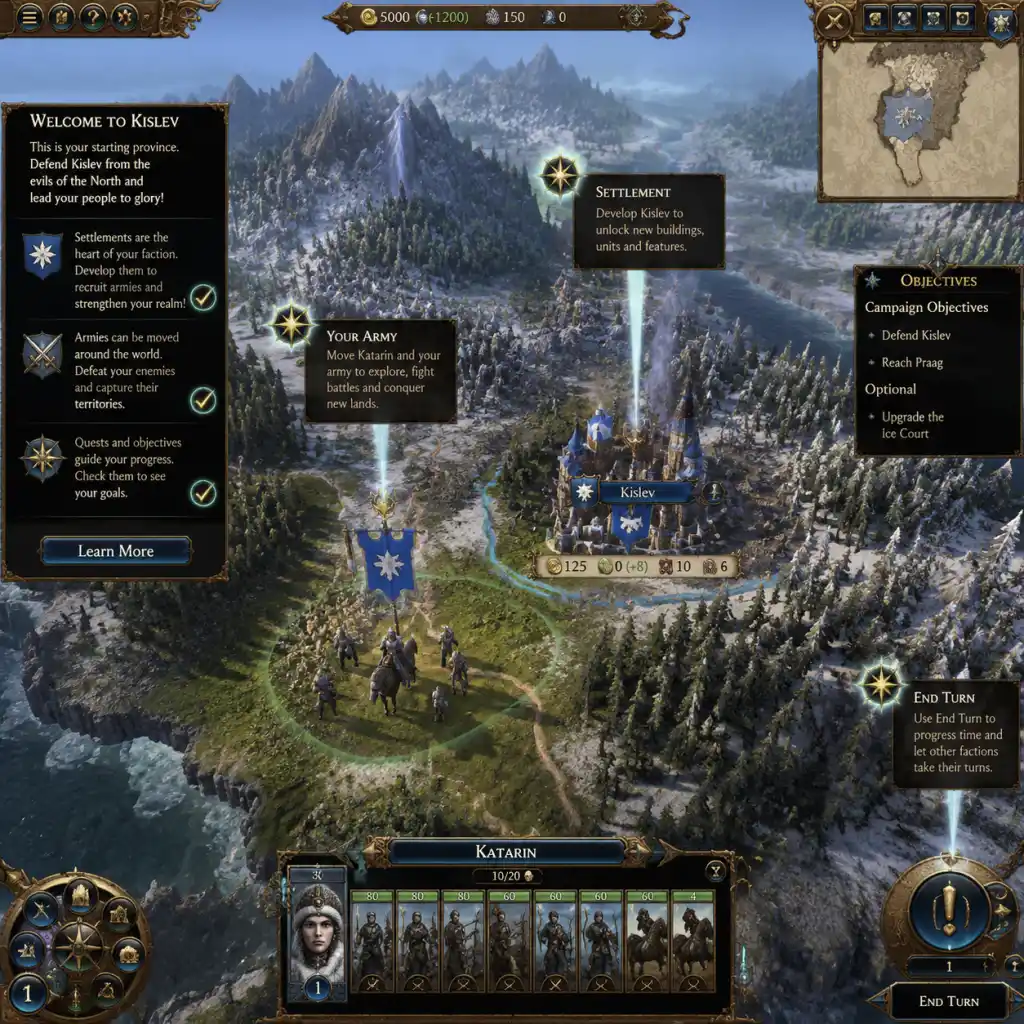
3. First Turn – Movement & Building (10 minutes): You start with a small army and a minor settlement. The advisor (a blue ghost) will pop up constantly. Follow his instructions:
- Click on your army and move it toward the nearby enemy settlement.
- Click on your settlement and build a growth or recruitment building. The game will highlight the cheapest option. Build it now.
4. End Turn (1 minute): Press "End Turn" (button at bottom right, or press Enter). Watch the enemy AI move.
5. Second Turn – Battle Tutorial (15 minutes): Your army is now next to an enemy garrison. Attack it. The game switches to real-time battle. A separate tutorial explains how to move units, attack, use abilities, and win. Follow the prompts. After winning, you auto-resolve some battles later.
6. Campaign Map Tutorial (remaining time): You'll learn about province control, edicts, diplomacy, and tech tree. The advisor will slowly introduce new features. Stick with it until he stops giving quests (about turn 8-10).
Important: Do not skip the tutorial battles. They teach mechanics that are essential even for veterans. The first hour may feel slow, but it's critical to understanding the game's rhythm.
---
Character Creation – Choosing Your Faction & Legendary Lord
Total War: Warhammer III does not have a traditional character creator where you design a face. Instead, you pick a faction and a Legendary Lord (the faction leader) at the start of a campaign. Each Legendary Lord has unique abilities, starting units, and campaign mechanics.
For your first campaign (outside the tutorial), choose one of these beginner-friendly factions:
| Faction | Legendary Lord | Why It's Good for Beginners |
|---|---|---|
| Kislev | Katarin Bokha (Ice Queen) | Strong hybrid army (melee + range), straightforward economy, and no complex magic. |
| Grand Cathay | Miao Ying (Storm Dragon) | Defensive playstyle, powerful ranged units, and easy to defend your homeland. |
| Khorne | Skarbrand (The Exile) | Melee-focused, simple mechanics, and you can ignore many campaign systems if you just fight. |
- Any Chaos Dwarf faction (their economy is very different and hard).
- The Daemons of Chaos (faction has multiple chaos gods to juggle).
- Any faction with "Horde" mechanic (like Beastmen or Warriors of Chaos – they don't build settlements).
Once you pick a faction, you can also customize the difficulty (Campaign and Battle separately). For first-time players, set both to Normal. You can adjust later.
---
Platform Controls
Total War: Warhammer III is a PC game. It does not officially support console controllers (Xbox/PlayStation), but it plays well with mouse and keyboard and is Steam Deck verified (with controller mapping).
PC (Mouse & Keyboard) – Essential Controls:
| Action | Control |
|---|---|
| Select unit/army | Left-click on it |
| Move army | Right-click on destination (on campaign map) |
| Move battle units | Left-click and drag to position, or right-click enemy to attack |
| Camera movement | W/A/S/D or arrow keys; scroll wheel to zoom; middle mouse to rotate |
| End turn | Spacebar or click "End Turn" button |
| Pause battle | Pause key or Escape (opens menu) |
| Speed up battle | 1/2/3 keys (1=normal, 2=fast, 3=very fast) |
| Group units (battle) | Select units, press Ctrl+G |
| Attack ground (artillery) | Alt + right-click |
- Left stick: camera movement
- Right stick: camera rotation
- Right trackpad: mouse cursor
- Right trigger: left-click
- Left trigger: right-click
- Face buttons (A/B/X/Y): various shortcuts (check the menu)
- Use the left back paddle (L4) for end turn or pause.
- Take the advisor's advice – he often gives free stuff (units, money) for completing simple tasks.
- Always check the “End Turn” button – it shows pending events (e.g., construction finishes, recruitment complete) so you never miss a turn.
- Use the “Quick Save” (F5) before major battles or diplomatic decisions. You can reload if disaster strikes.
- Build a growth building first in your starting settlement – it increases population growth, unlocking more building slots.
- Recruit one additional unit every 2-3 turns – don't over-recruit early, as you need money for buildings.
- Pause frequently in battles (press Pause) – you can issue orders while paused. This is a huge advantage for beginners.
- Attack multiple enemies at once. Focus on one war at a time. Use diplomacy to keep others neutral.
- Overextend without support. If your main army gets destroyed, you may lose. Keep a backup lord near your capital.
- Ignore public order (the green/yellow/red bar on settlements). If it drops below 0, rebellions spawn. Build a public order building or station a small garrison.
- Auto-resolve fights you should fight manually. Auto-resolve often over-calculates casualties, especially for balanced armies. Fight manually when odds are even.
- Sell trade goods without a trade agreement. You need a trade partner to get gold from resources.
- Use magic recklessly. Only certain units (wizards) can cast spells. They use Winds of Magic (resource). Practice with low-cost spells first.
Tip for all players: Spend 5 minutes in the tutorial battle just moving the camera and selecting units until comfortable. You can also remap keys in the settings menu.
---
User Interface (UI) Overview
The screen is divided into several key areas. Understanding them is crucial.
Campaign Map (the strategic layer):
1. Top Bar (Ribbon): Displays current turn number, treasury (gold), food (if applicable), and other faction-specific resources (e.g., Winds of Magic for magic factions).
2. Minimap (Bottom Left): Shows a small version of the campaign map. You can click to jump to locations. Green/red dots indicate friendly/enemy settlements.
3. Central Map: The main campaign map. Icons represent armies, settlements, quest markers, sea routes, and resources.
4. Left Panel (Settlement Info): When you click a settlement, a panel appears showing its buildings, garrison, and province details.
5. Right Panel (Army/Character Info): When you select an army, this shows its lord, units, and movement range (blue circle on map).
6. Bottom Menu Bar: Buttons for:
- End Turn (most important)
- Advisor (tutorial toggle)
- Diplomacy (talk to other factions)
- Technology (research tree)
- Buildings (quick build from settlement panel)
- Recruit (hire units for selected army)
- Quests & Objectives
- Faction Overview (economy, stats)
7. Event Notifications (Top Right): Pop-ups for battles, completed buildings, new units available, or diplomatic offers. Click to dismiss or act.
Battle Map (real-time tactics):
1. Top Center: Battle timer (if not quick battle) and number of remaining units.
2. Bottom Center (Unit Cards): Shows all your units. Green bars indicate health; unit icon and number of soldiers. Select cards to issue orders.
3. Bottom Left (Minimap): Battle map version – shows unit positions. Click to jump view.
4. Bottom Right (Abilities Panel): When you select a unit with special abilities (e.g., spells, breath attacks, rally), their icons appear here. Click to activate.
5. Top Right (Command Panel): Buttons for group commands, guard mode, skirmish mode, etc. Hover to learn.
6. Escape Menu: Pause and access options, save, quit.
---
Essential Early Objectives (First ~20 Turns)
1. Secure your starting province: Capture all settlements in your home province to gain province-wide bonuses (e.g., control bonuses, public order). Usually 2-3 settlements.
2. Build a second army (or reinforce): A single army is vulnerable. After securing home, recruit a second lord (cheap) and a few units to support or defend.
3. Research the first technology: Choose something that boosts income or growth first (e.g., "Improved Tally" for trade goods).
4. Establish trade with friendlies: Use diplomacy to sign non-aggression pacts and trade agreements with neighboring factions of the same race (e.g., other Kislev factions if you're Kislev). This provides income and prevents early war.
5. Complete the first quest battle: Your Legendary Lord will have a quest marker on the map (a golden shield). Completing it gives unique items and experience.
6. Recruit a hero: After building a hero recruitment building (e.g., Spire of the Ice Court for Kislev), recruit a hero to scout or assist in battles.
7. Expand to one more province: After turn 10-15, start conquering a neighboring weak province (preferably one with a port for trade income).
---
What to Do First & What to Avoid
DO THESE as your first actions after the tutorial:
AVOID these common traps:
---
Early Resource Priorities
| Resource | Priority | Why & How to Manage |
|---|---|---|
| Gold (Treasury) | HIGHEST | Everything costs gold. Early income comes from settlements (tax rate set to high), trade, and sacking. Keep a reserve of ~1000 gold for emergencies. Spend on buildings that increase income (markets, ports). |
| Food (if applicable) | HIGH | Only some factions (e.g., Skaven, Beastmen) need food. For beginner factions (Kislev, Cathay), food is not a primary resource – but for others, build farms. |
| Growth | HIGH | Determines how fast you unlock new building slots in a settlement. Build growth buildings early in every minor settlement. |
| Public Order | MEDIUM | Keep it above 0. Build a garrison building in newly conquered settlements. If it's low, reduce tax rate in that province. |
| Winds of Magic | MEDIUM | Replenishes each turn. Affects how much you can cast spells. Control magical forest or special buildings increase it. Not essential early, but don't ignore. |
| Influence (Cathay/Kislev) | LOW | Special resource for some factions. Use for diplomacy bribes, but early on focus on gold. |
Common Beginner Mistakes (and How to Fix Them)
1. Overbuilding units too early → Your army is too expensive and bankrupts you. Fix: Recruit only to full stacks when you have income surplus of +200 gold/turn.
2. Ignoring the building browser → You miss out on synergies. Fix: Read building descriptions; many buildings give bonuses to other buildings in the same province.
3. Not using heroes → Heroes can scout, assassinate, block armies, or buff your units. Fix: Recruit at least one hero early and assign them to your main army or to scout ahead.
4. Sending your army into enemy territory without vision → You get ambushed. Fix: Always scout with a fast unit or hero before marching.
5. Forgetting to upgrade your lord's skills → When your lord gains a level (every few battles), you get 2 skill points. Spend them immediately. Prioritize blue line (campaign buffs) first.
6. Declaring war on every minor faction → You become hated. Fix: Only declare wars you can finish quickly. Use “Join War” diplomacy to get allies to fight for you.
7. Not using the “Threat” mechanic → You can intimidate weaker factions into being your vassal. Fix: After beating an enemy army, demand vassalization in diplomacy – they often accept.
---
Day-One Checklist (First 2-3 Hours)
- [ ] Complete the Proving Grounds tutorial (first campaign ran as Kislev).
- [ ] Start a new campaign as Kislev (Katarin) or Grand Cathay (Miao Ying) on Normal/Normal.
- [ ] Read the first advisor pop-up and follow instructions for 5 turns.
- [ ] Build a growth building in your starting settlement.
- [ ] Research the first technology (increase income or growth).
- [ ] Move your army to conquer the nearest enemy settlement (within 2 turns).
- [ ] Manually fight the first battle to learn controls. Pause and issue orders.
- [ ] After winning, construct a public order building (Garrison) in the newly taken settlement.
- [ ] Set tax to high in your home province (if public order is green).
- [ ] Recruit one extra unit (spearmen or archers) during turns 3-5.
- [ ] Send a diplomatic envoy to a friendly neighbor for a trade agreement and non-aggression pact.
- [ ] Complete the first quest battle (golden shield icon) when it appears.
- [ ] Build a military recruitment building (e.g., Barracks) to unlock better units.
- [ ] By turn 10, secure your starting province completely (all settlements owned).
- [ ] Save game after each major action. Use quicksave (F5).
- [ ] Watch a 5-minute beginner's guide video on YouTube if still confused (search “Total War Warhammer 3 for beginners”).
---
Final Advice
Total War: Warhammer III has a steep learning curve, but it's incredibly rewarding. Take your time, don't be afraid to lose a campaign (it's part of learning), and experiment with different factions after you feel confident. Remember: the pause button is your best friend in battles, and the advisor is there to help – listen to him for the first 20 turns. Good luck, and may the winds of magic be with you!