Getting Started
Getting Started: Your First Steps in Counter-Strike 2
First Hour Walkthrough
1. Launch the game – After installation (see [Download & Installation](#download--installation-guide-for-counter-strike-global-offensive)), double-click Counter-Strike 2 from your Steam library. The game opens to the main menu.
2. Watch the tutorial (optional but recommended) – The main menu offers a “Tutorial” button. Play through it to learn basic movement, shooting, and bomb mechanics. This takes about 10–15 minutes.
3. Visit the settings – Click the gear icon (⚙️) in the top-left of the main menu. Adjust:
- Video: Set resolution to your native monitor (e.g., 1920x1080), enable “Fullscreen,” and set “Display mode” to “Fullscreen Windowed” if you want alt-tab quick.
- Audio: Enable “HRTF” (headphone mode) for accurate sound direction.
- Controls: Keep default mouse/keyboard for now.
4. Choose a game mode – Back on the main menu, click “PLAY.” Options include:
- Competitive – 5v5, intense, requires map knowledge. Not recommended for first hour.
- Casual – 10v10, less pressure, good for learning.
- Deathmatch – Free-for-all, respawn instantly, practice aim.
- Wingman – 2v2 on smaller maps.
5. Play your first match – Select Casual and pick any map (e.g., Dust II). The game will match you with other players. Focus on:
- Following teammates
- Buying weapons (press B to open buy menu)
- Shooting at enemies
6. End of match – After the game, review the scoreboard (Tab key) to see your performance. Don’t worry about K/D ratio; focus on learning.
Character Creation (None)
Counter-Strike has no character creation. You play as one of two teams: Terrorists (T) or Counter-Terrorists (CT). Your appearance is randomly assigned from preset models (e.g., FBI, Phoenix Connexion). You cannot customize your avatar’s face, gender, or body—only skins bought or earned can change weapon and knife appearances. This keeps the focus on skill, not appearance.
Controls (PC Only; No Console Support in CS2)
CS2 is only on PC. The standard keyboard and mouse controls are critical. Here’s the default layout:
| Action | Key | Notes |
|---|---|---|
| Move forward | W | Strafing (A/D) is more important than W+W. |
| Move backward | S | Use rarely—only when retreating. |
| Strafe left/right | A / D | Core movement for dodging and peeking. |
| Crouch | Ctrl | Toggle or hold (set in settings). Essential for accuracy. |
| Jump | Space | Use for climbing over obstacles or bunnyhopping (advanced). |
| Shoot | Left mouse | Hold left click for automatic fire; single tap for semi-auto. |
| Aim down sights | Right mouse | Some weapons (snipers, some pistols) have scope; others just zoom slightly. |
| Reload | R | Reload only when safe; avoid reloading mid-fight. |
| Use/Plant/Defuse | E | Interact with bombs (plant/defuse), pick up weapons, open doors. |
| Drop weapon | Q | Drop current weapon for a teammate. |
| Switch weapons | 1 (primary), 2 (pistol), 3 (knife), 4 (grenades), 5 (bomb) | Practice fast switching. |
| Buy menu | B | Open buy menu during buy phase (start of each round). |
| Scoreboard | Tab | View team stats and round info. |
| Voice chat | K (mic), V (text team chat), U (text all chat) | Communicate—but avoid flame. |
| Walk silently | Shift | Hold to move without making footsteps. |
| Inspect weapon | F | Show off your skin. |
UI Overview
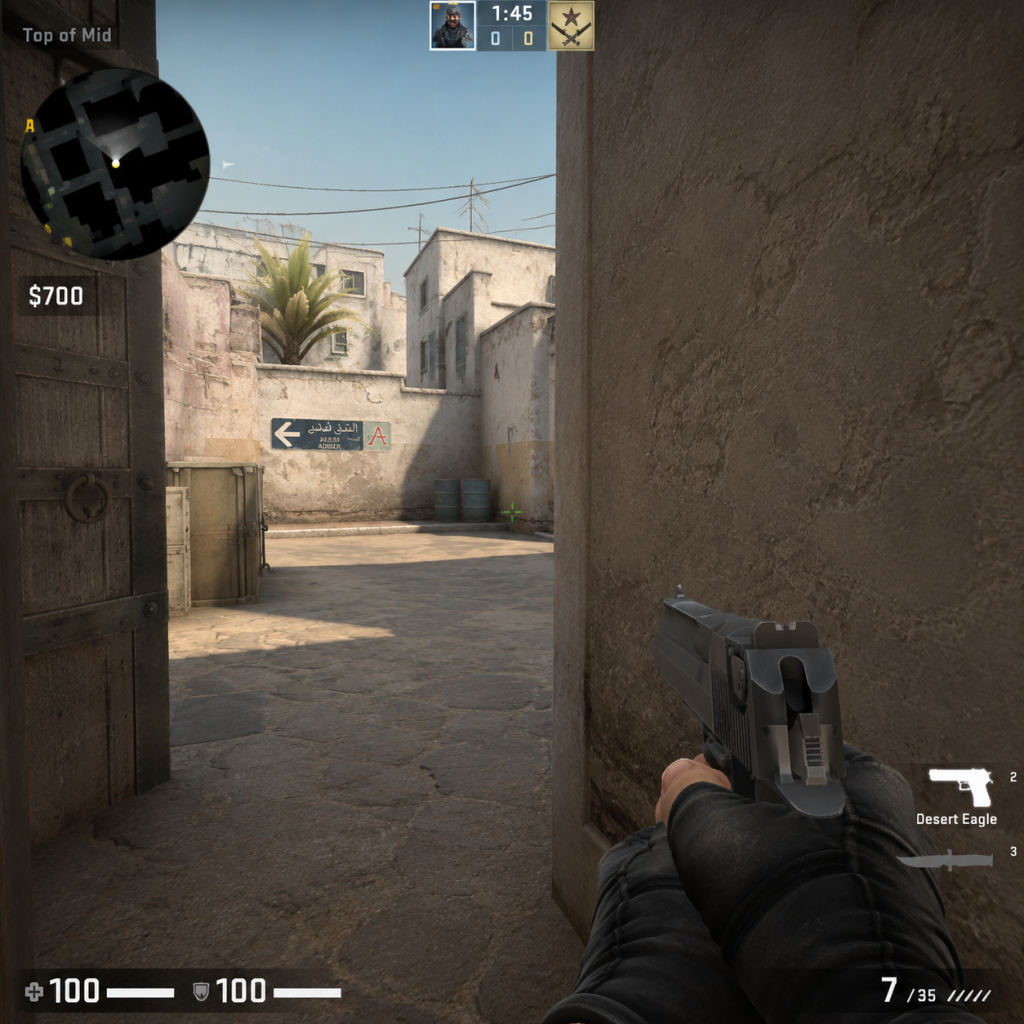
When you’re in a match, the Heads-Up Display (HUD) shows:
- Top of screen: Team logos (T or CT), round timer (1:55 default), bomb status, round number, and your team’s score.
- Bottom-left: Health bar (green), armor indicator (blue/gold for helmet), money.<br>
- Bottom-center: Crosshair—your aim point. Customize in settings (crosshair style, color).<br>
- Bottom-right: Minimap—shows team positions (white dots) and map layout.<br>
- Bottom row: Weapon icons (primary, pistol, knife, grenades) and ammo count.<br>
- Radar (minimap) – Enable “Radar always on” in settings. Icons show teammates; enemy only visible when seen by a teammate (red dot).<br>
- Buy menu (B key) – Opens a grid of weapons, utility, and equipment. Costs are displayed. Quick keys: F1–F5 for presets.
- Learn the bomb mechanics: As T: plant the bomb (C4) at one of two bomb sites (A or B). As CT: prevent bomb plant or defuse after plant.<br>
- Master the economy: Manage money wisely. Don’t spend all on the first round—save for later armor/rifles.<br>
- Map awareness: Focus on one map (Dust II is simplest). Memorize callouts like “Long,” “Short,” “Pit,” etc.<br>
- Team communication: Even with text chat, call out enemy positions (e.g., “One at B” or “Long doors” ).<br>
- Practice aim: Use Deathmatch mode for 10–15 minutes daily to warm up.<br>
- Play the tutorial and a few Casual matches to understand flow.<br>
- Bind a key to “walk” (Shift) and use it often to stay quiet.<br>
- Watch the minimap every few seconds to know where teammates are.<br>
- Buy armor (vest + helmet, $1000) before buying a rifle. Armor is crucial.<br>
- Stick with teammates—don’t roam alone as a beginner.<br>
- Use the “Crosshair Follow Recoil” setting (on) to see spray pattern.<br>
- Running while shooting—you’ll be inaccurate. Stop or crouch before firing.<br>
- Reloading after every kill—wastes time and leaves you vulnerable.<br>
- Buying expensive snipers (AWP) until you can consistently hit shots.<br>
- Peeking the same angle twice—enemies will prefire you.<br>
- Ignoring economy: don’t buy a rifle if you have less than $2000 left for next round.<br>
- Toxic chat: mute toxic players (Scoreboard > right-click > mute) and focus on self-improvement.<br>
Essential Early Objectives
What to Do First / What to Avoid
Do:
Avoid:
Early Resource Priorities
Your main resource is money ($). Each round you earn cash based on win/loss and kills. Spend wisely:
| Round Type | Priority Buy | Why |
|---|---|---|
| Pistol round (first round of half) | No buy or buy a P250/armor? Follow team: often team saves. | Better to save for second round (buy SMG/armor). |
| Second round after loss (bonus round) | Buy SMGs (MAC-10, MP7) or cheap rifle (FAMAS/Galil) + armor. | You get bonus money if you lost first round. |
| Full buy rounds (when team has $) | Buy M4A4 (CT) or AK-47 (T) + full armor + flash/smoke/HE. | These are the main rifles for damage. |
| Eco rounds (no money) | Don’t buy anything—use default pistols. | Save for a full buy next round. |
| Force buy (last round of half) | Everyone buys cheap weapons to upset opponent. | Not for beginners—stick to saving. |
Common Beginner Mistakes
1. Running and gunning – Always stop moving before firing. Use shift to walk when needed, but shoot while stationary or crouched.<br>
2. Ignoring crosshair placement – Keep crosshair at head level around corners, not at the floor.<br>
3. Not using headphones – Sound is critical: footsteps, gunshots, bomb beeps. Use good headphones.<br>
4. Spraying at long range – Tap fire (single shots) at distance to control recoil.<br>
5. Buying the wrong weapon – Don’t buy a sniper if you can’t aim; stick to rifles.<br>
6. Not watching the minimap – You can see where teammates die, indicating enemies.<br>
7. Peeking too wide – “Slicing the pie” (slowly clearing angles) is safer than jumping out.<br>
8. Playing too aggressively – As a beginner, play passively, hold angles, and let enemies come to you.<br>
9. Not using grenades – Learn to throw smokes/flashes to block sightlines or push.<br>
10. Giving up early – Rounds can look lost but still be winnable. Never abandon a round.<br>
Day-One Checklist
- [ ] Complete the in-game tutorial.<br>
- [ ] Adjust settings: video (native resolution, fullscreen), audio (HRTF on), mouse sensitivity (low ~1.5 at 400 DPI).<br>
- [ ] Play 1 Casual match on Dust II. Focus on using only A/D to peek, shift to walk, and stop to shoot.<br>
- [ ] Play 1 Deathmatch (free-for-all) for 10 minutes to practice aiming without pressure.<br>
- [ ] Learn the buy menu: open with B, hover over weapons to see stats, memorize key binds for common buys (e.g., B + 4 + 3 for AK).<br>
- [ ] Watch a 5-minute YouTube guide on Dust II callouts (e.g., “Long,” “Short,” “Cat”).<br>
- [ ] Buy armor (vest+helmet) $1000 in the second or third round of a Casual match to see its effect.<br>
- [ ] Use the minimap: keep an eye on it during every round.<br>
- [ ] Avoid toggling voice chat until you understand the flow—mute disruptive players.<br>
- [ ] End your session by reviewing one thing you learned (e.g., “I need to stop reloading after every kill”).<br>
Final tip: CS2 is a game of refinement, not instant mastery. Focus on one skill per day: crosshair placement, economy management, or utility usage. After day one, you will have a solid foundation to enjoy the game and improve.
---
Note: If you see references to “CS:GO” in menus or guides, it’s the same game as CS2. The transition is seamless; your inventory and ranks carry over.