All Game Items
All Game Items in Microsoft Flight Simulator
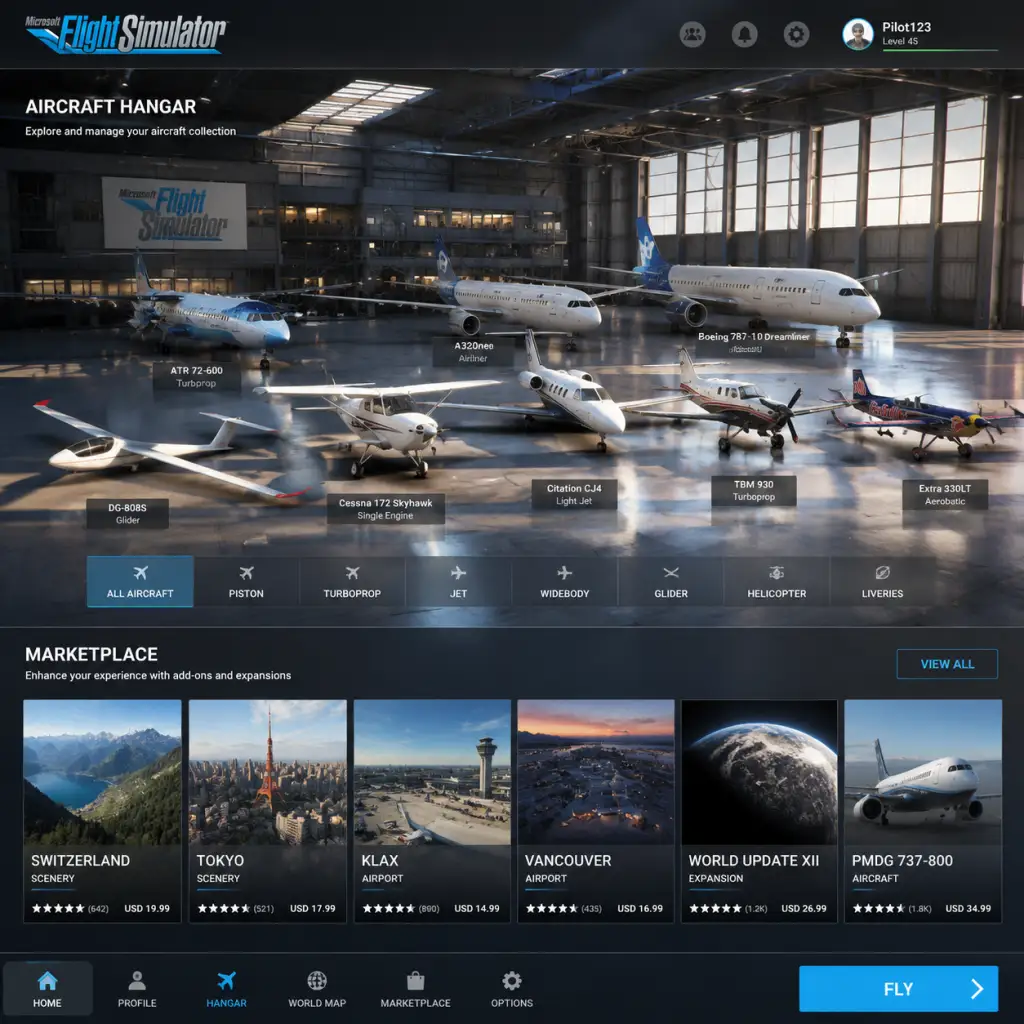
Unlike traditional games, Microsoft Flight Simulator does not feature weapons, armor, or craftable materials. Instead, its "items" are aircraft, avionics, liveries, scenery, consumables (simulated), currencies, and unlockable content. This guide catalogues every major item type, explaining how to obtain them, when they're useful, and any relevant synergies.
1. Aircraft
The core items of the game. Each aircraft is a distinct vehicle with unique flight characteristics, avionics, and performance.
#### Default & Edition-Included Aircraft
- Standard Edition: 20+ aircraft including the Cessna 152, Cessna 172 Skyhawk, Beechcraft King Air 350i, Airbus A320neo, Boeing 747-8 Intercontinental.
- Deluxe Edition: Adds 5 extra aircraft (e.g., Diamond DA40-Tundra, Mooney M20R Ovation, Textron Aviation Bonanza G36).
- Premium Deluxe Edition: Adds 5 more (e.g., Boeing 787-10 Dreamliner, Cessna Citation Longitude, Zlin Shock Ultra).
- Obtaining: These are included in the purchase or available as separate paid upgrades via the in-game Marketplace.
- Hundreds of third-party aircraft from developers like PMDG, Aerosoft, Fenix, Just Flight, and Carenado.
- Examples: PMDG 737-800, Fenix A320, Aerosoft CRJ, Just Flight Piper PA-28 Arrow.
- Obtaining: Purchased with Flight Simulator Credits (see Currency section) from the Marketplace. Prices range from $15 to over $100.
- When useful: Adds higher fidelity, regional jets, historic planes, or specialized planes (e.g., bush planes, gliders).
- Free third-party aircraft like the FlyByWire A32NX, Working Title CJ4, or the Headwind A330-900.
- Obtaining: Downloaded from websites like flightsim.to or via the in-game Mods menu (if using the official mod framework).
- Note: Community mods are not official items but are widely used. They often improve default aircraft or add new ones.
- Each aircraft suits different missions: bush flying (Cessna 208 Caravan), airliner (A320, 747), IFR training (G1000-equipped planes).
- Synergy: Using a high-fidelity add-on with realistic systems requires additional setup (e.g., third-party avionics).
- G1000 NXi: High-end glass cockpit system for general aviation planes. Included in many default aircraft (Cessna 172, DA40). Also available as a stand-alone upgrade for other GA planes via mods.
- GNS 430W/530W: Older GPS/NAV/COM units. Found on default planes like the Cessna 152.
- GTN 750/650: Premium touch-screen GPS (available in some payware aircraft).
- How to obtain: Included with aircraft; third-party upgrades may be purchased or downloaded as mods.
- When useful: IFR flight, navigating VOR/ILS approaches, RNAV GPS waypoints.
- Default autopilot modes: Heading hold, altitude hold, VOR/ALS tracking. Present in most aircraft.
- Advanced FMS systems: In airliners (e.g., A320 FCU, 747 MCP). Can be upgraded via mods (e.g., Working Title CJ4 improvement mod).
- How to obtain: Built into aircraft; no separate item.
- Simulated radar: In airliners like the A320 NEO (default) and 787. Provides visual of precipitation.
- Marketplace upgrade: Some payware aircraft include more realistic weather radar (e.g., PMDG).
- Default liveries: Every aircraft comes with at least two (e.g., “Red” and “Blue”).
- Marketplace liveries: Packs of liveries (e.g., “Airline Fleet Pack”) sold for credits. Also free community liveries.
- How to obtain: Via Marketplace (paid) or flightsim.to (free, installed manually or through an installer).
- When useful: Personalization, role-play (e.g., flying for a virtual airline).
- Synergy: Some virtual airlines require specific liveries for rep flights.
- World Updates: Free periodic updates from Microsoft that enhance specific regions (e.g., USA, Japan, UK, France). Include new POIs, handcrafted airports, and photogrammetry.
- Marketplace Airports: Individual airports or airport packs (e.g., KLAX Los Angeles, EGLL Heathrow, LIRF Rome). Prices vary from $5 to $40.
- City/Landmark packs: e.g., “Downtown Las Vegas”, “Eiffel Tower”.
- How to obtain: Free from Content Manager (World Updates) or purchased with credits.
- When useful: When flying in those regions; improves immersion and accuracy for VFR navigation.
- Fuel: Aircraft have fuel tanks. Use fuel from the current airport. Fuel level can be adjusted in the pre-flight menu (Fuel and Payload). Running out of fuel causes engine failure. Replenish at airports (via ATC for ground services).
- Oil: Simulated in some aircraft (e.g., radial engine planes like the Beechcraft Model 18). Check oil temperature and pressure. Low oil can cause engine damage.
- Oxygen: For high altitude flight (e.g., over 12,500 feet). Some aircraft have tank systems; simulate oxygen supply duration. Manage via system page.
- De-icing fluid: Used on airliner wings; controlled via ground services (de-icing pad). Essential in winter weather.
- How to manage: In cockpit via systems; set in pre-flight for fuel/payload.
- How to obtain: Purchased with real money through the Microsoft Store or Steam overlay. Bundles come with game editions (e.g., Premium Deluxe includes $50 worth of credits).
- When useful: To buy payware content. Cannot be earned through gameplay.
- Achievements / Gamerscore: Obtainable on Xbox and Windows (via Xbox app). Examples: “First Flight” (complete a flight), “Globe Trotter” (land at 50 different airports).
- Badges: In-game profiles show badges for specific milestones (e.g., 1000 hours flown).
- Discovery Flights: Unlockable missions that teach specific skills. Completing all Discovery Flights for a category grants a “Master” achievement.
- Bush Trips: Pre-made long-distance flights across wilderness. Completing a Bush Trip unlocks a special livery (e.g., “Bush Trip” livery for the Cessna 172).
- Landing Challenges: Quick scenarios (e.g., landing at St. Barts). Earn medals (Gold, Silver, Bronze) that appear on your profile.
- How to obtain: By performing in-game actions.
- Bush Trips: Navigation exercises without GPS. 10-20 legs each. Unlock after completing previous legs.
- Landing Challenges: Short landing scenarios. ~50 included; additional ones in Marketplace.
- Discovery Flights: Guided tutorials (e.g., takeoff, landing, navigation).
- Live Events: Time-limited activities (e.g., Reno Air Races, New Year’s Eve flyovers).
- How to obtain: From the main menu. Bush Trips and Landing Challenges are pre-installed; Live Events appear during promotion periods.
- When useful: For training or variety. Some unlock special liveries or achievements.
- Yoke / Joystick: For primary flight control. Examples: Thrustmaster TCA Officer Pack (Airbus), Honeycomb Alpha.
- Throttle Quadrant: For engine controls. Honeycomb Bravo, Logitech throttle.
- Rudder Pedals: For steering on ground and coordinated turns.
- TrackIR / VR Headset: For head movement and immersion.
- Mouse / Keyboard: Basic control.
- Purchasing: Available from electronics retailers; not in-game.
- Aircraft & Liveries: In the “Aircraft” section of the main menu. Select a plane, then choose a livery.
- Airport & Scenery: In the World Map, enable or disable add-ons under the “Megascenery” filter. For purchased airports, they are automatically active.
- Consumables: Set fuel and payload in the pre-flight “Fuel and Payload” panel for each aircraft.
- Currencies: View your Fx balance in the Marketplace. Credits are added after purchase.
- Activities: From the sidebar: “Activities” > “Bush Trips”, “Landing Challenges”, etc.
- Add-ons Management: Content Manager (in main menu) to install/uninstall World Updates, Marketplace purchases, and community mods.
#### Marketplace Aircraft (Payware)
#### Community Mods (Freeware)
#### How to Use & Synergies
2. Avionics & Instruments
Aircraft panels are composed of individual instruments, many of which can be upgraded or replaced (in mods). Default aircraft come with built-in systems; add-ons often allow modular upgrades.
#### Garmin GPS Units
#### Autopilots
#### Weather Radar
3. Liveries & Paint Schemes
Cosmetic items that change the appearance of your aircraft (both default and add-on).
4. Airport & Scenery Packs
Add-on airports, landmarks, and region upgrades. These improve visual fidelity and may add more detailed terminal buildings, taxiways, and local scenery.
5. Simulated Consumables
While not inventory items, these are consumed during flight and must be managed.
6. Currencies
Flight Simulator Credits (Fx): Virtual currency used exclusively in the in-game Marketplace to purchase aircraft, airports, scenery, and liveries. 1 Fx = 1 USD (roughly).
Microsoft Points: Not used in MSFS.
Rewards from Activities: Some activities (Bush Trips, Landing Challenges) award trophies or achievements (gamerscore on Xbox) but no in-game currency.
7. Collectibles & Achievements
While not physical items, these are tracked for completionists.
8. Activities & Missions (Content Items)
These are scripted “missions” that can be considered items because you can choose to play them.
9. Key Equipment (Hardware & Accessories)
While not in-game items, the game supports and recommends certain peripherals for optimal experience. These are not “items” you find, but we list them for completeness.
10. How to Access & Manage Items
Summary Table of Item Types
| Item Category | Key Examples | How to Obtain | When Useful |
|---|---|---|---|
| Aircraft | Cessna 152, A320neo, PMDG 737 | Included, Marketplace, Mods | Any flight |
| Avionics | G1000 NXi, GTN 750 | Built-in, mods | IFR flight |
| Liveries | Airline packs, Bush Trip livery | Marketplace, mods, achievements | Role-play, aesthetics |
| Airports | KLAX, EGLL | Marketplace, World Updates | Regional flying |
| Scenery Packs | World Updates, city packs | Free (World Updates) or paid | Visual enhancement |
| Consumables | Fuel, oil, oxygen | Simulated – manage in flight | When needed for flight |
| Currencies | Flight Simulator Credits | Purchased with real money | Buying Marketplace content |
| Collectibles | Achievements, bush trip liveries | By completing activities | Profile, cosmetic |
| Activities | Bush trips, landing challenges | Pre-installed or time-limited | Training, variety |
| Equipment (hardware) | Yokes, pedals | External purchase | Essential for realism |