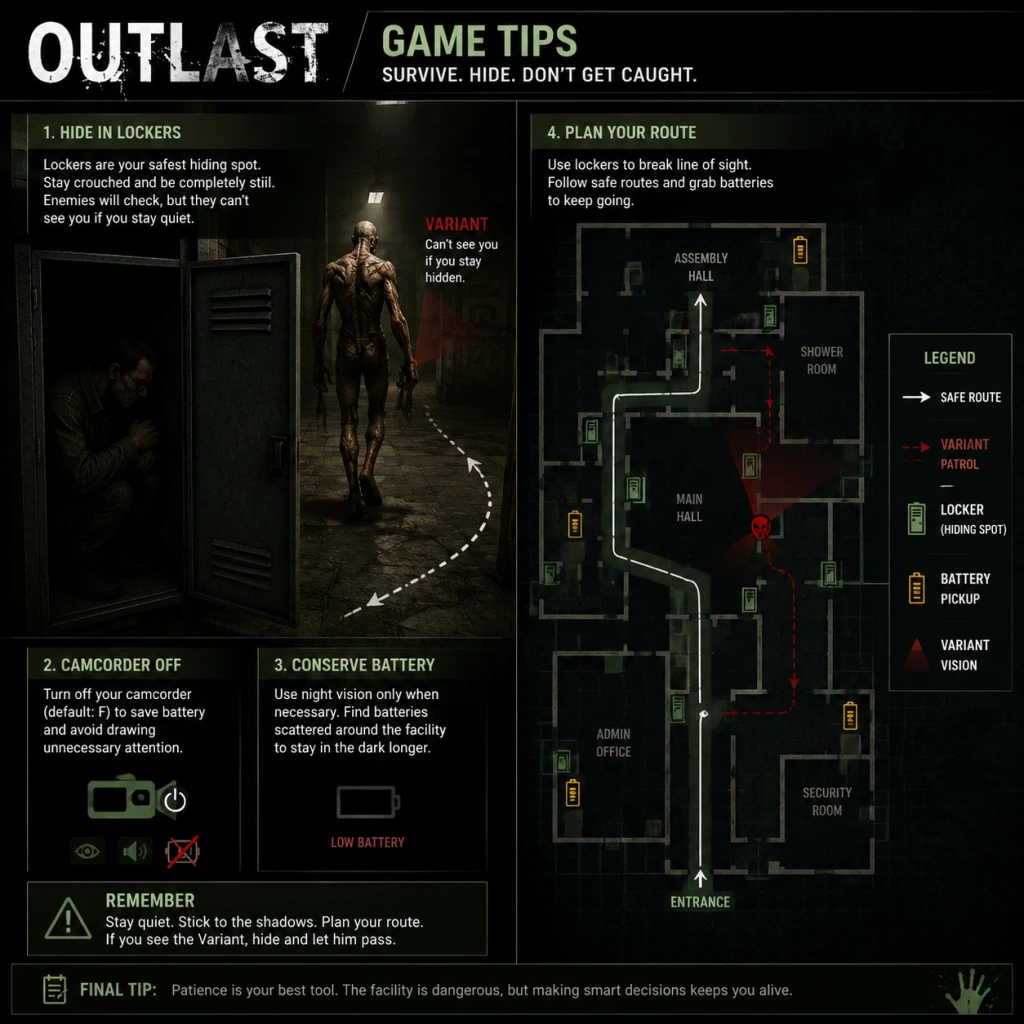
Game Tips
Game Tips: Outlast - Master Mount Massive Asylum
This section provides essential tips grouped by gameplay aspect. Since Outlast has no combat, builds, or economy, the tips focus on stealth, camera management, exploration, and survival.
Beginner Tips (First Time Players)
1. Learn the Night Vision Toggle Early
- Press the default key (right mouse button / R2 on controller) to toggle night vision on/off. Do not leave it on constantly; it drains batteries fast. Only activate in truly dark areas or when searching for clues.
- Why it works: Saves battery life for critical moments (e.g., chase sequences in total darkness).
- When to use: During slow exploration; you can see outlines with minimal light.
2. Never Sprint Unnecessarily
- Sprint (Shift / L3) creates loud footsteps that alert enemies from far away. Walk or crouch-walk instead.
- Why it works: Sound is the primary detection method. Walking allows you to pass close to patrolling enemies without triggering an alert.
- When to use: Only sprint when enemies are already chasing you or you have a clear, safe path.
3. Check Every Corner and Locker
- Lockers and closets are your primary hiding spots. Enter them (press interact) and wait until the threat passes.
- Why it works: Many enemies have a limited search radius. Once they lose sight of you, they will eventually return to their patrol route.
- When to use: When an enemy is heading directly toward you and you have no other escape route.
4. Listen to Audio Cues
- The game uses directional sound to indicate enemy locations (footsteps, grunts, doors opening). Use headphones for best results.
- Why it works: You can anticipate where an enemy is heading and plan your movement.
- When to use: Always. Even without night vision, sound gives you spatial awareness.
5. Save Batteries for Critical Sections
- Batteries are finite. Only use night vision when absolutely necessary (document reading in dark rooms, navigating unlit corridors). In well-lit areas, keep the camera off.
- Why it works: Running out of batteries in a dark area during a chase means instant death.
- When to use: Prioritize conservation; pick up batteries whenever you find them, even if you are full (they will not be wasted if you are at maximum? Actually, you cannot exceed capacity, so only pick up when below max).
Exploration & Navigation
1. Memorize the Asylum Layout
- Outlast uses a semi-open level design. Learning room connections, shortcuts (e.g., vents, broken windows), and dead ends reduces panic during chases.
- Why it works: Panicking leads to wrong turns. Familiarity lets you escape quickly.
- When to use: After dying in a section, take note of alternate paths.
2. Use the Camera Zoom
- The camcorder has a zoom function (right mouse button while holding camera? Actually, zoom is separate: middle mouse button or L1+R1 on controller). This can help spot documents, key items, or enemies in the distance.
- Why it works: Increases your reconnaissance range without moving closer.
- When to use: Before entering a new room, zoom to check for threats.
3. Look for Environmental Clues
- Red Barrels placed subtle hints: blood trails indicate recent enemy activity, flickering lights mean an unstable area, open doors suggest a route.
- Why it works: These cues guide you toward progress items or warn of danger.
- When to use: When stuck, examine the environment for pathways or objects.
4. Vault Over Obstacles
- Press spacebar (X on controller) to vault over low walls, desks, and pipes. This can create distance during chases.
- Why it works: Vaulting briefly slows enemies (they may take a different path or climb over).
- When to use: When an enemy is 10–15 feet behind you, vault to gain a few seconds.
Night Vision & Batteries (Resource Management)
1. Turn Off Night Vision When Hiding
- Once you are safely inside a locker or under a bed, switch off the camera. The glow of the night vision can sometimes be seen by enemies.
- Why it works: Prevents visual detection and saves battery.
- When to use: Immediately after entering a hiding spot, turn it off.
2. Stagger Battery Usage
- Do not use night vision continuously even in dark areas. Pause every 30 seconds to turn it off and listen. If you hear no footsteps, you can proceed briefly without it.
- Why it works: Greatly extends battery life; you may find replacement batteries before depletion.
- When to use: Any time you are exploring a large, dimly lit area.
3. Know Battery Spawn Locations
- Batteries respawn? No, they are fixed pickups. Memorize where they are (e.g., on shelves, in drawers). Once used, they are gone. Plan your route to pass known battery locations.
- Why it works: Ensures you have enough for the next dark room.
- When to use: On repeat playthroughs, optimize your route.
4. The Camera Can Be Used Without Night Vision
- Even without night vision, the camera viewfinder shows a slightly brighter image than the naked eye. Use it in low light (not total darkness) to see better without draining battery.
- Why it works: Saves battery while providing minor visual assistance.
- When to use: In areas with ambient light (e.g., rooms with moonlight or emergency lights).
Stealth & Evasion (Enemy Encounters)
1. Understand Detection Mechanics
- Enemies have a cone of vision (about 120 degrees) and hearing range. They do not see in complete darkness unless you shine a light. They react to sound: footsteps, opening doors, camera clicks.
- Why it works: You can predict when you are safe to move.
- When to use: Always keep this in mind when moving.
2. Use Crouch Walk (Ctrl / R3)
- Crouch walking is nearly silent and reduces your profile. Use it when enemies are nearby, even if they are facing away.
- Why it works: Prevents sound detection; also makes you harder to spot visually.
- When to use: When an enemy is within 30 feet and you are not in immediate danger.
3. Lure Enemies with Camera Noise
- Equipping the camera and turning it on/off makes a distinct beep or click sound (depending on version). You can use this to attract an enemy to a location, then circle around.
- Why it works: Creates a distraction; enemies will investigate the source of the sound.
- When to use: When an enemy blocks a doorway you need to pass.
4. Fake Out by Hiding in Plain Sight
- Some areas have curtains, under desks, or behind boxes. If an enemy is about to see you, quickly hide behind a large object. Often they will patrol past without checking.
- Why it works: AI does not always check every hiding spot; they have a limited search pattern.
- When to use: When you have no time to reach a locker.
5. Break Line of Sight During Chases
- When spotted, run away but break the enemy's visual contact as soon as possible by turning corners, going through doors, or dropping down. Once out of sight, quickly hide.
- Why it works: Enemies lose track of you after a few seconds of no visual contact. They will search the last known area.
- When to use: Immediately after being spotted.
6. Different Enemies Have Different Behavior
- Chris Walker (the large orderly) chases you relentlessly once spotted; you cannot outrun him for long. The crazy patients are slower but patrol in groups late game. Study each enemy's pattern.
- Why it works: Tailor your approach: for Chris, never stay still; for patients, use stealth.
- When to use: Adapt based on the type of enemy.
Intermediate Strategies (Advanced Tips)
1. Learn the Movement Speed Tiers
- Normal walk: slow, silent. Sprint: faster but noisy. Crouch walk: very slow, silent. Jump+vault: moderate speed, some noise. Master when to use each.
- Why it works: Helps in timed scenarios (e.g., running from a breaking door).
- When to use: Practice in safe areas.
2. Use the Camera Flash (Light) to Stun?
- In Outlast, the camera's bright light does not stun enemies. Do not attempt it. The light only illuminates areas; it does not affect enemies. Misconception from other games.
- Why it works: Avoids wasting time trying to fight.
- When to use: N/A.
3. Plan Battery Routes
- Before entering a dark zone, check your battery count. If low, backtrack to a known battery pickup. It is worth the extra time.
- Why it works: Prevents being caught without power.
- When to use: Whenever you approach a new area (e.g., basement, sewer).
4. Replay Chapters to Memorize Enemy Patterns
- The game has chapter select after completion. Use it to practice specific sections (e.g., the prison block, the cafeteria).
- Why it works: Reduces failure rate on subsequent playthroughs.
- When to use: If you are stuck on a particular encounter.
Advanced Optimizations (Speedrun & Hardcore Tips)
1. Skip Cutscenes (Not always possible) - Not applicable in Outlast 1; cutscenes are brief and unskippable.
2. Use Wall Humps for Precision
- When hiding, press against walls to maximize your view angle. This allows you to peek around corners without exposing your body.
- Why it works: Gives you information while staying safe.
- When to use: When scouting ahead.
3. Speedrun Trick: Use Door Glitches
- On PC, some doors can be bypassed by quickly spamming interact while moving. Not intended, but effective for speedruns.
- Why it works: Saves time.
- When to use: Only for speedrunning; not recommended for first playthrough.
4. Minimize Inventory Management
- Never hold more than one item (the camera and documents). There are no weapons or inventory slots. Only documents and batteries matter. Always carry max batteries (10).
- Why it works: No decision paralysis.
- When to use: Always.
5. Use the Environment to Slow Pursuers
- Knock over carts or chairs? You cannot; Outlast does not allow environmental interactions like that. Instead, use doors to block enemies slightly (they may take time to open).
- Why it works: Creates a short delay.
- When to use: When running, close doors behind you.
Conclusion
Mastering Outlast requires patience, observation, and resource management. There is no combat, so all tips revolve around staying unseen and conserving batteries. Practice makes perfect—each death teaches you something new about the asylum's layout and enemy behavior. Good luck, and try to keep your sanity.