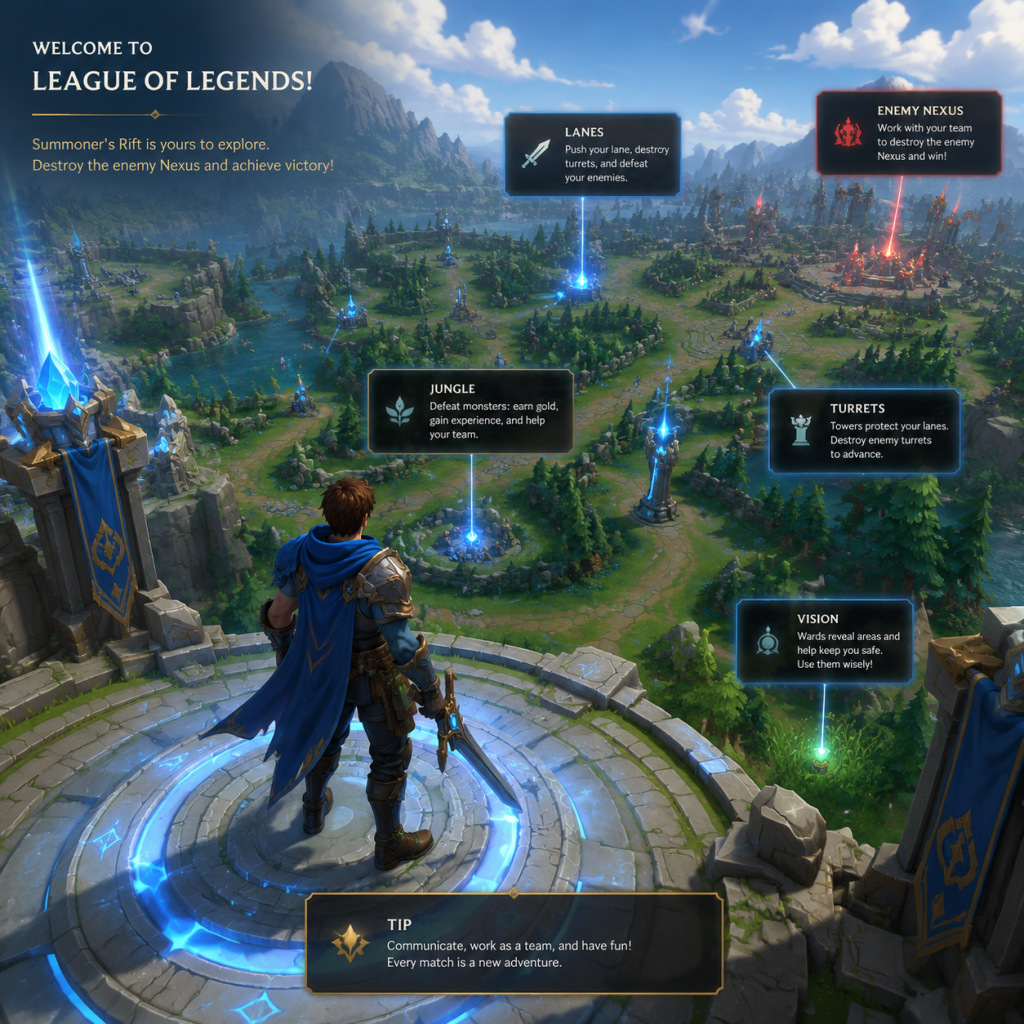
Getting Started
League of Legends Getting Started Guide
Welcome to the Rift
League of Legends (LoL) is a complex team-based strategy game. This guide will walk you through your first hour, explain the interface, controls, and common pitfalls so you can start your journey confidently. LoL is PC-only (Windows/macOS) and requires a Riot Games account.
---
First Hour Walkthrough
#### Step 1: Tutorial and First Match
- Upon logging in, Riot strongly recommends completing the in-game tutorial (accessed from the Play > Tutorial button). The tutorial teaches basic movement, attacking, and turret targeting.
- After the tutorial, play a Co-op vs. AI match on the easiest difficulty (Intro or Beginner). Select the recommended starting champions (Garen, Ashe, Lux are free during the first week).
- A match lasts 20–45 minutes. The map (Summoner’s Rift) has three lanes: Top, Mid, Bottom. A jungle is in between.
- Objectives: Destroy the enemy Nexus (a building in their base) while defending yours.
- Phases: Laning phase (first 10–15 minutes) -> Mid game (grouping up, taking towers/dragons) -> Late game (team fights around Baron Nashor and the Nexus).
- Use Right-click to move your champion. Right-click on enemy minions to attack them.
- Last-hitting: Wait until a minion’s health is very low (green health bar) and then attack it to get gold. Gold = items = power. This is the most important early skill.
#### Step 2: Understand the Game Flow
#### Step 3: Practice Movement and Last-Hitting
---
Controls (PC Only – Mouse & Keyboard)
| Action | Default Key | Notes |
|---|---|---|
| Move / Attack Move | Right-click | Right-click on ground to move, on enemy to basic attack |
| Cancel current action | S | Stops movement and attacks |
| Cast Ability 1–4 | Q, W, E, R | R is ultimate (most powerful) |
| Summoner Spell 1 & 2 | D, F | Two spells per game (e.g., Flash, Ignite) |
| Recall (return to base) | B | Takes 8 seconds (channel) |
| Place trinket ward | 4 | Default: Yellow Trinket (sight ward) |
| Purchase recommended items | P | Opens shop; left-click to buy |
| Ping the map | G (default ping), V (danger) | Hold + click to ping |
| Open scoreboard | Tab | See KDA, gold, items, CS |
| Level up ability | Ctrl + Q/W/E/R | Or click the ability icon |
| Quick cast (no indicator) | Shift + Q/W/E/R | Most players enable quick cast in settings |
- Scroll edges of screen to pan, or hold Space to center on your champion.
- Lock/unlock camera with Y (toggle).
- Minimap – Shows allies (blue/green dots), enemies (red dots if visible), wards, objectives. Check it every few seconds.
- Ping wheel – Use to signal danger, on my way, etc.
- Ability icons (Q W E R) – Cooldown timers, level up available (+ sign).
- Summoner spells (D F) – Flash (teleport small distance) most common.
- Trinket (4) – Free ward for vision.
- Items (1-6 and 7 for trinket slot) – Active items (e.g., potions) need pressing.
- Gold counter – Amount of gold; 500g starts, earn more.
- CS (Creep Score) – Number of minions killed. Showed on scoreboard (Tab).
- Team score (Kills/Deaths/Assists) – Red vs Blue side.
- Timers – Game clock, objective spawn timers (Dragon, Baron, etc.).
- Buff entries – If you kill a jungle monster, a buff icon appears.
- Complete the tutorial completely.
- Play at least 5 Co-op vs AI games on Intro difficulty.
- Stick to one role and one champion for your first 10 games (recommended: Garen for Top, Ashe for Bottom AD Carry, Lux for Mid).
- Buy Doran’s Blade/Shield/Ring as starting item, plus a health potion.
- Use the practice tool to practice last-hitting for 10 minutes daily.
- Don’t play ranked until you reach level 30 (unlocked after 60+ games).
- Don’t play champions with high skill requirements (e.g., Lee Sin, Yasuo, Zed).
- Don’t chase kills – Chasing often leads to overextending and dying.
- Don’t attack the first minion wave mindlessly – Last-hit only; pushing the wave too hard makes you vulnerable.
- Don’t ignore pings – Your team may warn of danger.
- Don’t use Flash (D/F) to engage – Keep Flash for escaping or saving yourself.
- [ ] Create a Riot Games account (if you haven’t already).
- [ ] Download and install the client (wait times vary, ~2-4 GB).
- [ ] Log in and complete the in-game tutorial (summoner name free, no character creation – champions are chosen per match).
- [ ] Play your first Co-op vs AI game on Intro difficulty.
- [ ] Play two more Co-op vs AI games (total 3).
- [ ] Try the Practice Tool to last-hit for 10 minutes.
- [ ] Set up your controls (enable quick cast if comfortable, adjust camera lock).
- [ ] Read the champion spotlight for your chosen champion (YouTube or in-client).
- [ ] Join the official League of Legends Discord and ask for tips in #newplayers channel.
- [ ] Understand the summoner spells: Flash (essential on every champion) + either Teleport (top) or Heal/Ignite (bot/mid).
- [ ] Unlock free champion rotation – you get 15 free champions each week. Pick one that looks fun and simple (e.g., Garen, Ashe, Annie, Warwick, Sona).
- [ ] Do not play Blind Pick (you will be matched with experienced players). Stick to Co-op vs AI until level 10+.
- [ ] Watch a beginner-friendly streamer (e.g., Neace’s “LoL Basics” series or Phreak’s patch notes).
- Be patient. League has a steep learning curve. You will die; learn from each death.
- Communication – Use pings (G key) rather than typing. Chat can be toxic, mute toxic players (Tab > mute button).
- Mute all – If you’re sensitive to criticism, mute everyone in chat by typing `/mute all` at the start.
- Leveling up – Playing games grants XP to increase your account level (max 30). You unlock summoner spells, runes (free system now), and ranked mode at 30.
- Runes and Summoner Spells – Before each game, select your preset rune page (recommended pages work fine) and adjust summoner spells. Use auto-fill for now.
---
UI Overview
#### In-Game HUD (Heads-Up Display)
Bottom Center: Your champion, health bar (green/grey), mana/energy bar (blue/yellow). Level indicator.
Bottom Left:
Bottom Right:
Top of Screen:
Shop – Press P to open. Recommended items tab is best for beginners. Buy items when you recall or die.
---
Essential Early Objectives
1. Get 30–50 CS by 10 minutes – The standard benchmark for beginners.
2. Do NOT die to enemy champions – Death gives gold to opponents and sets you back. Play safe behind your minions.
3. Place your free ward – Use trinket (4) in a bush near your lane to avoid ganks.
4. Recall when low on health or mana – Better to base and return than die. Use health potions (bought at start).
5. Help secure Dragon (bottom side) and Rift Herald (top side) – Around 5 minutes, but don’t force it.
6. Destroy the outer tower of your lane – It gives global gold and map control.
---
What to Do First and What to Avoid
#### Do First:
#### Avoid:
---
Early Resource Priorities
Gold: Use exclusively for items. Do not save gold beyond the next item’s cost – spend it. Prioritize component items (e.g., Pickaxe, Long Sword).
Experience: Stay within range of dying minions to gain XP. Even if you can’t last-hit, being near minion deaths gives you XP. Falling behind in level = weaker.
Health & Mana: Use health potions (bought at start or with refillable potion) to sustain. Recall when below 30% HP unless you can farm safely.
Wards: Your trinket (Yellow Ward) lasts 90-120 seconds. Place it in the river bush. Replace with Oracle Lens (red trinket) later to clear enemy wards.
---
Common Beginner Mistakes
1. Overstaying – Not recalling when you have no health/mana. This leads to death.
2. Not looking at minimap – Tunnel vision on your champion. Glance every 5 seconds.
3. Spamming abilities – Mana runs out fast. Save abilities for last-hitting or trading.
4. Ignoring turret aggro – Don’t attack enemy champion under their turret unless you can kill instantly (low health). Turret lasers hurt.
5. Building wrong items – Follow the recommended item set. Don’t copy pro builds without understanding them.
6. Trying to 1v5 – You cannot solo the enemy team. Wait for your team.
7. Not using attack move – To avoid mis-clicks, practice Attack Move (Shift + Right-click) or bind it to a side mouse button.
8. Neglecting CS for kills – A kill is ~300g, but 20 minions is more gold. Prioritize farming.
---
Day-One Checklist
---
Final Tips
Good luck on the Rift!